Start Here — The Zero-to-Hero Path
Level: Everyone · Time: ~15 minutes to read this page · Prerequisites: none
This page is the map. Read it once, then follow the lessons in order.
What this course is
A complete, ordered path from "I know nothing about security" to "I can defend a network, build a lab, spot an intrusion and explain why each control exists."
It is built as 48 short lessons, each 10–20 minutes of reading, each ending with a way to check yourself. They are written to be read in order on the first pass, and used as a reference afterwards.
Three promises about the content:
- No hand-waving. Where there is a command, it is a real command. Where there is a port, it is the real port. Where there is a number, it is the real number.
- Open source first. Every tool in the toolkit module is free, and most run on your own hardware. You do not need a budget to start.
- Defence and attack together. Understanding how something is broken is how you learn to protect it — but always inside a lab, never on systems you do not own.
The rules of engagement — read this before anything else
[!WARNING] Every offensive technique in this course is for systems you own or have written permission to test. Port-scanning, exploiting, password-cracking or sniffing a network you do not control is a criminal offence in most countries (in France, articles 323-1 to 323-3 of the Code pénal; in the UK, the Computer Misuse Act; in the US, the CFAA) — even with no damage and even "to help". Ignorance of ownership is not a defence.
The safe pattern, used throughout this course:
- Build your own lab (Lesson 37) and attack machines inside it.
- Use purpose-built vulnerable targets (DVWA, Juice Shop, Metasploitable, VulnHub, HackTheBox, TryHackMe) — they exist so you can break them legally.
- On anything else, get written, scoped authorisation that names the hosts, the window and the contact.
- Report what you find privately to the owner. Never publish an unpatched finding.
How to use this course
If you are starting from zero — read Lessons 1 to 48 in order, one or two a day. Do not skip the Foundations module; almost every later lesson assumes it.
If you need one answer now — use the curriculum map to jump straight to the lesson, then read its Prerequisites line and go back if it names something you have not covered.
If you are preparing for a job — read everything, then work the labs in Module 05 until you can do them without the notes, and finish with Lesson 47 — Your Career Path.
If you run a small business — Lesson 40 (hygiene), 43 (small business), 45 (incident playbooks) and 44 (detection) are the practical core. Read Lesson 8 (taxonomy) first so the threats have names.
The lab you need
You cannot learn security by reading. You need somewhere to break things. Two options:
| Minimum viable lab (today) | Full home lab (Lesson 37) | |
|---|---|---|
| Machine | the laptop you already have | a small dedicated box, e.g. a used mini-PC or a server |
| Memory | 8 GB (16 GB comfortable) | 32–64 GB |
| Software | VirtualBox or UTM + one VM | Proxmox VE + pfSense + 3–4 VMs |
| Cost | €0 | €150–400 used |
| Gives you | a safe target and a place to run tools | isolated network, real routing, IDS, full blue-team pipeline |
Start with the left column today. Lesson 37 — Build Your Home Security Lab builds the right column when you are ready.
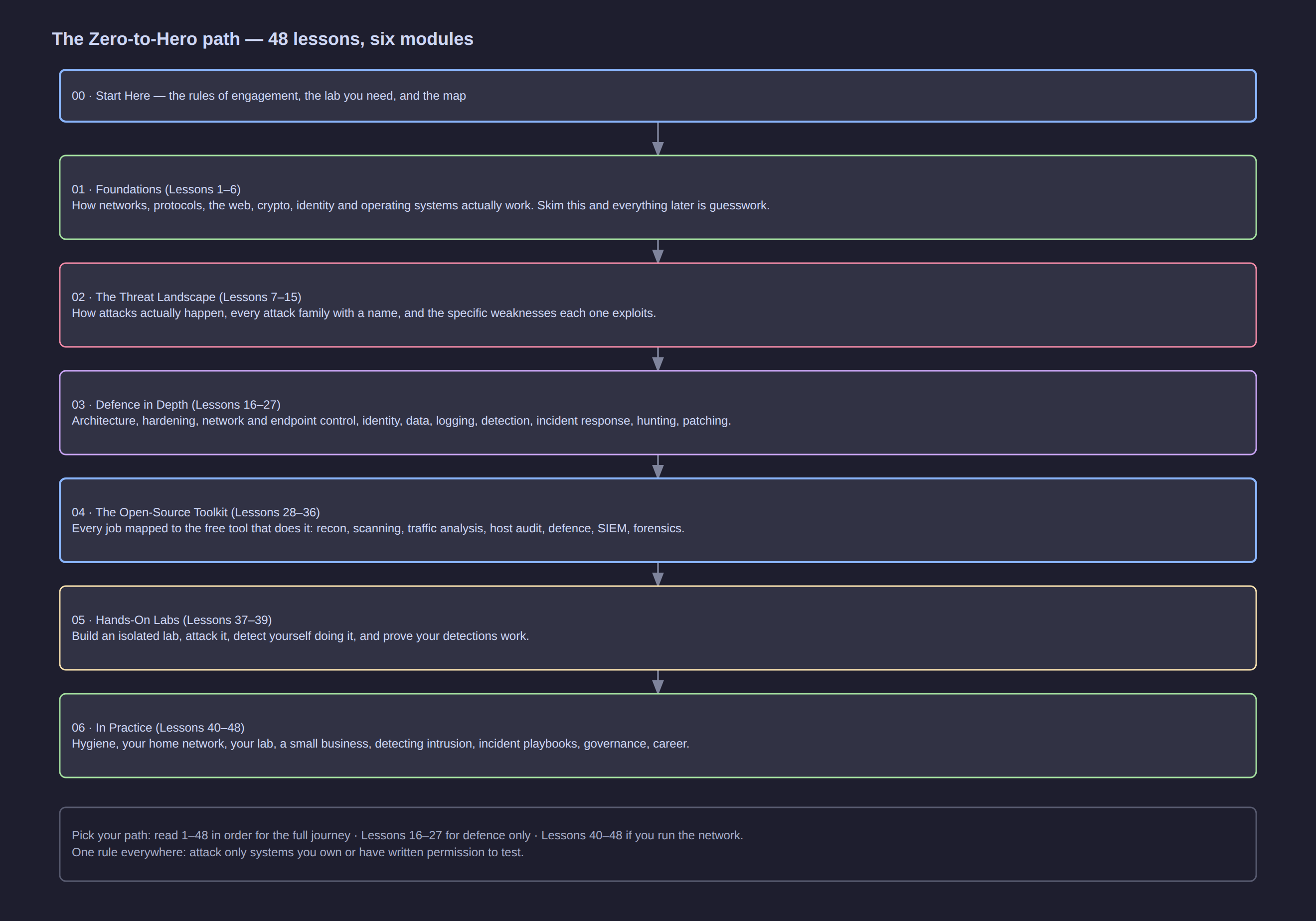
Click the diagram to open it full size.
The curriculum map
48 lessons in six modules. The number in front of each lesson is its position in the path — follow them in order the first time.
01 — Foundations
How the technology you are protecting actually works. Skim this and everything later feels like guesswork.
| # | Lesson | What it gives you |
|---|---|---|
| 1 | Networking Fundamentals for Security | Packets, addresses, ports, NAT, routing — the ground floor every attack and every control stands on |
| 2 | Protocols You Must Know | TCP, UDP, DNS, HTTP/S, TLS, ARP, DHCP, SSH, SMB, RDP, LDAP: what each does and where it is abused |
| 3 | How the Web Works, and Where It Breaks | The full path of a web request, cookies and sessions, headers, CDNs and WAFs, and the attack surface at each step |
| 4 | Cryptography Essentials | Symmetric and asymmetric crypto, hashing, PKI and certificates, the TLS handshake, and the mistakes that break them |
| 5 | Identity, Authentication and Authorisation | Authentication factors, MFA, sessions and tokens, OAuth2/OIDC/SAML, LDAP and Kerberos, RBAC and privileged access |
| 6 | Operating System Security Basics | Linux and Windows security fundamentals: users, permissions, sudo and UAC, services, SELinux/AppArmor, auditing |
02 — The Threat Landscape
How attackers think, and the full catalogue of attack families with a name for each.
| # | Lesson | What it gives you |
|---|---|---|
| 7 | How Attacks Actually Happen — Kill Chain and MITRE ATT&CK | The cyber kill chain, MITRE ATT&CK, TTPs versus IOCs, threat actors, and one intrusion told end to end |
| 8 | The Attack Taxonomy — Every Major Class in One Place | The master map of attack families — network, web, host, identity, human, physical, supply chain, cloud, crypto |
| 9 | Network Attacks | Sniffing, MITM, ARP spoofing, DNS poisoning, session hijacking, VLAN hopping, rogue DHCP, DoS and DDoS |
| 10 | Web Application Attacks | The OWASP Top 10 in plain language: injection, broken auth, XSS, CSRF, SSRF, IDOR, deserialisation, misconfiguration |
| 11 | Malware and Ransomware | Viruses, worms, trojans, rootkits, loaders, stealers, botnets, Ransomware-as-a-Service, and how to survive it |
| 12 | Social Engineering and Phishing | Phishing, spear-phishing, whaling, vishing, smishing, business email compromise, pretexting, deepfakes, tailgating |
| 13 | Credential and Active Directory Attacks | Brute force, spraying, stuffing, credential dumping, pass-the-hash, Kerberoasting, Golden Ticket, DCSync |
| 14 | Insider Threats and Supply Chain Attacks | The malicious and the careless insider, third-party and vendor risk, dependency confusion, build pipeline compromise |
| 15 | Wireless, Physical and Cloud Attacks | WiFi cracking and evil twins, physical access and USB drops, cloud misconfiguration, IAM abuse and container escape |
03 — Defence in Depth
The controls, layer by layer, from architecture down to logging and incident response.
| # | Lesson | What it gives you |
|---|---|---|
| 16 | Defence in Depth and Zero Trust | Layered controls, zones and segmentation, least privilege, zero trust, and preventive/detective/corrective thinking |
| 17 | Hardening — The Baseline Everything Starts From | CIS Benchmarks, patch cadence, service minimisation, secure boot and disk encryption — with practical checklists |
| 18 | Network Security Controls | Firewalls and rule design, ACLs, DMZ, VLANs, VPN, DNS filtering, NAC, and where IDS/IPS belongs |
| 19 | Endpoint Security | From antivirus to EDR: application allowlisting, privilege control, patch management, ransomware-resistant backups |
| 20 | Identity and Access Defence | MFA and passkeys, conditional access, PAM and jump hosts, joiner-mover-leaver, service accounts, break-glass access |
| 21 | Data Protection and Backups | Data classification, encryption at rest and in transit, key management, DLP, 3-2-1 backups and restore drills |
| 22 | Logging and Monitoring Foundations | What to log and where — endpoints, network, identity, cloud — plus time sync, retention and log integrity |
| 23 | Detection Engineering and SIEM | Detection rules, correlation, Sigma, alert fatigue and tuning, the triage process, mapped to ATT&CK |
| 24 | Incident Response | The NIST incident response lifecycle: preparation, detection, containment, eradication, recovery, lessons learned |
| 25 | Digital Forensics Basics | Order of volatility, disk and memory artefacts, timelines, chain of custody, and when to call a professional |
| 26 | Threat Hunting | Hypothesis-driven hunting, hunting for TTPs rather than IOCs, data sources, and three worked hunts |
| 27 | Vulnerability Management | Asset inventory, scanning, CVSS and EPSS, prioritisation that survives contact with reality, and proving the fix |
04 — The Open-Source Toolkit
The free tools that do each job — reconnaissance, defence, monitoring, forensics.
| # | Lesson | What it gives you |
|---|---|---|
| 28 | The Open-Source Security Arsenal | The whole toolkit at a glance: every job mapped to the open-source tool that does it |
| 29 | Recon and Scanning Tools | nmap, masscan, amass, theHarvester, dnsrecon — finding what is exposed, and how to reduce your own footprint |
| 30 | Vulnerability Scanning and Exploitation Tools | Greenbone/OpenVAS, Nuclei, Nikto, sqlmap, Metasploit, ZAP and Burp CE — scanning and exploitation, in your lab |
| 31 | Traffic Analysis and IDS Tools | tcpdump, Wireshark, Zeek, Suricata and Arkime: reading traffic, spotting beacons and building network detections |
| 32 | Host Security and Audit Tools | Lynis, auditd, AIDE, rkhunter, ClamAV, osquery, OpenSCAP and Sysinternals — auditing the hosts themselves |
| 33 | Password, Crypto and Secrets Tools | hashcat, John, OpenSSL, GPG, age, sops, KeePassXC: testing password strength and managing secrets properly |
| 34 | Network Defence Tools | nftables, ufw, OPNsense, Suricata, fail2ban, CrowdSec, Pi-hole, WireGuard and honeypots — the defensive stack |
| 35 | SIEM, Logging and Monitoring Stacks | Wazuh, the ELK/OpenSearch stack, Graylog, Grafana, Security Onion, MISP and TheHive — collecting and acting on logs |
| 36 | Forensics, IR and Cloud Tools | Volatility, Autopsy, Velociraptor, Trivy, Falco, kube-bench, Prowler — forensics, response and cloud auditing |
05 — Hands-On Labs
Build the lab, then attack it and detect yourself doing it.
| # | Lesson | What it gives you |
|---|---|---|
| 37 | Build Your Home Security Lab | Proxmox or VirtualBox, an isolated network, pfSense, and legal vulnerable targets to practise on |
| 38 | Build Your Blue-Team Lab | Wazuh + Suricata + Zeek + a honeypot, generating attacks with Atomic Red Team, and verifying your own detections |
| 39 | Purple Team Drills and Detection Validation | ATT&CK-driven exercises, mapping atomic tests to rules, measuring detection coverage, and reporting it |
06 — In Practice
Applied: your home, your lab, a small business, detecting intrusion, and your career.
| # | Lesson | What it gives you |
|---|---|---|
| 40 | Security Hygiene — The 20% That Stops 80% | The handful of habits that prevent most incidents: patching, MFA, backups, least privilege, phishing awareness |
| 41 | Securing a Home Network | Router hardening, WPA3, guest and IoT isolation, DNS filtering, disabling UPnP/WPS, and remote access done safely |
| 42 | Securing a Home Lab | Isolating your lab from the house, never exposing it, hypervisor hardening, snapshots and clean teardown |
| 43 | Securing a Small Business | The SME playbook: inventory, MFA, email security (SPF/DKIM/DMARC), backups, policies, budgets and the first 30 days |
| 44 | Detecting Intrusion with Open-Source Tools | Where to look and what to look for: concrete detection recipes with open-source tools and a triage workflow |
| 45 | Incident Response Playbooks for Small Teams | One-page playbooks for the incidents you will actually face: ransomware, BEC, lost laptop, compromised account |
| 46 | Risk, Governance and Compliance | Risk assessment, NIST CSF, ISO 27001, CIS and SOC 2, policies that get followed, and metrics that mean something |
| 47 | Your Career Path — From Zero to Hired | Roles from SOC analyst to CISO, the certifications worth paying for, portfolio building, and how to get hired |
| 48 | Cybersecurity Glossary and Cheat Sheet | Every acronym and term in this course, defined in one line, as the reference you keep coming back to |
A twelve-week plan
Two lessons a day is not sustainable; a steady pace is. This spread assumes roughly one hour a day on weekdays.
| Week | Focus | Lessons |
|---|---|---|
| 1 | How networks and protocols actually work | 1–2 |
| 2 | Web, crypto and identity foundations | 3–5 |
| 3 | Operating system security; the attacker's playbook | 6–7 |
| 4 | The attack landscape, part 1 | 8–11 |
| 5 | The attack landscape, part 2 | 12–15 |
| 6 | Defence in depth: architecture and hardening | 16–18 |
| 7 | Endpoint, identity and data defence | 19–21 |
| 8 | Logging, detection and incident response | 22–24 |
| 9 | Forensics, hunting and vulnerability management | 25–27 |
| 10 | The open-source toolkit | 28–36 |
| 11 | Build and run your labs | 37–39 |
| 12 | Applied: home, business, detection, career | 40–48 |
Milestones worth aiming for: end of week 3 you can read a packet capture without panic; end of week 8 you can explain what a SIEM alert means and what you would do next; end of week 11 you have a lab you built and detections you validated yourself.
How every lesson is written
Each lesson follows the same shape, so you always know where to look:
| Section | What it gives you |
|---|---|
| Header line | Level, reading time, and the prerequisites you should have read |
| Why this matters | the concrete security reason the topic exists — never "because it is on an exam" |
| The body | the mental model first, then the details, then real commands or configuration |
| Attack it / Defend it | where applicable: how the thing is abused, and the specific control that stops it |
| Key takeaways | 3–5 lines you should remember a year from now |
| Check yourself | questions you can answer without scrolling up; if you cannot, re-read |
| Next | the following lesson, so you can always move forward |
Diagrams are draw.io files published beside the lessons — click any diagram to open it full size.
The eight things that matter most
If you remember nothing else from this course, remember these. Every one of them is expanded somewhere in the modules.
- Patch. Most successful intrusions use a known vulnerability with an available fix. Patch cadence beats exotic technology.
- MFA on everything that matters. It defeats the majority of credential attacks, which are the majority of attacks.
- Backups, tested, offline or immutable. This is the difference between a ransomware incident and a company-ending event.
- Least privilege. Users, services and applications get the minimum access they need, and admin rights are separate and rare.
- Assume breach. Segment, monitor and log as if someone is already inside — because eventually someone is.
- Know your assets. You cannot protect what you have not inventoried, and you cannot detect what you have never baselined.
- Log and look. Centralised logs with someone (or something) actually reviewing them are what turn an unnoticed breach into a contained one. Attackers rely on you not looking.
- People are the attack surface and the defence. Awareness, clear process and a culture where reporting a mistake is safe beat every technical control alone.
What this course is not
- Not a certification cram course — though Lesson 47 maps the certifications worth having.
- Not a substitute for legal or compliance advice.
- Not a permission slip to test systems you do not own.
- Not exhaustive on any single topic — each lesson ends where the deeper specialist material begins.
For the one-page summary of the whole field, see the existing overview article in this KB: Cyber Security — Principles, Tools & Best Practices.
Two companion references live beside this course and are worth bookmarking as you work through the toolkit lessons: SSH (keys, configuration, hardening) and OpenSSL (certificates, keys, encryption from the command line).