01 — Networking Fundamentals for Security
Level: Beginner · Time: ~15 min · Prerequisites: Start Here — The Zero-to-Hero Path
Why this matters
Almost every attack is a network event. A phishing link is an HTTP request to a hostile server. Ransomware is a file transfer out of your building. Lateral movement is SMB traffic between two hosts that had no business talking. If you cannot read an address, a port and a route, you cannot tell any of those apart from normal traffic — and if you cannot tell them apart, you cannot defend or detect anything.
This lesson is the ground floor. Everything later leans on it.
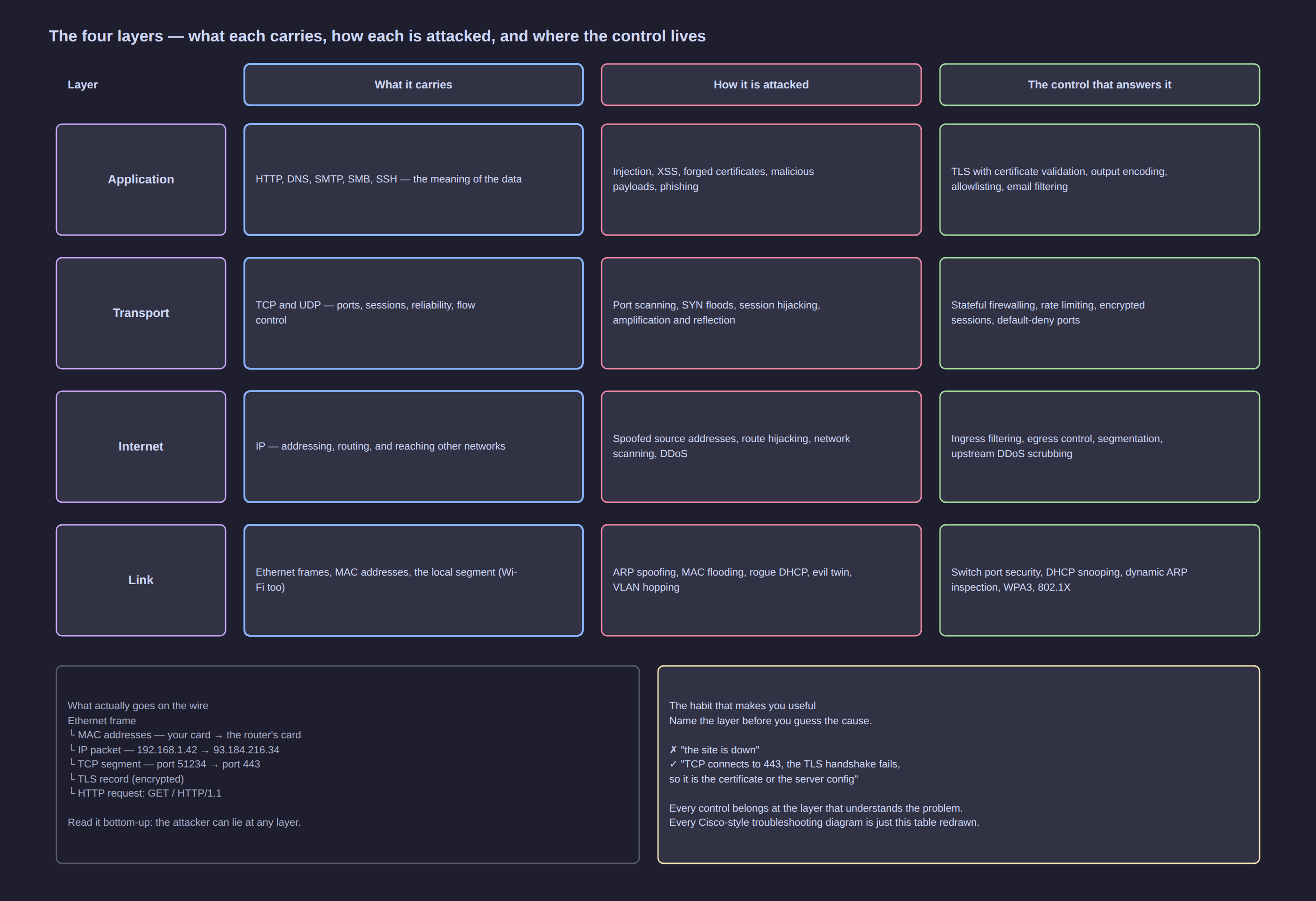
Click the diagram to open it full size.
The mental model: layers
Networks are built in layers so that each layer can be changed without rewriting the others. Your browser does not need to know whether you are on WiFi or fibre; your WiFi card does not need to know you are loading a web page.
| Layer (TCP/IP) | OSI equivalent | Carries | Security questions it raises |
|---|---|---|---|
| Application | 5–7 | HTTP, DNS, SMTP, SMB, SSH — the actual meaning | Is it encrypted? Is it authenticated? Is the content trustworthy? |
| Transport | 4 | TCP and UDP — ports, sessions, reliability | Which port is open? Is the connection stateful? Is it being flooded? |
| Internet | 3 | IP — addressing and routing between networks | Who can reach whom? Can source addresses be forged? |
| Link | 1–2 | Ethernet/WiFi frames, MAC addresses, the local segment | Who else is on this wire? Can they see or spoof my traffic? |
The single most useful security habit this table gives you: when something goes wrong, name the layer first. "The website is down" is not a finding. "TCP connections to port 443 complete but the TLS handshake fails" is.
The four things you must be able to answer
1. What is the address?
IPv4 addresses are 32 bits, written as four numbers: 192.168.1.42. Subnetting splits them into a network part and a host part. The /24 suffix (or 255.255.255.0) says how many bits are the network.
| CIDR | Addresses | Typical use |
|---|---|---|
/32 |
1 | a single host (a firewall rule for one machine) |
/30 |
4 (2 usable) | a point-to-point link between two routers |
/24 |
256 (254 usable) | a normal LAN — your house, a small office |
/16 |
65,536 | a large campus or a cloud VPC |
/8 |
16.7 million | the old, giant allocations |
Three ranges are private (RFC 1918) — never routed on the public internet, which is why almost every home network looks the same:
10.0.0.0/8          the big one — used by businesses, VPNs and cloud
172.16.0.0/12       172.16.x.x through 172.31.x.x
192.168.0.0/16      your home router, almost certainly 192.168.0.x or 192.168.1.x
You will also meet 127.0.0.1 (loopback — this machine), 169.254.x.x (link-local — a host that failed to get a DHCP lease, a classic diagnostic tell), and ::1 / fe80:: for IPv6.
[!TIP] Seeing a
169.254.x.xaddress on a machine is a 5-second diagnosis: it means DHCP failed. The host is up, the cable or WiFi is fine, and it simply never got a lease. Stop debugging the application.
2. Which port?
An IP address gets you to a machine; a port gets you to a service on it. There are 65,535 TCP and 65,535 UDP ports, and convention puts well-known services in the low numbers.
| Port | Protocol | Service | Why a defender cares |
|---|---|---|---|
| 22 | TCP | SSH | remote administration — should never be open to the internet unprotected |
| 25 / 587 | TCP | SMTP | email sending — a hacked host becomes a spam cannon |
| 53 | UDP/TCP | DNS | the most abused protocol: tunnelling and exfiltration hide here |
| 80 / 443 | TCP | HTTP / HTTPS | the web, and the delivery path for most malware |
| 139 / 445 | TCP | SMB | file sharing — the lateral-movement highway in ransomware |
| 3389 | TCP | RDP | remote desktop — a favourite for brute force and initial access |
| 3306 / 5432 | TCP | MySQL / PostgreSQL | databases — should never be reachable from outside |
Open port equals running service equals potential vulnerability. The first thing any attacker does is look for open ports; the first thing a defender should do is close the ones that are not needed.
3. What is the MAC address, and who else is on my wire?
aa:bb:cc:11:22:33 is a link-layer address burned into a network card. Inside a LAN, machines talk to each other by MAC address, using ARP to ask "who has 192.168.1.1?". It is a shout to the whole segment, and it is unauthenticated — which is why ARP spoofing exists and why anyone on the same WiFi can often see your traffic.
Wired and encrypted-WiFi segments limit who can shout at whom. Open WiFi and flat networks do not. That is the entire argument for network segmentation (Lesson 18).
4. How does a packet leave my network?
Your machine sends anything not destined for the local subnet to its default gateway — normally the router. The router performs NAT (Network Address Translation), rewriting your private source address to its public one so the return traffic can find its way back.
Your PC 192.168.1.42  ──►  Router (LAN 192.168.1.1, WAN 203.0.113.7)  ──►  Internet
         source: 192.168.1.42:51234                                source: 203.0.113.7:40123
Two security consequences worth internalising now:
- NAT is not a firewall. It hides your internal addresses and blocks unsolicited inbound connections as a side effect, but it filters nothing else. Outbound traffic — including stolen data — passes freely.
- Spoofing is easy, returning spoofed traffic is not. An attacker can put any source IP on a packet, but the replies go to the real owner of that address. This is why spoofing is used for reflection and denial-of-service, and why BCP 38 ingress filtering is a defence.
Encapsulation: what actually goes on the wire
When you load https://example.com, every layer wraps the one above it:
Ethernet frame
├── MAC: source aa:bb:…, destination the router's MAC
└── IP packet
    ├── source 192.168.1.42, destination 93.184.216.34
    └── TCP segment
        ├── source port 51234, destination port 443   (SYN, then ACK, then data)
        └── TLS record
            └── HTTP request: GET / HTTP/1.1  Host: example.com
Read that stack bottom-up and the attack surface becomes obvious: the attacker can lie at any layer. A forged MAC to bypass a filter, a spoofed IP to hide the origin, a hijacked TCP session, a fake TLS certificate, a malicious HTTP response. Each has its own defence, and each defence sits at the layer that understands it:
| The lie | The defence |
|---|---|
| Forged MAC address | port security, 802.1X, DHCP snooping |
| Spoofed IP source | ingress filtering (BCP 38), uRPF |
| ARP poisoning on the LAN | Dynamic ARP Inspection, static ARP, encrypted protocols |
| TCP session hijacking | TLS, encryption, network monitoring for anomalies |
| Fake certificate / MITM | certificate validation, HSTS, internal PKI |
| Malicious payload in HTTP | filtering proxy, allowlisting, EDR |
The three services that make a home network work
| Service | What it does | Where it is abused |
|---|---|---|
| DHCP (port 67/68) | hands out IP addresses, gateway and DNS server | a rogue DHCP server hands out itself as the gateway — instant man-in-the-middle |
| DNS (port 53) | turns names into addresses | cache poisoning sends you to an attacker's IP; tunnelling exfiltrates data in queries |
| NAT + firewall | shares one public address and blocks unsolicited inbound | UPnP lets an application punch holes through it automatically |
All three live in your router, which is why Lesson 41 spends so much time on router configuration. Your router is the security boundary of the whole house.
Commands to know on your own machine
Run these on your own machine. They are read-only and safe.
# 1. My addresses and interfaces
ip a                      # Linux: addresses, interfaces, state
ipconfig /all             # Windows

# 2. My routes — which gateway carries my traffic
ip r                      # looks like:  default via 192.168.1.1 dev wlan0

# 3. Who is listening on my own machine, and on which port
ss -tulpn                 # Linux (netstat -ano on Windows)

# 4. Who is on the local segment (answers the "who else is here" question)
ip neigh                  # ARP/neighbour table: IP ↔ MAC
arp -a                    # same, older tooling

# 5. Does name resolution work, and what does it return?
dig example.com +short
nslookup example.com

# 6. Where does a path actually go?
traceroute example.com    # traceroute on Windows; use tcptraceroute through firewalls

# 7. What is exposed on the local network (your own network only!)
nmap -sn 192.168.1.0/24   # ping sweep: who is alive
That last command is the first step of every engagement and the first step of every good network hygiene review. Run it at home: if it shows devices you cannot identify, that is a finding.
Attack it / Defend it
| The attack | How it works | The control that stops it |
|---|---|---|
| ARP spoofing | claim to be the gateway; traffic flows through the attacker | Dynamic ARP Inspection, static ARP for gateways, edge encryption |
| Rogue DHCP | hand out a malicious gateway and DNS server | DHCP snooping, port security |
| DNS poisoning | return a wrong IP for a legit name | DNSSEC, DoH/DoT, trusted resolvers, monitoring for new domains |
| IP/MAC spoofing | bypass address-based trust | 802.1X, ingress filtering, do not trust addresses as identity |
| Port scanning | discover what is listening | close unused ports, firewall default-deny, alert on sweeps |
| Man-in-the-middle | sit between two parties and relay | TLS with certificate validation everywhere, HSTS, no open WiFi for sensitive work |
| Traffic sniffing | capture what crosses your segment | encryption, switching not hubs, segmentation, WPA3 |
| Beaconing / exfiltration | periodic outbound connections carrying data | egress filtering, DNS monitoring, netflow analysis (Lesson 44) |
Key takeaways
- Layers are your diagnostic and defensive map. Name the layer before you guess the cause, and put each control at the layer that understands the problem.
- Addresses and ports are not identity. They are easy to forge; never build trust on them alone.
- NAT is not a firewall, and "we are behind a router" is not a security control.
- DHCP, DNS and ARP are unauthenticated by design — which is why they are the classic man-in-the-middle toolkit.
- Everything an attacker does first, you should do first on your own network: enumerate, identify, and close what should not be open.
Check yourself
- A machine shows
169.254.13.7. What failed, and what would you check first? - Which port would you audit first on an internet-facing server, and why?
- Why can an attacker spoof a source IP but rarely receive the reply — and what attack does that enable?
- You see SMB traffic (port 445) from a workstation to another workstation. Why is that worth investigating rather than ignoring?
- Name one control that protects a lie told at the link layer and one that protects a lie told at the application layer.