08 — The Attack Taxonomy — Every Major Class in One Place
Level: Beginner · Time: ~20 min · Prerequisites: Lesson 7 — How Attacks Actually Happen — Kill Chain and MITRE ATT&CK
Why this matters
Attack names arrive without warning and in no particular order: a supplier asks whether you are exposed to "IDOR", a client asks about "BGP hijacking", a news story screams about "fileless malware". If every new term feels unfamiliar, you cannot triage it, price it, or decide whether it applies to you. This lesson names every major class of attack once, in one place, with a one-line definition and the control that defeats it, so that from Lesson 9 onwards nothing is new — only deeper. Read it as an index rather than a course: nothing here is taught to depth, and each family's heading names the lesson that does that work. Ten families cover the ground — network; web and application; malware; human and social; identity and credential; insider and supply chain; wireless and physical; cloud and container; cryptography; and denial of service.
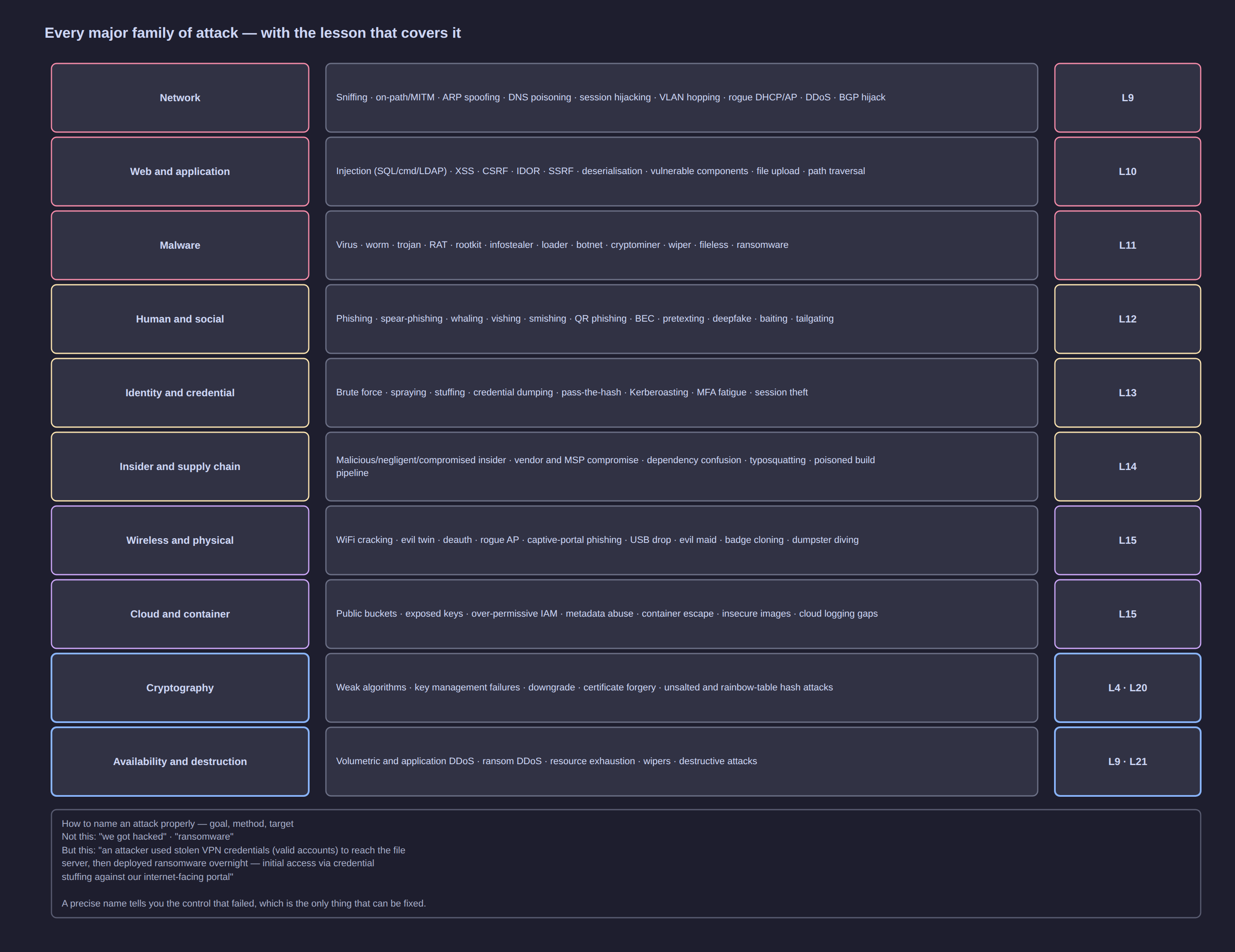
Click the diagram to open it full size.
Attacks on the path and on the mathematics — network, availability and cryptography
1. Network-level attacks — in depth in Lesson 9
| Attack |
One-line definition |
What defends against it |
| Sniffing |
capturing traffic that crosses a segment you can reach |
encryption, switched networks, segmentation, no open WiFi |
| On-path / man-in-the-middle |
sitting between two parties and relaying their traffic |
TLS with certificate validation, HSTS, 802.1X, Dynamic ARP Inspection |
| ARP spoofing |
answering "who has this IP?" falsely to redirect a LAN's traffic |
Dynamic ARP Inspection, static ARP for gateways, port security |
| DNS poisoning |
returning a wrong address for a legitimate name |
DNSSEC, trusted resolvers, encrypted DNS, monitoring of new domains |
| Session hijacking |
taking over an authenticated session by stealing or predicting its token |
TLS everywhere, HSTS, short-lived sessions, binding sessions to more than a cookie |
| VLAN hopping |
crossing a VLAN boundary you should not reach |
disable unused ports, keep user traffic off the native VLAN, no trunk negotiation on access ports |
| Rogue DHCP or rogue access point |
handing out a malicious gateway, DNS server or network |
DHCP snooping, port security, wireless monitoring |
| DDoS |
overwhelming a service until it stops answering |
upstream scrubbing, CDN absorption, rate limiting, autoscaling |
| BGP hijacking |
announcing someone else's address block so their traffic routes to you |
route filtering and RPKI at your transit provider; you buy this, you do not build it |
10. Denial of service and availability — in depth in Lesson 9
| Attack |
One-line definition |
What defends against it |
| Resource exhaustion |
consuming a finite resource — connections, memory, threads — until the service fails |
rate limiting, connection limits, queue tuning, autoscaling |
| Volumetric and application-layer flooding |
filling the link with traffic, or sending expensive but valid-looking requests in volume |
upstream scrubbing, CDN absorption, request-cost limits, login throttling |
| Ransom DDoS |
an extortion email backed by a short, real attack |
scrubbing arranged in advance, an incident plan, and a policy of not paying |
| Destructive attacks and wipers |
destroying data rather than encrypting it, because availability is the objective |
immutable offline backups, segmentation, least privilege |
Lesson 45 covers the response side of the availability family.
9. Cryptography attacks — in depth in Lesson 4 and Lesson 20
| Attack |
One-line definition |
What defends against it |
| Weak algorithms |
still using MD5, SHA-1 or obsolete ciphers for integrity or storage |
a written crypto standard; inventory what still uses the old algorithm and migrate |
| Key management failure |
keys hardcoded in source, committed to a repository, or never rotated |
a secrets manager, rotation policy, secret scanning in the build pipeline |
| Downgrade attacks |
forcing a connection to negotiate a weaker protocol than both sides support |
disable legacy protocols outright rather than merely preferring the newer one |
| Certificate forgery or mis-issuance |
presenting a certificate the client should not trust |
certificate validation, certificate-transparency monitoring, internal PKI |
| Hash and rainbow-table attacks |
recovering passwords from stored hashes using precomputed tables |
salted, slow password hashing (bcrypt, scrypt, Argon2), never bare hashes |
Attacks on the code and on your machines — web, application and malware
2. Web and application attacks — in depth in Lesson 10
| Attack |
One-line definition |
What defends against it |
| Injection (SQL, command, LDAP) |
user input is treated as instructions instead of data |
parameterised queries, allowlisting, never interpolating input into a shell |
| Cross-site scripting (XSS) |
attacker-supplied script runs in another user's browser |
output encoding, Content-Security-Policy, framework auto-escaping |
| Cross-site request forgery (CSRF) |
a logged-in user's browser is tricked into making an unintended request |
anti-CSRF tokens, SameSite cookies, re-authentication on sensitive actions |
| Broken access control / IDOR |
changing an identifier in a request reveals someone else's data |
server-side authorisation on every object, deny by default |
| Server-side request forgery (SSRF) |
the server is made to fetch a URL the attacker chooses |
destination allowlists, block cloud metadata addresses, egress control |
| Insecure deserialisation |
a serialised object is rebuilt from untrusted input and runs code |
avoid native deserialisation of untrusted data, integrity checks, typed formats |
| Vulnerable and outdated components |
a known-flawed library or plugin is still in production |
dependency inventory, patch discipline, software composition analysis |
| Unrestricted file upload |
an uploaded file is stored and later executed |
store outside the web root, validate type by content, never execute uploads |
| Path traversal |
../ sequences escape the intended directory |
canonicalise the path and verify it stays inside the base directory |
| API abuse |
an endpoint is called without the authorisation checks its UI sibling has |
object-level authorisation on every endpoint, rate limiting, schema validation |
3. Malware — in depth in Lesson 11
| Attack |
One-line definition |
What defends against it |
| Virus |
code that attaches to a legitimate file and spreads when it is run |
application allowlisting, endpoint protection, patching |
| Worm |
self-propagating malware that crosses networks with no user action |
segmentation, patching, disabling unnecessary network services |
| Trojan |
useful-looking software that also does something hostile |
software sourcing policy, allowlisting, code-signing checks |
| Remote-access trojan (RAT) |
gives an operator interactive control of the host |
EDR behavioural detection, egress filtering, application allowlisting |
| Rootkit / bootkit |
hides itself and its activity deep in the operating system |
measured and secure boot, integrity monitoring, reimage rather than clean |
| Infostealer |
harvests browser credentials, session cookies and crypto wallets |
disk and cookie protection, credential hygiene, phishing-resistant MFA |
| Loader / dropper |
a small first stage whose only job is to fetch the real payload |
script and macro blocking, EDR, network egress control |
| Botnet agent |
enrols the host in a network used for floods, spam or proxying |
egress filtering, beaconing detection, patching |
| Cryptominer |
steals CPU, electricity and cloud budget for someone else's profit |
resource monitoring, allowlisting, cloud cost alerting |
| Wiper |
destroys data with no recovery path, often disguised as ransomware |
immutable offline backups, segmentation, a restored-priority plan |
| Fileless / living-off-the-land |
uses only built-in tools such as PowerShell and WMI, so nothing reaches disk |
command-line and script-block logging, behaviour rules rather than signature rules |
| Ransomware |
encrypts data and demands payment, usually after stealing it |
tested offline backups, segmentation, least privilege, patching, MFA |
Attacks on people, accounts and trust
4. Human and social attacks — in depth in Lesson 12
| Attack |
One-line definition |
What defends against it |
| Phishing |
bulk fraudulent email asking for a click, a credential or a payment |
mail filtering, DMARC enforcement, training, phishing-resistant MFA |
| Spear-phishing |
phishing written for one named person, using research about them |
the same controls, plus fewer public personal details and a questioning culture |
| Whaling |
spear-phishing aimed at executives and their assistants |
executive-specific training, mailbox protections, payment verification |
| Vishing and smishing |
the same fraud by phone call or text message |
callback procedures using known numbers, awareness, carrier filtering |
| QR phishing (quishing) |
a QR code that sends a phone to a hostile page, sometimes stuck over a real one |
treat QR codes as untrusted links; prefer typed addresses |
| Business email compromise |
a real or spoofed mailbox is used to redirect a payment |
DMARC, payment-change procedures, two-person approval, mailbox-rule monitoring |
| Pretexting |
a fabricated scenario, such as fake IT support, that earns cooperation |
identity verification procedures, helpdesk scripts, least privilege |
| Deepfake fraud |
synthetic voice or video impersonating authority to authorise a transfer |
callback to a number you already hold, dual approval on payments |
| Baiting |
leaving tempting media or a download for someone to pick up |
device control policy, awareness, never plug in found media |
| Tailgating |
following an authorised person through a controlled door |
access control, visitor management, staff willing to challenge |
5. Identity and credential attacks — in depth in Lesson 13
| Attack |
One-line definition |
What defends against it |
| Brute force |
trying many passwords against one account |
lockout and throttling, strong password policy, MFA |
| Password spraying |
one common password against many accounts, to dodge lockout |
MFA, banned-password lists, alerting on distributed failures |
| Credential stuffing |
replaying username and password pairs leaked from other breaches |
MFA, breach-password screening, unique passwords per site |
| Credential dumping |
extracting secrets from memory or the credential store |
credential protection, removing local admin, EDR on sensitive process access |
| Pass-the-hash |
authenticating with a stolen password hash instead of the password |
credential tiering, managed local admin passwords, no reusable admin credentials |
| Kerberoasting |
requesting service tickets and cracking them offline for service-account passwords |
long random service-account passwords, managed service accounts, monitoring |
| MFA fatigue |
flooding a user with push prompts until one is approved |
number matching, prompt rate limiting, phishing-resistant MFA |
| Session theft |
stealing a valid session cookie and skipping the login entirely |
short session lifetimes, token binding, cookie protection, session revocation |
| Token replay |
reusing a stolen authentication token elsewhere |
tokens bound to device or context, short validity, conditional access |
6. Insider and supply chain — in depth in Lesson 14
| Attack |
One-line definition |
What defends against it |
| Insider, malicious or negligent |
a trusted person steals, sabotages or accidentally exposes access and data |
least privilege, separation of duties, monitoring, classification, offboarding discipline |
| Compromised insider |
a legitimate account is taken over and used from inside |
MFA, behaviour analytics, session revocation |
| Vendor or MSP compromise |
your supplier's access is used to reach you |
contractual security requirements, least privilege for vendor accounts, separate admin planes |
| Dependency confusion |
an internal package name is published publicly with hostile content |
pin versions, private registries with scopes, dependency review |
| Typosquatting |
a package or domain name one character away from the real one |
namespace monitoring, dependency pinning, package provenance checks |
| Compromised build pipeline |
the automation that builds your software is altered |
hardened CI/CD, short-lived build credentials, signed build artefacts |
| Malicious update |
a trusted update channel delivers hostile code |
code signing and verification, staged rollouts, vendor risk assessment |
Attacks on proximity and on rented systems
7. Wireless and physical — in depth in Lesson 15
| Attack |
One-line definition |
What defends against it |
| WiFi cracking |
recovering the network passphrase from captured handshakes |
WPA3, or WPA2 with a long random passphrase; 802.1X for staff networks |
| Evil twin |
a fake access point impersonating a legitimate network |
certificate validation, WPA3, wireless monitoring, no auto-connect to open networks |
| Deauthentication attack |
forcing clients off a network so they reconnect to the attacker's access point |
WPA3 management-frame protection, monitored wireless |
| Rogue access point |
an unauthorised access point plugged into your network |
port security, 802.1X, wireless sweeps |
| Captive-portal phishing |
a fake login page presented as hotel or airport WiFi |
use a VPN on untrusted networks, never enter corporate credentials on a portal |
| USB drop |
planted media that a curious employee plugs in |
disable autorun, device control policy, awareness |
| Evil maid |
physical access used to install a hardware implant or alter boot |
disk encryption, secure boot, tamper-evident cases, physical controls |
| Badge cloning |
copying an access credential to enter a building |
encrypted credentials, multi-factor door access, access logging |
| Shoulder surfing |
reading a screen or keyboard from behind |
privacy filters, clean-desk policy, lock on leave |
| Dumpster diving |
recovering documents or media from the waste |
cross-cut shredding, secure disposal, no printed secrets |
8. Cloud and container — in depth in Lesson 15
| Attack |
One-line definition |
What defends against it |
| Misconfigured storage |
a bucket or share readable by anyone on the internet |
configuration baselines, continuous posture scanning, no public-by-default |
| Exposed keys |
an API key or token in a repository, a screenshot or a chat message |
secret scanning, a secrets manager, short-lived credentials |
| Over-permissive IAM |
identities with far more rights than the task requires |
least privilege, permission reviews, no wildcard policies |
| Metadata-service abuse |
SSRF or a compromised workload reads cloud instance credentials from the metadata endpoint |
require authentication on the metadata service, block it from application components, egress control |
| Container escape |
breaking out of a container to the host filesystem or kernel |
patched kernels, no privileged containers, read-only root filesystems, seccomp profiles |
| Insecure images |
a container image with known flaws or embedded secrets |
image scanning, minimal base images, signed images, rebuild rather than patch |
| Cloud logging gaps |
the attacker operates in a blind spot because audit logging was never enabled |
enable and centralise audit logs, alert on identity and policy changes, test that logs arrive |
Naming and interrogating an attack
An attack description is only useful if it names the goal, the method and the target or impact. "We had a cyber incident" is not a description; it is a shrug.
| Badly named |
Why it fails |
Named well |
| "Someone hacked our website." |
no goal, method or impact, so you cannot choose a control |
"An attacker used SQL injection against our public login form to read the customer table." |
| "We've had a phishing attack." |
nothing about which users, what was taken, or what it led to |
"A targeted email took six finance staff to a credential-harvesting page; two entered passwords, and one mailbox was used to redirect a payment." |
| "Ransomware." |
hides the intrusion that made it possible, and so hides the fix |
"An unpatched internet-facing service was exploited for initial access; four days later files on two file servers were encrypted and shadow copies deleted." |
Named well, the control almost names itself: parameterise the query, deploy phishing-resistant MFA and a payment-change procedure, patch the service and segment the file servers. Whatever the source — a vendor bulletin, a news story, a regulator's alert — ask the same three questions and map the answers onto the models from Lesson 7.
| Question |
Kill chain phase |
ATT&CK tactics |
What you do with the answer |
| How did they get in? |
delivery, exploitation |
Initial Access, Execution |
close the entry point and check whether you have the same exposure today |
| How far did they get? |
installation, command and control, actions |
Persistence, Credential Access, Discovery, Lateral Movement, Collection |
scope your exposure and hunt for the same behaviours in your logs |
| What stops the same thing next time? |
the phase you can most cheaply break |
the tactic you can most cheaply detect |
pick one technical control and one detection; assign both to a person and a date |
If a report cannot answer the first question, it is marketing. If your own incident review cannot answer the third, it is not finished.
Attack it / Defend it
| The attack |
How it works |
The control that stops it |
| ARP spoofing on a flat LAN |
false ARP replies redirect traffic through the attacker |
Dynamic ARP Inspection, static gateway entries, segmentation, encrypted protocols |
| SQL injection |
user input is interpreted as SQL instructions |
parameterised queries, least-privilege database accounts, validation |
| Stored XSS |
a payload saved in the application runs in every visitor's browser |
output encoding, Content-Security-Policy, framework auto-escaping |
| Credential phishing |
a user is persuaded to type a password into a hostile page |
phishing-resistant MFA, DMARC enforcement, mail filtering, a reporting culture |
| Password spraying |
one common password tried against many accounts |
MFA, banned-password lists, distributed-failure alerting |
| Ransomware |
data encrypted at scale after a quiet foothold |
immutable tested backups, segmentation, patching, removing local admin |
| Supply-chain injection |
hostile code arrives through a trusted dependency or update |
dependency pinning, signed artefacts, build-pipeline hardening, vendor assessment |
| Cloud key exposure |
a leaked credential is used from anywhere in the world |
short-lived credentials, secret scanning, conditional access, least privilege |
| QR phishing |
a phone is sent to a hostile page the desktop controls never see |
treat QR codes as untrusted, mobile device management, awareness |
| A report nobody can act on |
no stage was named, so no owner was ever assigned |
the naming discipline and three questions above; a written owner per control |
Key takeaways
- Ten families cover everything. If a new term does not fit, it is a seam between two of them — place it before you fear it.
- Every family has a control, and most controls are boring. Patching, least privilege, segmentation, MFA and tested backups appear in almost every row of every table here.
- Name the goal, the method and the impact, or you cannot choose a fix. Precision is a security control.
- Two or three questions applied to every report beat reading a hundred bulletins you never act on.
- Depth lives later. This lesson's job was to make Lessons 9 to 15 feel like revision rather than surprise.
Check yourself
- Which family does a leaked API key belong to, and which control would you choose first?
- An attacker uses only built-in operating-system tools and never writes a file to disk. Which family and which control — and why do signature-based tools struggle?
- Name the three parts of a precise attack description, then rewrite "we had a DDoS" to include all three.
- A vendor bulletin describes a flaw in a library you use. Which two of the three questions in the final table would you answer first?
- Pick two families and give one control that appears in both, and one that appears in only one.
Next
Lesson 9 — Network Attacks