16 — Defence in Depth and Zero Trust
Level: Intermediate · Time: ~20 min · Prerequisites: Lesson 15 — Wireless, Physical and Cloud Attacks
Why this matters
Module 02 gave you the attack catalogue; everything from here on is the answer to it. The problem is that a list of thirty controls is not a strategy — you need a way to decide which ones to deploy, in what order, with the money and staff you actually have. Defence in depth supplies that framework: layers chosen so that no single failure is fatal, and controls chosen by category so that prevention is never your only plan. Zero trust is the operating principle behind it. This lesson is the architecture the rest of the module hangs on, so treat it as the map rather than a topic to memorise.
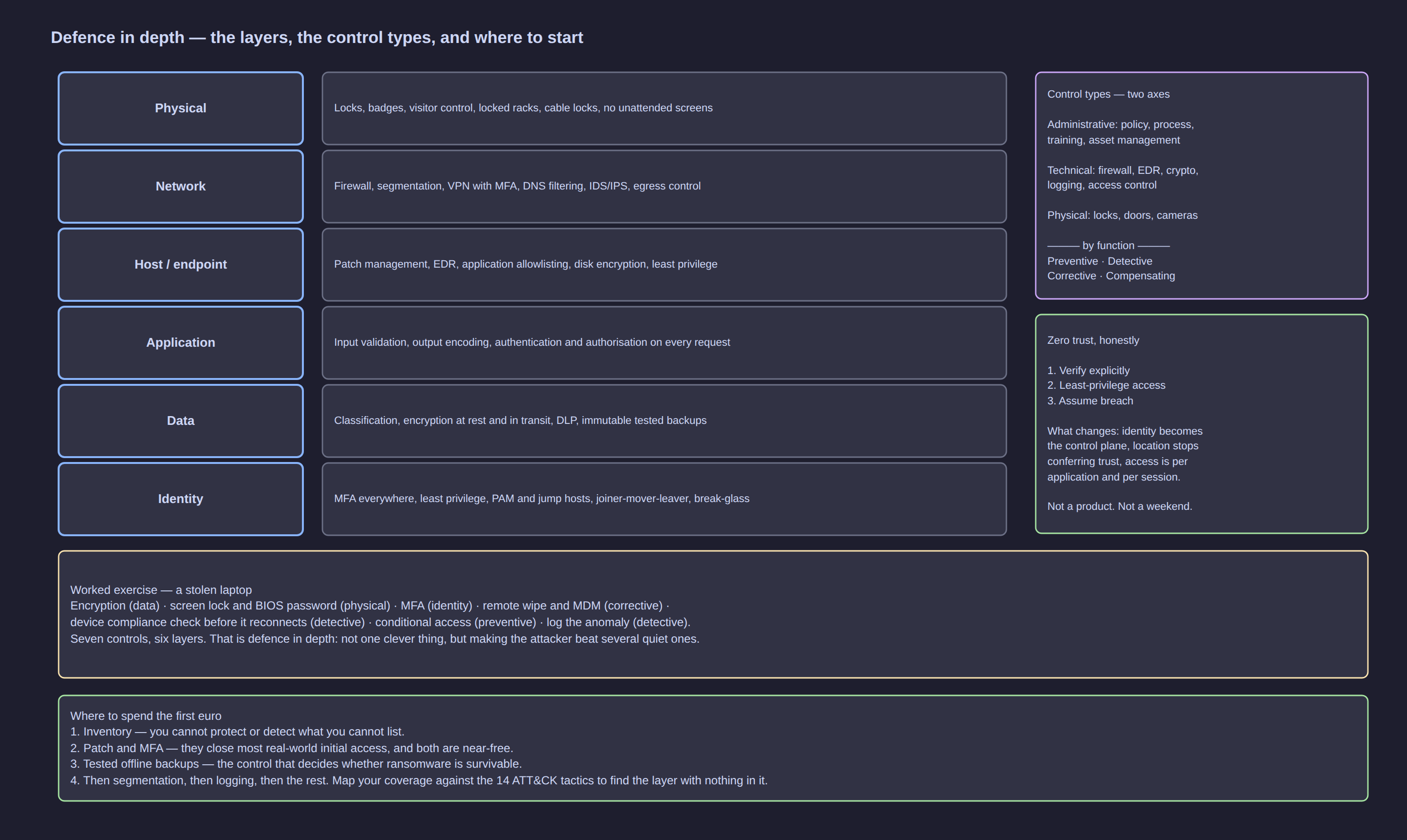
Click the diagram to open it full size.
What defence in depth actually means
Multiple independent layers of control, so that a failure in any one of them is survivable. A phished password still faces MFA; a stolen session still faces segmentation; a compromised workstation still faces encrypted data it cannot read and a backup it cannot destroy.
The honest counterpoint, which most diagrams omit: layers only help if they are independent (three controls that all depend on the same password are one control with three names) and if they are monitored (an unread log is not a detection layer, it is a record of your loss). More layers is not the goal — each control has an operational cost, and what you are buying is the absence of a single point of failure.
The layers, with concrete examples
| Layer | Two or three concrete examples | What it buys you |
|---|---|---|
| Physical | locked doors, badge access, full-disk encryption, locked racks | the attacker cannot reach the hardware |
| Network | firewall zones, segmentation, VPN, IDS/IPS | movement inside the network is limited and visible |
| Host / endpoint | EDR, application allowlisting, patching, secure boot | compromise of one machine is contained and detected |
| Application | input validation, authentication, WAF, dependency scanning | the service cannot be abused through its own interfaces |
| Data | classification, encryption at rest and in transit, DLP, backups | the data is unreadable and the copies are recoverable |
| Identity | MFA, least privilege, privileged access management, session control | a stolen credential alone does not become access |
| Human and process | policies, training, change control, incident response, asset ownership | the layers above are operated consistently by people |
That last row is not a seventh wall — it cuts across the other six. A technically perfect control that nobody owns will be switched off, mis-set or forgotten after the first upgrade.
Control categories: two dimensions you can apply to anything
By nature — what the control is:
| Category | Examples | Typical owner |
|---|---|---|
| Administrative | policies, procedures, training, asset management, supplier review, joining/moving/leaving | management, supported by IT |
| Technical | firewalls, EDR, encryption, MFA, logging, backups, patching systems | IT or the security function |
| Physical | locks, badges, locked racks, power and cooling, secure destruction | facilities, with IT input |
By function — what the control does:
| Function | Purpose | Example |
|---|---|---|
| Preventive | stop the event | MFA, application allowlisting, default-deny firewall |
| Detective | know it happened | EDR alerts, audit logs, IDS, file integrity monitoring |
| Corrective | limit and repair the damage | backups and restores, isolation, patch deployment, account revocation |
| Compensating | cover a gap you cannot close technically | network isolation for an unpatched system, controls for end-of-life hardware |
| Deterring | influence the attacker before they act | visible cameras, warning banners, honeytokens, prosecution policy |
The habit worth building: whenever you propose a control, say which function it serves. "We installed EDR" is preventive and detective, but "we enabled logging" is not preventive at all — and describing a detective control as if it prevented anything is how gaps get missed.
Worked exercise: two scenarios, many controls
The pattern underneath both tables is the point: the answer is never one control.
Scenario 1: a laptop is stolen from a car
| Layer / category | Control | Function |
|---|---|---|
| Physical | never leave devices visible in a vehicle; carry it as hand luggage | deterrent |
| Data | full-disk encryption with a strong passphrase | preventive — the data is unreadable |
| Data | no unencrypted copies of sensitive data on the endpoint | preventive |
| Identity | device-conditional access, so a stolen token alone cannot sign in from an unknown device | preventive |
| Host | BIOS/UEFI password, secure boot, boot from external media disabled | preventive |
| Identity | remote session revocation and password reset within the hour | corrective |
| Detective | alerting if the device reconnects and behaves oddly; file access auditing | detective |
| Data | backups on a separate system, so the data still exists | corrective |
| Administrative | an asset register that says what was on it, and a lost-device playbook (Lesson 45) | administrative |
Scenario 2: a user clicks a ransomware attachment
| Layer / category | Control | Function |
|---|---|---|
| Human | awareness training, and a culture where reporting the click in five minutes is rewarded | preventive |
| Application | email gateway filtering attachments and links, macro blocking by default | preventive |
| Host | EDR with behavioural blocking; attack surface reduction rules | preventive |
| Host | macro-free document policy where the business does not need macros | preventive |
| Identity | the user is not a local administrator, so the payload cannot install a service | preventive |
| Network | egress filtering, so the new executable cannot call home | preventive |
| Network | segmentation, so it cannot reach the file server in one hop | preventive |
| Data | offline or immutable backups, and a restore that has been tested | corrective |
| Detective | file integrity monitoring, mass-rename alerts, SIEM correlation | detective |
| Process | an incident playbook with contact numbers and a decision to disconnect the host | corrective |
Look at the imbalance: prevention dominates the left column, but the decisive control in both scenarios is a corrective one — the backup, the revocation, the restore. Defence in depth is what lets you survive when the preventive column is defeated, which it eventually is.
Zones, segmentation and zero trust
Segmentation is the part of defence in depth you can see on a network diagram.
The zone model
| Zone | What lives there | Rules between it and the rest |
|---|---|---|
| Internet | everything untrusted | nothing inbound except explicitly published and hardened services |
| DMZ | services that must be reachable from outside: web front ends, VPN terminators, mail relays | reachable from the internet on specific ports; almost no access into the internal network |
| Internal user | workstations, phones, printers | can reach the services they use — not the management plane, and not other subnets by default |
| Server | application and file servers | reachable from user zones only on needed ports, never from guest or IoT |
| Management | hypervisor consoles, switch and firewall admin interfaces, monitoring | reachable only from a dedicated management network or a privileged workstation |
| IoT / guest | cameras, TVs, thermostats, visitor devices, personal phones | internet access only; no route to internal systems whatsoever |
Two distinctions explain why segmentation keeps failing in small companies. North-south versus east-west: north-south crosses your boundary and east-west moves between internal hosts; almost all spending targets north-south, but once an attacker is inside the damage is done east-west, which is why the flat internal network is the biggest structural weakness in a small business. Macro versus micro-segmentation: macro is VLANs and firewall zones — coarse, achievable in a weekend; micro applies policy per workload or identity, usually with host-based controls, and is the goal for the few systems that matter most. Start macro, and remember that a VLAN without firewall rules between it and the rest is not segmentation, it is a naming convention.
Segmentation, isolation and air-gapping
| Technique | What it means | Use case |
|---|---|---|
| Segmentation | separated zones with policies controlling what may cross | a normal corporate network: users, servers, guest, management |
| Isolation | a system deliberately cut off from everything it does not strictly need | legacy equipment, an unpatched appliance, a lab, a compromised host during response |
| Air-gapping | no network connection at all, including wireless | industrial control systems, offline backups, key-signing machines |
Zero trust: the three principles and what actually changes
| Principle | What it means in practice |
|---|---|
| Verify explicitly | authenticate and authorise every request using the strongest signals available: identity, device health, location, sensitivity of the resource |
| Use least-privilege access | just-enough, just-in-time access scoped to the resource, with no standing administrator rights |
| Assume breach | design as if an attacker is already inside: minimise blast radius, encrypt, segment, log and verify |
What genuinely changes when you adopt it: identity becomes the control plane, so policy attaches to who and what the request is rather than to which cable it arrived on; network location stops conferring trust, which is the biggest mental shift from perimeter thinking; every request is authenticated and authorised, not just the first one at the boundary; access is per application and per session, so you reach the payroll application rather than "the internal network where payroll happens to live"; and devices are checked for health — patched, encrypted, managed — before they are trusted with sensitive data.
What zero trust does not mean: it is not a product you buy (vendors sell components of it, nobody sells the outcome); it is not "no firewall" (segmentation and firewalls remain, doing fewer but more meaningful jobs); and it is not achievable in a weekend — claiming otherwise usually means a network diagram was renamed.
A realistic staged roadmap. One: inventory and MFA — know your assets and accounts, and put MFA on everything that can reach data, especially email, remote access, admin consoles and cloud. Two: identity-based access to applications, moving from network-level access to per-application access with single sign-on and conditional policy. Three: segment the most sensitive asset — pick one, the file server or the finance system or the domain controller, and put real rules around it (Lesson 18). Four: log, verify and iterate, with centralised logging, alerting on the identity and network events that matter, and a review cycle that keeps moving the next asset up the list.
[!TIP] Do not attempt a zero trust programme for the whole organisation at once. Choose the two systems whose loss would end the business, protect them as if the rest of the network were already hostile, and let that success pay for the next phase.
Choosing controls: what to do first
Map your controls against the ATT&CK tactics from Lesson 7 — initial access, execution, persistence, privilege escalation, credential access, discovery, lateral movement, collection, exfiltration, impact — and ask, for each, which control would give you a signal. Any tactic with no answer is a gap, and it is a better question than "are we compliant".
| Control | Risk reduced | Cost and effort | When |
|---|---|---|---|
| MFA on email, remote access and admin consoles | very high | low — a licence and a weekend of rollout | immediately: the best ratio available |
| Patching internet-facing systems quickly | very high | low to medium process effort | immediately |
| Offline or immutable backups, restore-tested | very high (ransomware) | medium | immediately |
| Unique local admin passwords; no standing admin rights | high | low to medium | week one |
| Egress and DNS filtering | high | low | early: cheap detection and blocking |
| Segmentation of the most sensitive asset | high | medium to high effort | once MFA and patching are done |
| Centralised logging with a few good alerts | high, for detection | medium | early, but budget for tuning |
| EDR on endpoints that touch data | high | medium to high cost | early |
| Application allowlisting | high | high operational effort | after you can measure its impact |
| Full-disk encryption | medium to high | low | immediately, at purchase |
The seven layers as a checklist
Apply this to your home network, then to a small business. For each line: does something exist, and is it monitored?
- Physical — is the hardware locked down, and is the disk encrypted?
- Network — is there more than one zone, and is anything restricted between them?
- Host — is every machine patched, is admin rights restricted, is there an endpoint agent?
- Application — does anything you run get updated, scanned or reviewed, or does it just run?
- Data — is the data classified, encrypted, and backed up somewhere an attacker cannot encrypt it too?
- Identity — could one stolen password, with no second factor, reach a system that matters?
- Human and process — does someone own each of the above, and would you know how to react on a Friday night?
The honest limitation: defence in depth raises the attacker's cost and time, and buys you detection and recovery time. It does not make you unbreakable, and any vendor promising otherwise is selling a diagram. What it converts is a single failure into a survivable incident — which is the whole difference between a bad week and a closed business.
Attack it / Defend it
| The attack | How it works | The control that stops it |
|---|---|---|
| Phishing credential theft | a convincing page collects a password | MFA plus conditional access; awareness and a reporting culture |
| Ransomware payload on one endpoint | a user executes something they should not have | no local admin, EDR behavioural blocking, allowlisting |
| Lateral movement after one compromise | a flat internal network lets one host reach everything | segmentation, host firewalls, least privilege |
| Ransomware destroying the data | shares and backups are encrypted along with the files | offline/immutable backups, separate backup network |
| Stolen laptop | the device and its data leave the building | full-disk encryption, conditional access, remote revocation |
| Compromised management interface | an attacker reaches a hypervisor or switch admin UI from a user VLAN | management plane on its own network, MFA, source restrictions |
| Standing admin rights abused | one account provides permanent domain control | just-in-time elevation, no standing privilege, separate admin accounts |
| Attacker quietly living inside | nothing monitors east-west traffic or identity behaviour | centralised logging, internal IDS, identity anomaly detection |
| Control bypassed and nobody notices | a layer failed silently because it was never verified | purple-team drills and detection validation (Lesson 39) |
Key takeaways
- Layers only count when they are independent and monitored. Three names for the same mechanism is one control, and an unread log is not a detection.
- Name the function of every control — preventive, detective, corrective, compensating, deterring. Prevention-heavy designs fail silently; corrective controls are what let you survive.
- The answer is always several controls. If one control is holding up a scenario, you have found a single point of failure rather than a defence.
- Your internal network is the part attackers care about. Segment it, because east-west movement, not the boundary, is where incidents get expensive.
- Zero trust is identity as the control plane and the network as untrusted by default, delivered in stages, not purchased as a product.
Check yourself
- You have three controls that all rely on the same corporate password. How many independent layers do you have, and what is the practical consequence?
- Give one preventive, one detective and one corrective control for the scenario "attacker encrypts the file server".
- A VLAN has been created for guest devices but can still reach the internal network. Is that segmentation, isolation, or nothing at all?
- What is the difference between "we installed EDR" and "we have endpoint detection", and which zero trust principle does each touch?
- Of the controls in the cost table, which two would you deploy first in a 20-person business, and what would you tell the owner you are deliberately postponing?