HTTP vs HTTPS Explained
Companion write-up: ByteByteGo — How does HTTPS work? (Episode 6) · Guide — How does HTTPS work?
Overview
HTTP and HTTPS are the same protocol with a different transport guarantee. HTTPS is HTTP carried inside a TLS session: same methods (GET, POST, …), same status codes, same headers — but every byte is encrypted, integrity-protected, and the server has proven its identity with a certificate.
That buys exactly three things, and it is worth naming all three because interviewers listen for them:
| Property | Without TLS | With TLS (HTTPS) |
|---|---|---|
| Confidentiality | Anyone on the path (Wi-Fi, ISP, proxy) reads the request and response in plain text — ByteByteGo's diagram labels this "no encryption, anyone can intercept" | Only the two endpoints can read the payload |
| Integrity | A middlebox can silently alter the body or headers | Modification is detected and the connection is torn down |
| Authentication | The client has no proof it is talking to the real server (DNS spoofing, rogue Wi-Fi portal, ARP poisoning) | The server proves it holds a private key for a certificate signed by a trusted CA |
[!NOTE] Because HTTPS authenticates the server, it is the reason phishing still works: the padlock proves you reached
login-bank.comsecurely — not thatlogin-bank.comis who you think it is. The padlock is about the channel, not the counterparty.
The Handshake Diagram
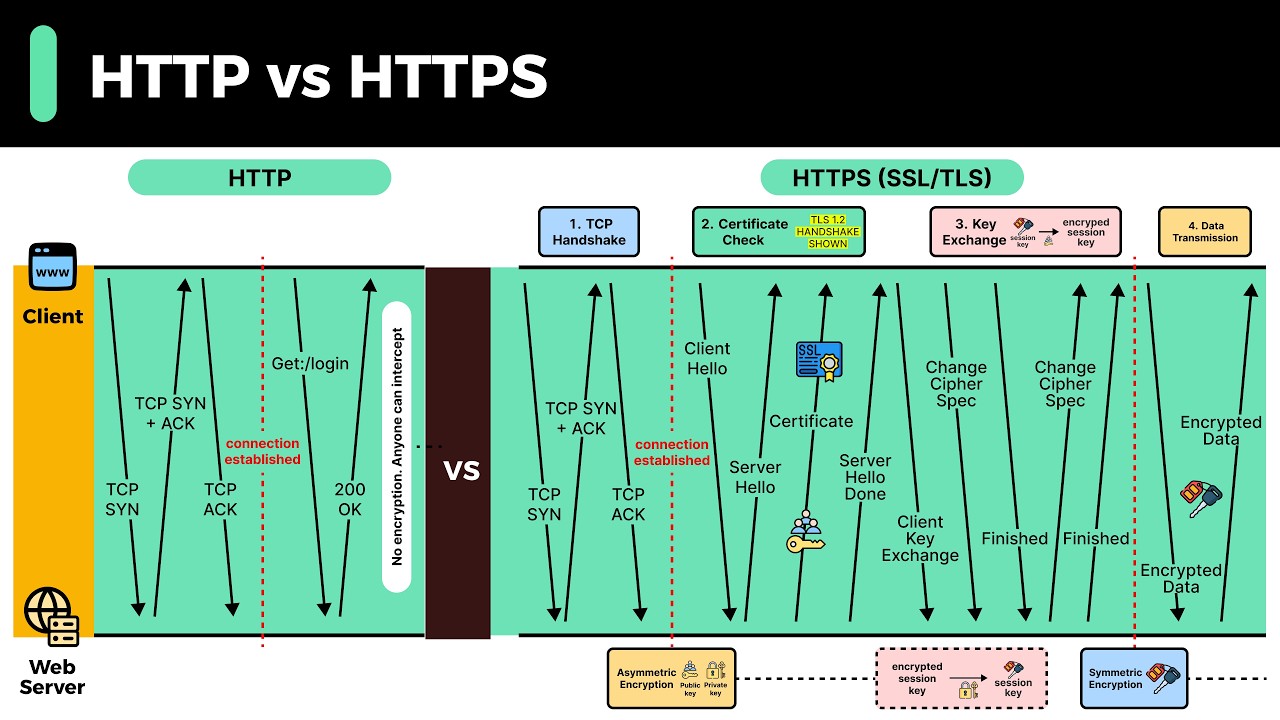
Diagram © ByteByteGo, reproduced from the companion article for personal study. Click to open at full resolution. The handshake shown is TLS 1.2; TLS 1.3 collapses it (see below).
The diagram puts HTTP and HTTPS side by side across four phases. HTTP stops after phase 1:
| Phase | Steps on the wire | What it accomplishes |
|---|---|---|
| 1. TCP handshake | TCP SYN → TCP SYN + ACK → TCP ACK; connection established |
A reliable, ordered byte stream exists |
| 2. Certificate check | Client Hello → Server Hello → Certificate → Server Hello Done |
Cipher suite agreed, server identity verified |
| 3. Key exchange | Client Key Exchange → Change Cipher Spec → Finished (both directions) |
Both sides derive the same symmetric session key |
| 4. Data transmission | GET /login → 200 OK, now encrypted |
Application data flows inside the tunnel |
Phase 1 — TCP Handshake (HTTP and HTTPS Both Do This)
SYN → SYN+ACK → ACK is the standard three-way handshake. It costs one round trip and establishes sequence numbers and a reliable stream before anything else happens. HTTP/1.1 and HTTP/2 over TCP pay it on every new connection; HTTP/3 (QUIC over UDP) folds the transport and TLS handshakes together instead.
An HTTP conversation adds nothing on top: the client sends GET /login and the server answers 200 OK in cleartext. Anyone with a vantage point on the path — shared Wi-Fi, a malicious exit node, an ISP with a logging box — can read both.
Phase 2 — Certificate Check (The TLS Handshake, Round 1)
Client Hello — the client proposes:
- the TLS versions it supports (e.g. 1.3, 1.2);
- an ordered list of cipher suites (e.g. TLS_AES_128_GCM_SHA256, TLS_ECDHE_RSA_WITH_AES_128_GCM_SHA256);
- a random nonce;
- SNI — the hostname it wants, so one IP can serve many certificates;
- in TLS 1.3, its key share is sent here, which is what removes a round trip.
Server Hello — the server picks one TLS version and one cipher suite from the client's list, and returns its own nonce.
Certificate — the server sends its X.509 chain. The client validates it before anything else happens:
- Chain of trust — leaf certificate → intermediate(s) → a root already in the OS/browser trust store, each signature verified.
- Hostname —
Subject Alternative Namemust match the host being contacted. - Validity window —
notBefore/notAfter. - Revocation — CRL or OCSP (in practice, OCSP stapling, where the server attaches a signed freshness proof so the client does not have to call the CA).
- Key usage / EKU and, increasingly, Certificate Transparency SCTs.
Any failure produces the browser's full-page warning. Server Hello Done closes this round.
[!TIP] This is the step that makes HTTPS resistant to the classic attack: without a valid certificate, an attacker who hijacks the traffic cannot impersonate the server, because it cannot produce a chain that terminates in a trusted root.
Phase 3 — Key Exchange (Where Asymmetric Crypto Is Used, Once)
The client generates the pre-master secret (or, with ECDHE, ephemeral key shares), encrypts it with the server's public key, and sends it as Client Key Exchange. The server decrypts it with the private key — the only party that can. Both sides then derive the same session key, and Change Cipher Spec + Finished in both directions confirm that everything since the handshake is encrypted and unmodified.
This is why the diagram illustrates the session key as encrypted with a public key, decrypted with the private key: asymmetric cryptography is used only to bootstrap a shared secret, never for the payload.
Why HTTPS Switches to Symmetric Encryption for the Data
ByteByteGo gives the two reasons worth memorising:
- Security. Public/private key encryption in the naive form is one-directional: if the server encrypts data with its private key, anyone holding the public key can decrypt it. Symmetric keys are known only to the two parties.
- Server resources. Asymmetric operations (modular exponentiation, elliptic-curve point multiplication) are orders of magnitude more expensive than AES. Delivering megabytes with them would melt the server.
AES-GCM runs at multiple GB/s per core on any CPU with AES-NI, which is why "HTTPS adds CPU cost" is mostly inaccurate today: the cost is the extra round trip, not the encryption.
Phase 4 — Data Transmission
With the session key in place, GET/response pairs, headers, cookies and bodies are all sent inside the tunnel, authenticated with a MAC or AEAD tag so tampering is detected. From the application's point of view this is ordinary HTTP.
HTTP vs HTTPS at a Glance
| Aspect | HTTP | HTTPS |
|---|---|---|
| Default port | 80 | 443 |
| Payload | Cleartext | Encrypted (TLS) |
| Integrity protection | None | AEAD / MAC |
| Server authentication | None | X.509 certificate + CA chain |
| Setup cost | 1 RTT (TCP) | TLS 1.2: TCP + 2 RTT; TLS 1.3: TCP + 1 RTT; 0-RTT on resumption |
| Browser treatment | "Not secure" warning; features gated (camera, geolocation, service workers, most APIs) | Required for modern web APIs |
| SEO / referrals | Penalised | Preferred; referrer sent cross-site |
| Typical deployment | Legacy internal services | Everything user-facing (Let's Encrypt made certificates free) |
What TLS 1.3 Changed
The diagram shows a TLS 1.2 handshake, which is still what most diagrams show. TLS 1.3 (RFC 8446) simplifies it:
- One round trip instead of two — the client guesses the key-exchange group and sends its key share in
Client Hello. - Handshake encryption after
Server Hello— the certificate is no longer visible to passive observers. - RSA key transport removed — forward secrecy is mandatory (ECDHE only). Stealing the server's private key later does not decrypt past sessions.
- Legacy algorithms dropped — no CBC-mode ciphers, no RC4, no SHA-1, no renegotiation; a shorter, safer cipher list (AEAD only).
- 0-RTT / early data on resumption — the client can send data in the first flight using a pre-shared key, at the cost of replay risk, so it must only be used for idempotent requests or with anti-replay protections.
- Encrypted Client Hello (ECH) extends SNI privacy, though deployment is still uneven.
Observing It Yourself
# Which protocol version and cipher does a server actually negotiate?
openssl s_client -connect example.com:443 -servername example.com -tls1_3 </dev/null 2>/dev/null \
  | grep -E "Protocol|Cipher|Server public key"

# What does curl see (certificate subject/issuer, ALPN = h2/h3)?
curl -vI https://example.com 2>&1 | grep -E "SSL connection|subject:|issuer:|ALPN"

# Certificate dates — the cheapest TLS expiry check in existence
echo | openssl s_client -connect example.com:443 -servername example.com 2>/dev/null \
  | openssl x509 -noout -subject -issuer -dates
# Where the handshake actually happens: capture and read it in Wireshark
# filter: tls.handshake.type == 1   (Client Hello)
sudo tcpdump -i any -n port 443 -w /tmp/tls.pcap
In the browser, DevTools → Security shows the protocol version, cipher suite and certificate chain for the current page; DevTools → Network → Protocol column shows h2/h3 when HTTP/2 or HTTP/3 is in use.
Interview Angle: The Questions That Follow
- "Why not use asymmetric encryption for everything?" Cost — both the CPU overhead and the one-directional problem ByteByteGo calls out. Symmetric + key exchange is the hybrid answer.
- "How does the client know the public key is genuine?" It does not inherently — that is what the CA chain and certificate validation are for. Without a trusted root the whole thing collapses (hence certificate pinning in mobile apps, and hence "install our root certificate" being the classic corporate-MITM move).
- "What is forward secrecy?" Ephemeral ECDHE keys per session: a later private-key compromise cannot retroactively decrypt recorded traffic. TLS 1.3 makes it non-optional.
- "Does HTTPS slow things down?" One extra RTT on a full handshake, ~zero for the symmetric payload on modern CPUs; session resumption and 1.3/0-RTT reduce or eliminate the handshake on repeat visits. The latency cost of HTTP/3 is mostly about avoiding TCP head-of-line blocking.
- "What about HTTP/2 and HTTP/3?" Both effectively require TLS in browsers (ALPN negotiates
h2/h3), so "HTTPS" is a prerequisite, not an alternative. - "How do you migrate a site to HTTPS safely?" Redirect 80 → 443 with 301, then HSTS (
max-age,includeSubDomains, eventuallypreload); serve every asset over HTTPS to avoid mixed content; point ACME/Let's Encrypt renewal at the site and monitor expiry.
Hardening Checklist
# Minimal nginx TLS config: modern protocols, HSTS, redirect from plaintext
server {
    listen 80;
    server_name example.com;
    return 301 https://$host$request_uri;          # permanent redirect to HTTPS
}

server {
    listen 443 ssl;
    http2 on;
    server_name example.com;

    ssl_certificate     /etc/letsencrypt/live/example.com/fullchain.pem;
    ssl_certificate_key /etc/letsencrypt/live/example.com/privkey.pem;

    ssl_protocols       TLSv1.2 TLSv1.3;           # TLS 1.0/1.1 are deprecated
    ssl_prefer_server_ciphers off;                 # let the client pick (1.3 style)
    ssl_session_cache   shared:SSL:10m;            # resume instead of re-handshaking
    ssl_session_timeout 1d;
    ssl_stapling on;                               # OCSP stapling
    ssl_stapling_verify on;

    add_header Strict-Transport-Security "max-age=31536000; includeSubDomains" always;
}
- Keep certificates renewed automatically (
certbot renew, systemd timer) and alert on expiry — an expired certificate is a hard outage, not a warning. - Mark cookies
Secure; HttpOnly; SameSite=.... - Terminate TLS in one place (load balancer/ingress) and re-encrypt or use a trusted network internally; "TLS everywhere, including east-west" is now the common stance.
- Watch for mixed content after a migration: one
http://image resets the padlock.
References
- ByteByteGo — How does HTTPS work? (Episode 6): https://blog.bytebytego.com/p/how-does-https-work-episode-6
- ByteByteGo Guide — How does HTTPS work?: https://bytebytego.com/guides/how-does-https-work/
- TLS 1.3 — RFC 8446: https://datatracker.ietf.org/doc/html/rfc8446
- TLS 1.2 — RFC 5246: https://datatracker.ietf.org/doc/html/rfc5246
- OWASP Transport Layer Security Cheat Sheet: https://cheatsheetseries.owasp.org/cheatsheets/Transport_Layer_Security_Cheat_Sheet.html