43 — Securing a Small Business
Level: Intermediate · Time: ~25 min · Prerequisites: Lesson 42 — Securing a Home Lab
Why this matters
A small business has none of the things the rest of this course quietly assumed. There is no security team, usually no dedicated administrator, and often one person who does the accounts, the payroll and the IT as well. Budgets are tight, and sometimes the only person with real access is an outsourced provider who holds the keys and is not accountable to you for much beyond a monthly invoice. The regulatory obligations, on the other hand, do not scale down: personal data is personal data whether the business has six staff or six thousand. The uncomfortable part is that all the well-known ways small businesses lose money are unglamorous and largely preventable — a phished mailbox, a changed bank detail, an account left active after someone left. This lesson is an ordered plan for the person who has to do it in the time they have.
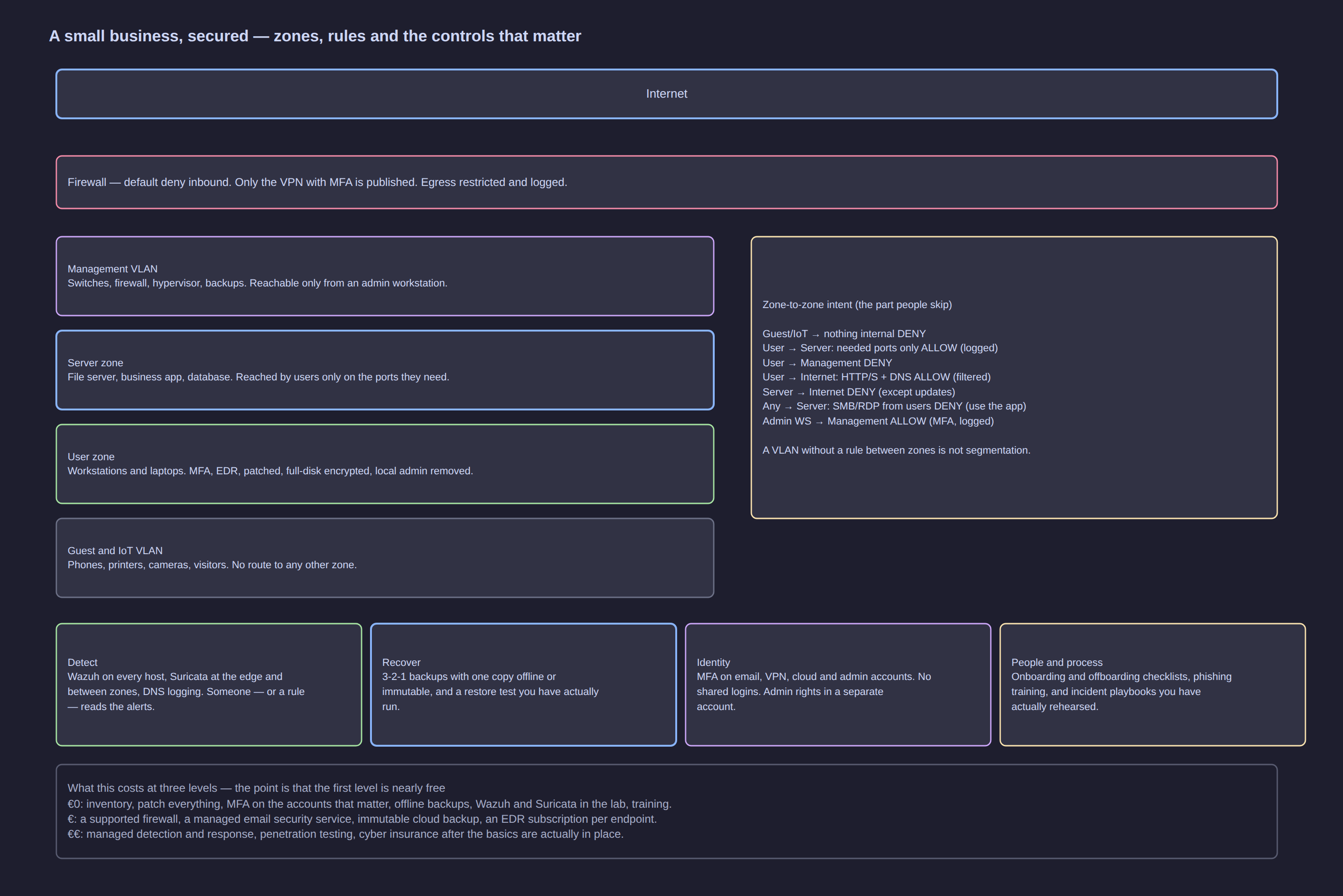
Click the diagram to open it full size.
The mental model: three facts that shape everything
| The fact | What follows from it |
|---|---|
| Email is the main way in | protecting the mail account and the identity behind it buys more than any network device. Mail is also the reset route for everything else |
| The owner or the finance person is the highest-value target | the attack is not aimed at the network, it is aimed at the person who can approve a payment or reset a password. Design controls around that role, not around the perimeter |
| Downtime is what actually hurts | there is no spare capacity and no second team. A day of lost systems is a week of lost revenue and goodwill, which is why backup and incident response outrank sophisticated tooling |
A fourth, quieter fact: the person reading this is probably also the person who will be handling the incident. Every control below is chosen because one person can run it while doing four other jobs, and because it keeps working when nobody is watching.
The first thirty days
In order. Each step is executable by a non-specialist, and each one survives being interrupted by the rest of the day.
- Write down the inventory. What you have (computers, phones, servers, the firewall, the router, any internet-facing service), who owns each item, where the data actually lives (mail, cloud storage, the accounts package, the CRM), and who holds administrator access to each. The list does not need to be complete to be useful; it needs to exist and get better every month.
- Turn on automatic patching everywhere it can be turned on — operating systems, browsers, the firewall and anything with a subscription behind it. Where automatic updates are not possible, diarise a monthly patching window, because patching is the one control that keeps working with no attention.
- Put a second factor on the accounts that matter: email accounts first, then the VPN, the cloud console, the bank, and every administrator account including the firewall and the domain or identity provider. Use an application or a hardware key rather than text messages where you can, and expect the mail account to be the one an attacker wants most because everything resets through it.
- Remove local administrator rights from everyday accounts, and create separate admin accounts. Staff who browse email as a local administrator run every attachment at the highest privilege available. Keep one named administrative account per person, used only for administrative work.
- Configure backups and immediately perform one restore test. Confirm the backups run, are encrypted, cover what the business actually needs, and that at least one copy cannot be reached or deleted from the systems being backed up. Then restore something real to a clean machine and open it.
- Disable or delete accounts and services nobody uses — the mailbox of someone who left two years ago, the former bookkeeper's cloud login, the demo account on the firewall, the vendor's spare access. Unused accounts are invisible and always reachable.
- Switch on whatever logging already exists and ship it somewhere other than the machine it comes from: the firewall's deny log, the mail provider's audit log, and sign-in logs for your cloud accounts, retained long enough to answer a question asked weeks later. This is Lesson 22 — Logging and Monitoring Foundations in practice, and it is the input to the detection work in Lesson 44.
- Write down who to call and in what order, including outside business hours, for the four situations that will actually happen: a suspicious email campaign, a lost device, system downtime, and suspected intrusion.
The control set in three tiers
Cost bands are deliberately bands, not prices — check current pricing when you buy, and remember that almost everything in the first two tiers is an afternoon of someone's time rather than a purchase order.
Tier 1 — free
| Control | What it stops | Cost band | Effort |
|---|---|---|---|
| Written inventory, with owners | everything, because you cannot protect an estate you cannot list | free | hours, then minutes a month |
| Automatic patching | exploitation of known flaws, which is the majority of successful attacks | free | hours, then nothing |
| Second factors on mail, VPN, cloud, bank, admin accounts | credential theft, password reuse and credential stuffing | free to low cost | hours, plus support requests |
| Local administrator rights removed, separate admin accounts | malware and phished users gaining the ability to install and change anything | free | hours |
| Backups, with one restore test | ransomware and hardware failure, which are the same incident to the business | free to low cost | hours |
| Unused accounts and services removed | the unattended account nobody is watching | free | hours |
| Existing logging switched on and shipped off-host | the questions you will ask after an incident | free | hours |
Tier 2 — low cost, and the sensible default for most
| Control | What it stops | Cost band | Effort |
|---|---|---|---|
| A supported firewall with current firmware and a sensible default-deny policy | exposure of services to the internet, and unlogged traffic paths | low cost | days to configure, then minutes a month |
| Email authentication: sender policy framework, domain keys, and domain-based message authentication with a policy that enforces | spoofed mail claiming to be your domain | free to low cost | hours, then monitoring |
| A filtering name resolver for the whole office | malware reaching known-malicious infrastructure, and some advertising-borne links | low cost | hours |
| Endpoint protection with behavioural detection | commodity malware and fileless attacks, and gives you a detection to act on | low cost to modest | days |
| Immutable or off-site backup, separate from the accounts it protects | ransomware that deletes the backups first | low cost | hours plus storage |
| A password manager for the team, with a shared-credential policy | password reuse and the shared login in a spreadsheet | low cost | hours plus support |
| Full-disk encryption on every laptop and phone | the stolen device that walks out of the building with the data | free where the operating system includes it | hours |
| A guest and internet-of-things network, separate from the business network | the cheap device that turns into a foothold | free to low cost | hours |
| Second factors for all staff, not just administrators | one phished password becoming an intrusion | free to low cost | days, including the conversations |
| A short, repeated awareness programme | nothing on its own, but it raises the rate at which staff report instead of clicking | low cost | hours a quarter |
Tier 3 — the tier you grow into
| Control | What it stops | Cost band | Effort |
|---|---|---|---|
| Centralised logging and monitoring, with alerts somebody reads | the quiet intrusion that currently runs for months | modest to significant, and ongoing | days to deploy, ongoing to run |
| An incident response retainer with an established provider | your first bad week being handled by strangers you have never spoken to | modest, annual | hours to arrange |
| A penetration test, scoped and external | the exposed thing nobody noticed | significant | days, plus remediation |
| Vendor access control: named accounts, least privilege, just-in-time access, and evidence it was used | the supply-chain path in, which bypasses everything else you built | low cost to modest | days, plus contract work |
| Cyber insurance | the financial tail of an incident, and a broker who asks you the right questions | modest, annual | days, plus questionnaires |
[!IMPORTANT] The tiers are ordered on purpose. Skipping the free tier to buy the third one makes the organisation worse, not better: a rented monitoring platform on an unpatched estate with no second factors produces alerts nobody can act on and a comforting dashboard that answers nothing. Every tier above assumes the one below is done, and the cheapest controls remove the largest share of realistic risk.
What is specific to a small business
The provider who holds the keys
Your outsourced IT provider can access your systems, and it also accesses hundreds of others with the same tooling and often the same credentials. That makes the provider a high-value target, and attackers have repeatedly gone after the provider in order to reach all of its customers at once. You cannot audit their estate, but you can ask four questions and act on the answers.
| Question | What a good answer sounds like |
|---|---|
| What access do you hold to our systems, and how is it protected? | named accounts per engineer with a second factor, not a single shared administrator login |
| Can you show us when that access was used? | they can provide access records, or you can require their access to come through a gateway you log |
| What happens to your access when the contract ends, or when an engineer leaves? | credentials rotated, accounts removed, and confirmation given to you in writing |
| Who is responsible for patching, backup and monitoring, item by item? | a written split of responsibilities, so nothing is assumed to be someone else's job |
Protecting the payment process
The most common way a small business loses money is not a technical exploit; it is a believable message that changes where a payment goes. The control is a rule, not a tool.
- Any change of bank details is confirmed by a callback to a number you already had on file — never to a number supplied in the message, never by reply to the email. Supplier email accounts get compromised precisely so that this request looks legitimate.
- Payments above a threshold need two people. Pick the threshold at the level where loss would hurt, and keep it in the finance procedure.
- Keep the verified contact list out of the systems an attacker is likely to reach. If the only copy of the supplier's phone number lives in the same mailbox that was just compromised, the callback is theatre.
- Treat a change of supplier contact details as seriously as a change of bank details. Attacks commonly begin by introducing a new contact, then making the change later.
- Watch what an attacker leaves behind in mailboxes — rules that forward or hide replies, delegations, and newly authorised applications — because the mailbox rule is often the step that keeps the fraud working.
The same logic applies upwards: a message that appears to come from the owner asking for an urgent payment is answered by the rule above, not by judgement exercised under pressure.
People arriving and leaving
An account left active after someone leaves is a direct route in, and small teams are worse at this than large ones. Two short checklists, kept in the same place as the finance procedure, remove most of the risk.
| Joiner | Leaver |
|---|---|
| a named account per person, never a shared login | disable the account the same day, and remove it after the handover |
| second factor enrolled on day one, before there is a hurry | revoke active sessions and application tokens, because disabling an account does not always end a session |
| rights by role, requested rather than granted by default | remove from groups, distribution lists and shared drives |
| equipment recorded against the person | recover and wipe devices, including phones and any personal device you allowed onto mail |
| administrative rights only where the role needs them | change shared team credentials the leaver knew — wireless, the shared mailbox alarm codes for systems nobody owns, the door entry |
| the person told who to report a mistake to | forward any mail, check for mailbox rules and delegations, and review the cloud applications they authorised |
When a week of downtime matters more than any tool
Ask the question out loud and write down the answer: how long can the business be unable to trade before a customer is lost, a contract breached, or wages missed? If that number is measured in days, then backup quality and incident response readiness matter more than any tool you could buy this quarter. It also tells you which systems are genuinely critical — usually fewer than the inventory suggests — and those are the ones the restore test in the first thirty days should cover.
Policies, compliance and budget bands
The one-page policies
Policies exist so that decisions have already been made, and so that when something goes wrong there is a written answer to "what were we supposed to do". One page each, dated, with a named owner, and reviewed once a year. A short policy that is followed beats a long one that is not.
| Policy | What it must contain in one page |
|---|---|
| Acceptable use | what work devices may be used for, and what must never be put on them |
| Passwords and second factors | a manager, minimum length, and which accounts require a second factor |
| Incident response and contacts | what counts as an incident, who to tell, and the out-of-hours numbers |
| Backup and restore | what is backed up, how often, where the copies live, and when a restore was last tested |
| Remote access | who may connect, from what, with which second factor, and through which method |
| Joining and leaving | the two checklists above, with the person responsible named |
| Vendor access | what access providers get, how it is audited, and how it ends |
| Data classification | three levels is enough — public, internal, restricted — and one line about handling each |
Compliance in the practical sense
If you handle personal data of people in the European Union, the general shape of the obligation is consistent, whatever the detailed rules turn out to be in your situation: know what personal data you hold and why you hold it, and be able to say so; protect it in proportion to the harm its loss would cause; limit who can see it and how long you keep it; and if it is breached in a way that risks people's rights, report it to the supervisory authority within a stated deadline, which under the data protection regulation is 72 hours from becoming aware, and tell the affected people when the risk to them is high. Sector regulators, contractual commitments to customers, and insurers' questionnaires add their own questions on top. This paragraph describes obligations rather than advising you on them — it is not legal advice, and your specific position is worth a conversation with your adviser or your supervisory authority.
Two operational consequences are worth stating, because they are the ones that land on a small team. First, you cannot report what you cannot see: the inventory, the logging and the detection work are compliance controls as much as security ones. Second, the paperwork follows the incident, so the incident-response notes, the case records and the restore tests you keep are the evidence that you did what the policy said.
The three budget bands
| Band | What to do |
|---|---|
| No budget at all | run the whole free tier, one item a week, and document it. This is the majority of the risk reduction, and the constraint is attention rather than money |
| A small monthly budget | keep the free tier running, then add the second tier in this order: off-site or immutable backup, a filtering resolver, endpoint protection with behavioural detection, a team password manager, email authentication in enforcement mode |
| A funded security line | everything above, plus centralised logging and monitoring, an incident response retainer, a scoped penetration test, vendor access control and insurance. Check current pricing — most of this is a subscription — and do not buy any of it while the free tier is undone |
Knowing it is working: metrics, the quarterly hour, and the action plan
The small set of metrics from Lesson 40 is enough, reviewed as a trend rather than a snapshot: how many assets are patched within your window, what proportion of accounts have a second factor, whether a restore has been tested this quarter, how many unused accounts were removed, and how many unknown devices appeared on the network. Five numbers, going the right way, are a better report than a dashboard nobody opens.
The quarterly hour, with the person who pays the bills in the room: the metrics against last quarter; the open items on the action plan; what broke or nearly broke since we last met, and what it taught us; and the single priority for the next quarter, with a name and a date against it. One priority, not seven, because the seventh never happens.
The one-page action plan is the artefact that turns this lesson into work.
| What | Who | By when | How we will know |
|---|---|---|---|
| Second factor on every mailbox | office manager | end of this month | sign-in report shows no account without it |
| Remove the six unused accounts | me | this week | account list shows no login in 90 days |
| Restore test of the file server data | provider | in three weeks | files open on a clean machine, and the date is written down |
| Payment verification rule written, and briefed to finance | owner | next week | finance can recite the callback rule |
| Firewall firmware updated and default rules reviewed | provider | end of the quarter | firmware version recorded, rule list attached to the review |
Attack it / Defend it
| The attack | How it works | The control that stops it |
|---|---|---|
| Phishing the owner or finance person | a believable message aimed at the one person who can approve or reset | second factors, attachment and link filtering, the payment rule, and a short awareness programme |
| Invoice fraud with changed bank details | a compromised or spoofed supplier mailbox changes where a payment goes | callback to a previously known number, two-person approval above a threshold |
| Password reuse from another breach | a leaked password opens the mail or cloud account | unique passwords with a manager, and a second factor everywhere |
| A malicious document | an office attachment executes code on a workstation | blocking macros from the internet, endpoint protection with behavioural detection, and no local administrator rights |
| An unpatched internet-facing service | a known flaw in the firewall, VPN or website is exploited | inventory, automatic patching, and a review of what is reachable from the internet |
| The provider is compromised | attackers use one provider's access to reach many customers at once | named accounts with a second factor, least privilege, access logs you can see, and offboarding at contract end |
| A leaver's account still works | an active account nobody watches is a route in | joining and leaving checklists, same-day disable, session and token revocation |
| Ransomware against data and backups | encrypts the file server, then the backups it can reach | immutable or off-site backup, segmentation, and a restore that was actually tested |
| A shared local administrator password | one stolen credential works on every machine | local administrator rights removed, unique per-machine administrative passwords (Windows LAPS) |
| A stolen laptop | the disk is read directly, no exploit required | full-disk encryption, with the recovery key escrowed somewhere you can still reach |
Key takeaways
- Email is the way in, and the owner or finance person is the target. Controls designed around that role beat anything aimed at the perimeter.
- The first thirty days beat the next thirty thousand pounds. Inventory, patching, second factors, administrative rights, a tested backup and unused-account removal cover most realistic loss.
- The tiers are ordered, and buying the third one before the first makes things worse. Sophisticated tooling on an unpatched, MFA-less estate produces alerts nobody can act on.
- Invoice fraud is a process control, not a technology problem. A callback to a known number and two people above a threshold are the whole defence.
- If the business cannot run for a week, backup and incident response outrank every tool. Ask the downtime question and write the answer down.
Check yourself
- Your provider holds a single shared administrator account with remote access. What three specific things do you ask for, and what do you do if the answer is no?
- A supplier emails with new bank details and a plausible story. State the rule that applies, including where the confirming phone number comes from.
- The budget allows one purchase this year: a penetration test or off-site immutable backup, with patching still manual. Which, and why?
- Someone leaves on Friday. Name five things that must happen to their access, beyond disabling the account.
- What does the 72-hour figure refer to, and why does it make logging a compliance control?