React — The Complete Guide, Illustrated with a Small ERP
Last reviewed: 2026-09-18
Purpose: Every React concept you need, in the order you need it — taught from a single running example (a small ERP) so a newcomer can follow one application from first render to production patterns, and an experienced developer can use the reference tables as a cheat sheet.
Contents
- How to Use This Article
- Overview
- The Example Application
- Setup
- The Mental Model
- JSX
- Components and Composition
- Props
- Events
- State
- Forms
- Derived State and Lifting State Up
- Effects
- Refs
- Context
- Reducers
- Custom Hooks
- Rendering, Reconciliation and Keys
- Memoisation and Performance
- Data Fetching and Server State
- Routing
- Error Handling
- Styling
- TypeScript with React
- Testing
- Project Structure
- Anti-Patterns
- Cheat Sheet
- Further Reading
How to Use This Article
Two reading paths, one article:
- New to React — read top to bottom. Every concept is introduced with the same ERP application, and each section ends by pointing at the code you would write next.
- Experienced — jump to Cheat Sheet for the reference tables, then use the concept sections as the explanation behind each row. The diagrams double as a mental-model refresh.
Editable diagrams. All illustrations are draw.io files. The .drawio sources sit next to this article in the KB folder, and a copy you can edit is in Drive: React — ERP Diagrams (KB).
Overview
React is a JavaScript library for building user interfaces. It is not a framework, not a full-stack toolkit, and not a state manager — it does one job: it turns your data into DOM, efficiently, and re-does it whenever the data changes.
Everything in React follows from one idea:
UI = f(state) — the screen is a function of your data. You describe what the UI should look like for the current state, and React works out how to get the DOM there.
That is a declarative model. In the imperative model you would find the table cell, read its current text, compare it to the new value, and write the difference. In React you write what the row looks like when the value is 12, and you stop worrying about how the DOM changes — React diffs the before/after descriptions and applies the minimum set of mutations for you.
Three consequences worth internalising early, because almost every React bug is a violation of one of them:
- Rendering must be pure. A component is a function; given the same props and state it must return the same output and must not modify anything outside itself while rendering.
- State is immutable. You never edit an object in state. You create a new one and hand it to the setter, because React compares by reference to decide what changed.
- Data flows one way. Props go down, changes come back up as callbacks. Nothing reaches into a child to change it.
Why it is still the default
| Strength | What it means in practice |
|---|---|
| Composable components | A DataTable used in five ERP screens is written once and configured with props |
| Huge ecosystem | Routing, data fetching, forms, tables, testing and component libraries all exist and interoperate |
| Transferable mental model | The same thinking applies in React Native, in Next.js, and in any team's codebase |
| Hiring and documentation | It is the most documented UI library in existence; almost every question has an official answer |
| Escape hatches | When the abstraction is in your way you can drop to a ref and touch the DOM directly |
What this article covers
The full surface: JSX, components, props, state, events, effects, refs, context, reducers, custom hooks, rendering and reconciliation, memoisation, data fetching, routing, error handling, styling, TypeScript, testing, and project structure — plus an anti-patterns list and a cheat sheet.
The Example Application
One example threads through the whole guide: a small ERP — the back-office application a distribution business runs on. It is deliberately unglamorous, because ERP screens exercise every React concept you will ever need:
| Module | Screen | Concepts it forces you to use |
|---|---|---|
| Customers | searchable, paginated list + detail | server state, URL filters, debounced input, tables, memoisation |
| Products | catalogue with inline editing | controlled inputs, validation, optimistic updates |
| Sales orders | order with dynamic line items | useReducer for complex state, derived totals, list keys |
| Invoices | generation + status | mutations, cache invalidation, error handling |
| Dashboard | KPIs and charts | derived data, layout composition, lazy loading |
The domain in code
export interface Customer {
  id: string;
  name: string;
  email: string;
  country: string;
  createdAt: string;          // ISO date
}

export interface Product {
  id: string;
  sku: string;
  name: string;
  unitPrice: number;          // in cents — never floats for money
  stock: number;
  active: boolean;
}

export interface OrderLine {
  id: string;
  productId: string;
  quantity: number;
  unitPrice: number;          // price at the time of the order
}

export type OrderStatus = 'draft' | 'confirmed' | 'invoiced' | 'cancelled';

export interface SalesOrder {
  id: string;
  number: string;             // e.g. SO-2026-0142
  customerId: string;
  lines: OrderLine[];
  status: OrderStatus;
  placedAt: string | null;
}
The REST API it talks to
GET    /api/v1/customers?search=&page=&ordering=     → { results: Customer[], count }
GET    /api/v1/customers/:id
POST   /api/v1/customers
PATCH  /api/v1/customers/:id
GET    /api/v1/products?search=&page=
GET    /api/v1/orders?status=&page=
POST   /api/v1/orders
POST   /api/v1/orders/:id/confirm
GET    /api/v1/whoami                                 → { id, name, permissions[] }
Where each layer lives
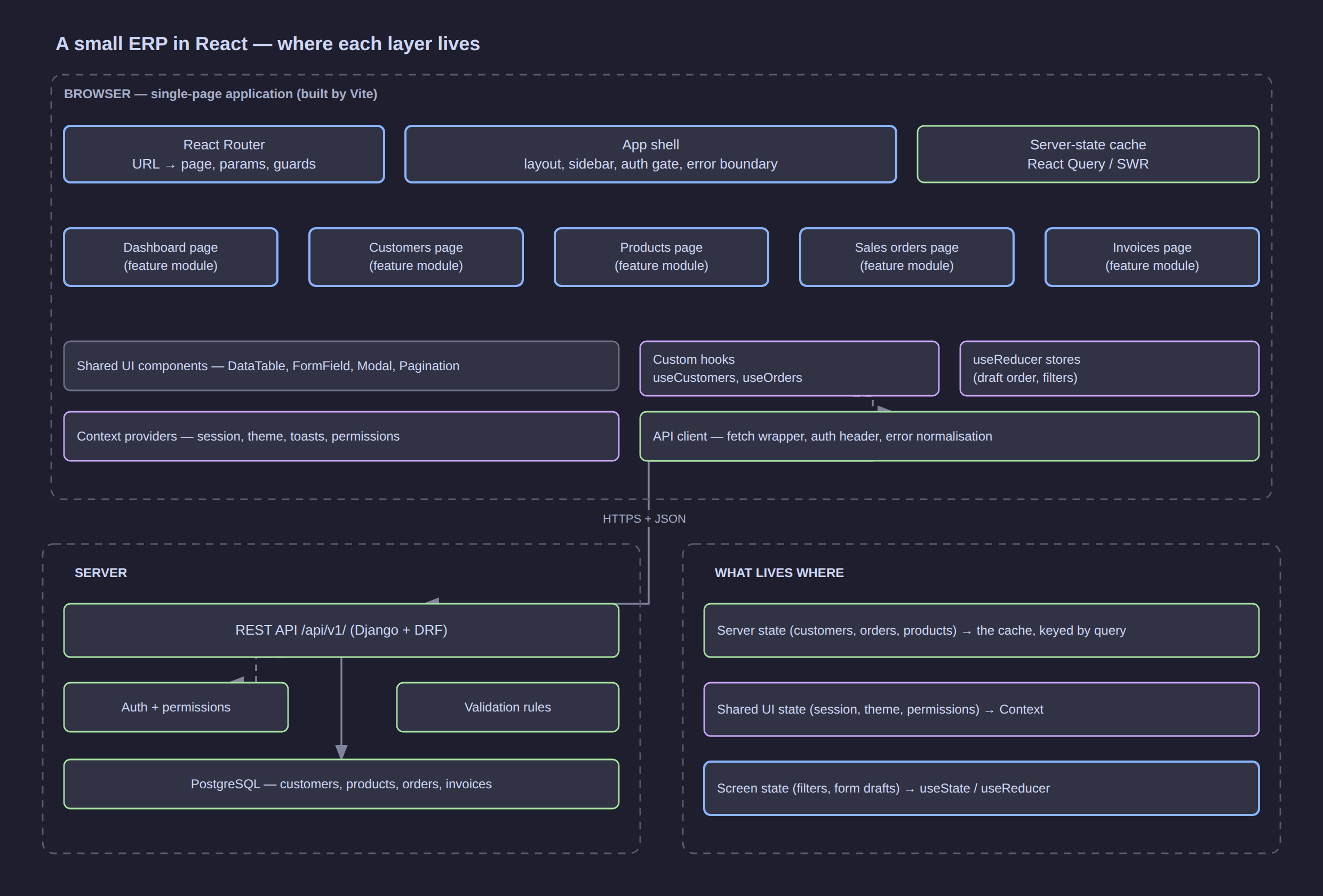
Click the diagram to open it at full resolution.
The diagram is the map for the rest of this article. Every section adds detail to one of its boxes — and the diagram exists to make one point visible: the browser holds three different kinds of state, and confusing them is the single most common source of React architecture pain.
| Kind of state | Example in the ERP | Where it belongs |
|---|---|---|
| Server state | the customer list, an order's lines | a query cache, keyed by query — not useState |
| Shared UI state | session, permissions, theme, toasts | Context |
| Screen state | the current filter, an unsaved draft order | useState / useReducer in the screen |
Setup
The standard starting point is Vite, which gives you a dev server with hot module replacement and a production build with almost no configuration.
npm create vite@latest erp-web -- --template react-ts
cd erp-web
npm install
npm run dev        # http://localhost:5173
The files that matter:
erp-web/
├── index.html            # the single HTML page; contains <div id="root">
├── package.json
├── vite.config.ts
└── src/
    ├── main.tsx          # entry point: mounts React into #root
    ├── App.tsx           # the root component
    └── index.css
// src/main.tsx
import { StrictMode } from 'react';
import { createRoot } from 'react-dom/client';
import App from './App';
import './index.css';

createRoot(document.getElementById('root')!).render(
  <StrictMode>
    <App />
  </StrictMode>,
);
What is happening: createRoot takes a real DOM node and hands React ownership of it. From then on you never touch that subtree with document.querySelector — React owns it. .render(<App />) describes what should be in it.
StrictMode
<StrictMode> is a development-only wrapper that deliberately double-invokes render functions and effects. It is not a bug; it is a test for the purity rule. If double-invoking breaks your component — a fetch firing twice, a counter incrementing twice, a mutation applied twice — you have found a real impurity that would otherwise show up as a heisenbug in production.
React DevTools
Install the React Developer Tools browser extension. Two panels carry most of the weight:
- Components — inspect the live component tree, see each component's props, state and hooks, and edit them to reproduce a bug.
- Profiler — record an interaction and see exactly which components re-rendered and how long each took. This is the tool that tells you whether optimisation is needed — and which component deserves it.
What the build actually does
A bundler (Vite uses esbuild for dev, Rollup for production) transforms your JSX into plain function calls:
becomes, conceptually:
JSX is syntax sugar for function calls that produce plain JavaScript objects called elements. No template engine, no runtime parsing of strings, no magic — this single fact explains why JSX is as flexible as it is.
The Mental Model
Elements are not components
| Term | What it is | Example |
|---|---|---|
| Element | a plain object describing what you want on screen | { type: 'h1', props: { children: 'Orders' } } |
| Component | a function that returns elements | function OrdersPage() { … } |
| Instance / fiber | React's internal record of a mounted component | not something you handle directly |
| DOM node | the real browser object | not something you handle directly (except via refs) |
An element is cheap and disposable — it is a description, not the thing itself. React builds a tree of these descriptions, compares it with the previous tree, and only then touches the DOM. That gap between "describe" and "apply" is where all of React's power (and all of its performance characteristics) live.
Declarative, concretely
Here is the same ERP requirement written both ways — update the stock cell when a product's stock changes.
Imperative — you manage the transitions:
function updateStockCell(rowId, newStock) {
  const cell = document.querySelector(`#row-${rowId} .stock`);
  if (newStock === 0) {
    cell.textContent = 'Out of stock';
    cell.classList.add('danger');
  } else {
    cell.textContent = String(newStock);
    cell.classList.remove('danger');
  }
}
You must remember every case, and keep it in sync forever. Add a "low stock" warning and you edit this function again.
Declarative — you describe the outcome for each state:
function StockCell({ stock }: { stock: number }) {
  if (stock === 0) return <span className="danger">Out of stock</span>;
  if (stock < 10) return <span className="warn">{stock} — low</span>;
  return <span>{stock}</span>;
}
No transition logic exists. Whatever the stock is, the component's output follows. New rules are new conditions, not new state transitions.
Render is a snapshot
A render pass is a photograph of your state at one moment. This explains the most confusing beginner behaviour in React:
function Counter() {
  const [count, setCount] = useState(0);

  function handleClick() {
    setCount(count + 1);
    setCount(count + 1);      // still 1, not 2
    console.log(count);       // still the old value
  }

  return <button onClick={handleClick}>{count}</button>;
}
count is a const captured by this render. Calling setCount twice with the same computed value schedules the same update twice. To build on the previous value you pass an updater function:
Every value in a component body — props, state, local variables, the functions you define — belongs to one specific render and never changes afterwards.
Rendering is not the same as painting
React re-rendering a component (console.log fires in its body) does not mean the browser repainted. React compares the new output with the previous output and only mutates the DOM where they differ. "It re-rendered" and "the DOM changed" are different claims.
JSX
JSX is the syntax that lets you write element trees that look like HTML inside JavaScript.
Embedding expressions
Anything in curly braces is a JavaScript expression:
function OrderSummary({ order, customer }: { order: SalesOrder; customer: Customer }) {
  const total = order.lines.reduce((sum, l) => sum + l.quantity * l.unitPrice, 0);

  return (
    <section>
      <h2>{order.number}</h2>
      <p>
        {customer.name} — {order.lines.length} line{order.lines.length === 1 ? '' : 's'}
      </p>
      <p>Total: {(total / 100).toFixed(2)} €</p>
      <p>Status: {order.status.toUpperCase()}</p>
    </section>
  );
}
Expressions only. {if (x) {…}} is invalid — use a ternary or &&. Statements belong before the return.
Attributes
Attributes are camelCase and take expressions:
<button
  type="button"
  className="btn btn-primary"      // class → className
  disabled={saving}                // boolean attribute
  onClick={handleSave}             // a function reference, NOT a call
  aria-busy={saving}
  data-order-id={order.id}         // data-* and aria-* keep their dashes
>
  Save order
</button>
<label htmlFor="qty">Quantity</label>          {/* for → htmlFor */}
<input id="qty" style={{ width: 80, textAlign: 'right' }} />
style takes a camelCase object (textAlign, not text-align), and is best reserved for dynamic values — static styling belongs in CSS or a class library.
Children, fragments and conditional rendering
function Panel({ title, children }: { title: string; children: React.ReactNode }) {
  return (
    <div className="panel">
      <div className="panel-header">{title}</div>
      <div className="panel-body">{children}</div>
    </div>
  );
}
A component must return a single root, so wrap several siblings in a fragment. <>…</> is a fragment that adds no DOM node (use <Fragment key={…}> when it needs a key).
function Billing({ customer }: { customer: Customer }) {
  return (
    <>
      <AddressBlock customer={customer} />
      <PaymentTerms customer={customer} />
    </>
  );
}
Conditional rendering is just expressions:
{/* if — the commonest form */}
{loading && <Spinner />}

{/* if / else */}
{invoices.length > 0 ? <InvoiceTable invoices={invoices} /> : <EmptyState label="No invoices yet" />}

{/* assign to a variable when the branches grow */}
let body: React.ReactNode;
if (loading) body = <Spinner />;
else if (error) body = <ErrorBox error={error} />;
else body = <OrderList orders={orders} />;
[!WARNING]
{count && <Badge />}renders a literal0whencountis0, because0is falsy but still a value React will render. Write{count > 0 && <Badge />}.
Lists and keys
function OrderTable({ orders }: { orders: SalesOrder[] }) {
  return (
    <table>
      <tbody>
        {orders.map((order) => (
          <tr key={order.id}>
            <td>{order.number}</td>
            <td>{order.status}</td>
          </tr>
        ))}
      </tbody>
    </table>
  );
}
key is React's way of knowing which row is which between renders. It must be stable and unique among siblings — a database id is ideal. Using the array index looks harmless and is a real bug as soon as the list can be reordered, filtered or inserted into: React reuses the wrong DOM node, and input values, focus and internal state jump to the wrong row. More in Rendering, Reconciliation and Keys.
JSX is not HTML
| HTML | JSX | Why |
|---|---|---|
class="btn" |
className="btn" |
class is a reserved word in JS |
for="qty" |
htmlFor="qty" |
same |
style="width:80px" |
style={{ width: 80 }} |
an object, not a string |
onclick="fn()" |
onClick={fn} |
a function, not a string of code |
<br> <img> <input> |
<br /> <img /> <input /> |
JSX is XML-like; every tag must close |
<!-- comment --> |
{/* comment */} |
HTML comments are not JS |
Because JSX compiles to function calls and React escapes text content, injection is not a concern: {userInput} can never become markup. The escape hatch is dangerouslySetInnerHTML, and its name is the warning.
Components and Composition
A component is a function whose name starts with a capital letter and which returns elements (or null).
export function CustomerBadge({ customer }: { customer: Customer }) {
  return <span className="badge">{customer.name}</span>;
}
The capital letter is not style — it is how the compiler distinguishes your component (<CustomerBadge />) from a DOM tag (<span />). function customerBadge() rendered as <customerBadge /> would be emitted as an unknown HTML element.
Composition over inheritance
React has no component inheritance, and you will not miss it. Everything is composition — a component renders other components, and the parent decides what goes inside via children or named props.
// A layout that does not know what it wraps
function Card({ title, actions, children }: {
  title: string;
  actions?: React.ReactNode;
  children: React.ReactNode;
}) {
  return (
    <div className="card">
      <header>
        <h3>{title}</h3>
        <div className="actions">{actions}</div>
      </header>
      <div className="card-body">{children}</div>
    </div>
  );
}

// Two very different uses of the same component
<Card title="Recent orders" actions={<Link to="/orders">All orders →</Link>}>
  <OrderTable orders={recent} />
</Card>

<Card title="Stock alerts">
  <StockAlertList products={lowStock} />
</Card>
Passing elements as props (rather than data) is the main lever for keeping components generic: actions={<Button/>} lets the parent decide presentation while the child owns layout.
Specialisation by configuration
function Button({ variant = 'secondary', ...rest }: React.ComponentProps<'button'> & {
  variant?: 'primary' | 'secondary' | 'danger';
}) {
  return <button className={`btn btn-${variant}`} {...rest} />;
}

<Button variant="primary" onClick={save}>Save</Button>
<Button variant="danger" disabled={saving} onClick={remove}>Delete</Button>
One component, three behaviours, no subclasses.
Purity: what a component may and may not do
A component must be pure — same inputs, same output, nothing else touched.
| Allowed during render | Not allowed during render |
|---|---|
| Compute values from props and state | Modify variables created outside the component |
| Return elements | Mutate props, state, or any object you did not create |
console.log for debugging |
Call fetch, setTimeout, or write to the DOM |
| Throw (for error boundaries) | Read or write localStorage, document, window |
Data fetching, timers, subscriptions and DOM manipulation belong in event handlers or effects — never in the render body. This is the rule StrictMode's double-invocation is designed to catch.
When to split a component
Split when one of these is true:
- It renders two things that change for different reasons (a filter bar and a result table).
- It is longer than roughly a screenful, or has more than ~7 top-level pieces of state.
- You want to reuse a piece somewhere else.
- You need a new component boundary for performance —
React.memoonly helps if there is a component to memoise.
Do not split merely to reduce line count. A component called OrderFormPart2 is a smell; a component called Totals is a real thing in the domain.
The tree of the ERP's order screen
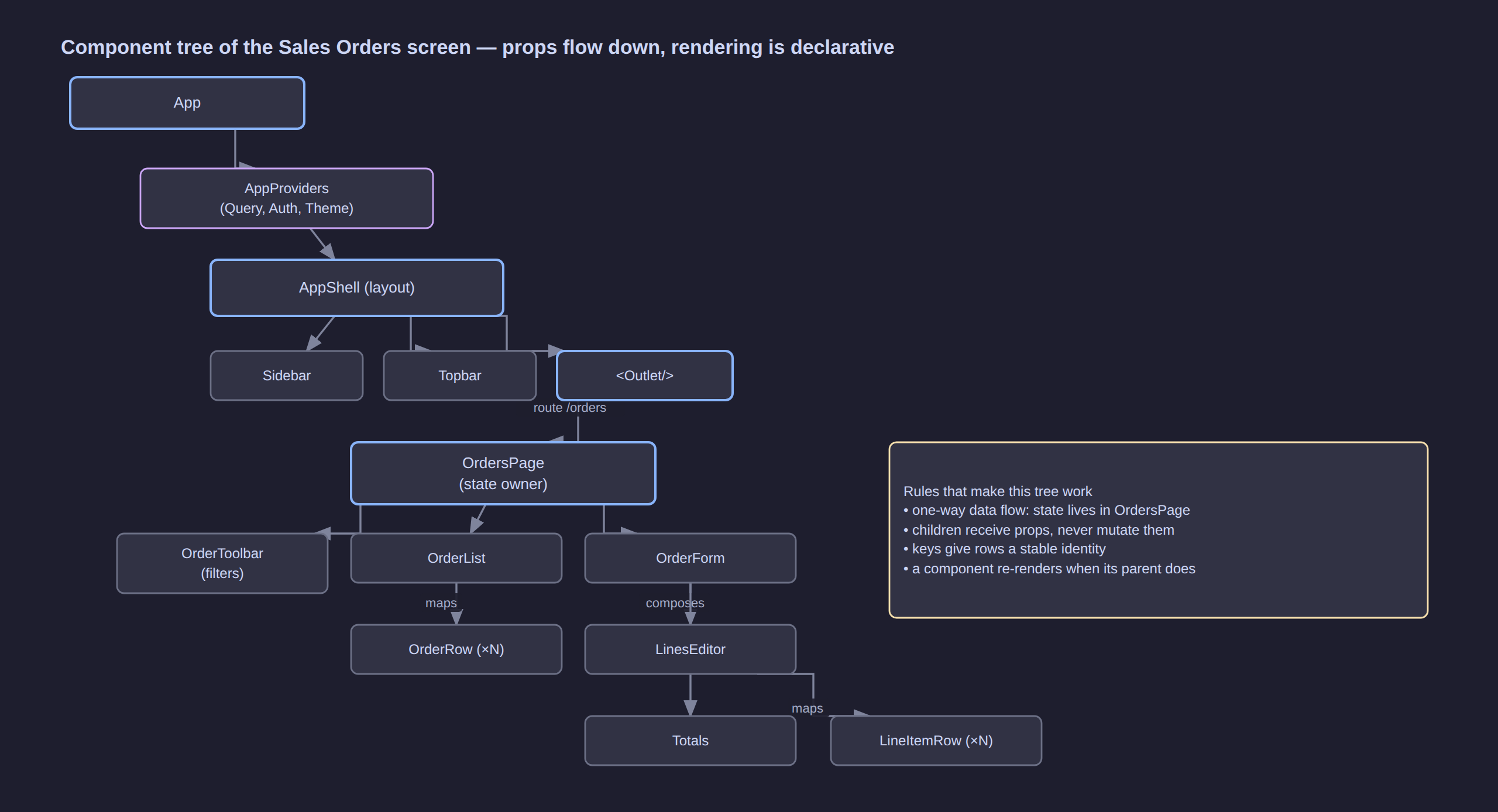
Click the diagram to open it at full resolution.
Read the tree top-down: App renders providers, which render the shell, which renders the routed page — and the page renders the three pieces of the screen. State lives in OrdersPage because that is the lowest common parent of everything that needs it (a rule formalised in Derived State and Lifting State Up).
Props
Props are the arguments of a component — a single object, read-only, passed from parent to child.
type OrderRowProps = {
  order: SalesOrder;
  selected: boolean;
  onSelect: (id: string) => void;
};

function OrderRow({ order, selected, onSelect }: OrderRowProps) {
  return (
    <tr className={selected ? 'selected' : undefined} onClick={() => onSelect(order.id)}>
      <td>{order.number}</td>
      <td>{order.status}</td>
    </tr>
  );
}
The rules
| Rule | Why |
|---|---|
| Read-only | A child that mutates a prop makes the parent's state unpredictable. Change flows up via a callback |
| Downward only | There is no way to pass data up as props; you pass a function that the child calls |
| Use destructuring | ({ order, onSelect }: Props) documents the contract at the signature |
Default with = in destructuring |
function Button({ variant = 'secondary' }) — no defaultProps on functions |
| Never spread blindly into the DOM | {...props} onto a <div> can leak unknown attributes and warnings |
children is just a prop
children is the JSX you nested between the tags. Because it is an ordinary prop you can inspect it (React.Children.count), reorder it, or forward it — the basis of layout and provider components.
Props vs state — the decision
Ask one question: does this value change over time because of something the user or the server does?
- Yes → state (or server state). The component owns it and re-renders when it changes.
- No → props. The parent decides it and the component just displays it.
- It can be computed from props/state → neither. Derive it during render.
A prop that is only ever passed straight through several layers is prop drilling — a signal to consider Context or a different component split (see Context).
Callbacks: how change flows up
function OrderToolbar({ onSearch, status, onStatusChange }: {
  onSearch: (term: string) => void;
  status: OrderStatus | 'all';
  onStatusChange: (s: OrderStatus | 'all') => void;
}) {
  return (
    <div className="toolbar">
      <SearchInput onChange={onSearch} />
      <select value={status} onChange={(e) => onStatusChange(e.target.value as OrderStatus | 'all')}>
        <option value="all">All</option>
        <option value="draft">Draft</option>
        <option value="confirmed">Confirmed</option>
      </select>
    </div>
  );
}
The child decides when something happened; the parent decides what it means. That separation is what makes both testable.
Events
React attaches one listener at the root and dispatches to your handler through its own synthetic event system, which normalises browser differences and cleans up automatically when a component unmounts.
function ProductRow({ product, onToggle }: { product: Product; onToggle: (id: string) => void }) {
  function handleClick(e: React.MouseEvent<HTMLButtonElement>) {
    e.preventDefault();               // stop the browser default
    e.stopPropagation();              // do not bubble to the row's onClick
    onToggle(product.id);
  }

  return (
    <tr>
      <td>{product.sku}</td>
      <td>{product.name}</td>
      <td>
        <button type="button" onClick={handleClick}>
          {product.active ? 'Archive' : 'Restore'}
        </button>
      </td>
    </tr>
  );
}
Passing arguments
{products.map((p) => (
  <ProductRow key={p.id} product={p} onToggle={(id) => toggleProduct(id)} />   // inline arrow
))}

// or, when the handler is a plain function you already have:
<button onClick={() => remove(p.id)}>Delete</button>
<button onClick={remove}>Delete</button>        {/* ❌ passes the event object */}
<button onClick={() => remove(p.id)}>Delete</button>   {/* ✅ */}
The event cheat sheet
| You want | Handler | Note |
|---|---|---|
| Click | onClick |
also onDoubleClick, onContextMenu |
| Text input | onChange |
fires on every keystroke in React (unlike the DOM's change) |
| Blur / focus | onBlur / onFocus |
validation on blur beats validation on keystroke |
| Key press | onKeyDown |
check e.key === 'Escape' |
| Form submit | onSubmit |
always e.preventDefault() |
| Mouse enter/leave | onMouseEnter / onMouseLeave |
onMouseOver/onMouseOut bubble; the enter/leave pair does not |
Events are not (usually) where state lives
An event handler is the right place for: user intent, calling a callback prop, starting a network request, and clearing an error. It is not the place for derived values (compute them during render) and not a substitute for an effect.
State
State is data that changes over time and belongs to a component. useState gives you a value and a setter:
const [selectedId, setSelectedId] = useState<string | null>(null);
const [filters, setFilters] = useState<OrderFilters>({ status: 'all', search: '' });
State is a snapshot, and the setter does not mutate
const [count, setCount] = useState(0);

setCount(count + 1);        // schedules an update; `count` is still 0 in this render
setCount((c) => c + 1);     // ✅ when the new value depends on the old one
React batches all updates from one event handler into a single re-render, so three setState calls produce one render, not three.
Immutability: the rule that catches everyone
React compares state by reference. Mutating an object in place leaves React holding the same reference, so it sees no change and does not re-render.
// ❌ mutating state — the list does not update
orders.push(newOrder);
setOrders(orders);

// ✅ a new array
setOrders([...orders, newOrder]);

// ✅ a new object with one field changed
setFilters({ ...filters, status: 'confirmed' });
Beyond triggering renders, immutability is what makes time-travel debugging, memoisation and useEffect dependency comparison possible at all.
Updating arrays and nested objects in the ERP
// add at the end
setLines((ls) => [...ls, { id: crypto.randomUUID(), productId, quantity: 1, unitPrice }]);

// update one line by id
setLines((ls) => ls.map((l) => (l.id === id ? { ...l, quantity: nextQty } : l)));

// remove one line
setLines((ls) => ls.filter((l) => l.id !== id));

// sort — copy first, sort the copy
setProducts((ps) => [...ps].sort((a, b) => a.name.localeCompare(b.name)));

// update a nested field without mutating
setForm((f) => ({ ...f, address: { ...f.address, city: 'Lyon' } }));
[!TIP]
structuredClone(value)(built into browsers and Node 17+) is the honest way to clone nested data before editing a draft. Use it when the shape is deep; use spread when it is shallow and you want to see exactly what changed.
Where state should live
| Question | Answer |
|---|---|
| Only this component needs it? | keep it there |
| A sibling needs it too? | lift to the common parent and pass down / call up |
| Many distant components need it? | Context |
| The server owns it (rows, lists, entities)? | server-state cache — see Data Fetching |
| Can it be computed from other state? | do not store it — derive it |
| Must it survive a reload or be shareable? | put it in the URL (filters) or localStorage (drafts) |
Forms
Forms are where controlled state pays for itself. A controlled input takes its value from React state and reports every change back; React is the single source of truth.
function CustomerForm({ initial, onSaved }: { initial?: Customer; onSaved: () => void }) {
  const [name, setName] = useState(initial?.name ?? '');
  const [email, setEmail] = useState(initial?.email ?? '');
  const [country, setCountry] = useState(initial?.country ?? 'FR');
  const [errors, setErrors] = useState<Record<string, string>>({});
  const [saving, setSaving] = useState(false);

  function validate() {
    const next: Record<string, string> = {};
    if (!name.trim()) next.name = 'Name is required';
    if (!/^[^@\s]+@[^@\s]+\.[^@\s]+$/.test(email)) next.email = 'Enter a valid email';
    setErrors(next);
    return Object.keys(next).length === 0;
  }

  async function handleSubmit(e: React.FormEvent<HTMLFormElement>) {
    e.preventDefault();                       // otherwise the browser navigates away
    if (!validate()) return;
    setSaving(true);
    try {
      await (initial ? updateCustomer(initial.id, { name, email, country })
                     : createCustomer({ name, email, country }));
      onSaved();
    } catch {
      setErrors({ form: 'Could not save the customer. Try again.' });
    } finally {
      setSaving(false);
    }
  }

  return (
    <form onSubmit={handleSubmit} noValidate>
      <label htmlFor="name">Name</label>
      <input id="name" value={name} onChange={(e) => setName(e.target.value)} aria-invalid={!!errors.name} />
      {errors.name && <p className="field-error">{errors.name}</p>}

      <label htmlFor="email">Email</label>
      <input id="email" type="email" value={email} onChange={(e) => setEmail(e.target.value)} />
      {errors.email && <p className="field-error">{errors.email}</p>}

      <label htmlFor="country">Country</label>
      <select id="country" value={country} onChange={(e) => setCountry(e.target.value)}>
        <option value="FR">France</option>
        <option value="SN">Sénégal</option>
      </select>

      {errors.form && <p className="form-error">{errors.form}</p>}
      <button type="submit" disabled={saving}>{saving ? 'Saving…' : 'Save'}</button>
    </form>
  );
}
Why controlled? Because validation, formatting (phone numbers, currency), conditional fields and disabling the submit button all need the value while typing, and one source of truth removes a whole class of "the form and the model disagree" bugs.
The trade-off
| Controlled | Uncontrolled | |
|---|---|---|
| Source of truth | React state | the DOM |
| Live validation, conditional fields | easy | awkward |
| Re-renders | one per keystroke (cheap, but real) | none |
| Best for | most ERP forms | file inputs, huge form sets, FormData-based submissions |
// Uncontrolled: read values once, on submit
function QuickNote() {
  function handleSubmit(e: React.FormEvent<HTMLFormElement>) {
    e.preventDefault();
    const data = new FormData(e.currentTarget);
    saveNote(String(data.get('note')));
  }
  return (
    <form onSubmit={handleSubmit}>
      <textarea name="note" defaultValue="" />
      <button>Save</button>
    </form>
  );
}
Debounce the expensive ones
A search box that fires a request per keystroke will hammer the API. Debounce the derived value, not the input:
const [search, setSearch] = useState('');                 // every keystroke, instant
const [status, setStatus] = useState<OrderStatus | 'all'>('all');
const urlFilters = useDebouncedValue({ search, status }, 300);   // see Custom Hooks
Or keep the URL as the source of truth for filters (see Routing) so a filtered list is shareable and the back button works.
Derived State and Lifting State Up
Do not store what you can compute
This is the most common React bug in real codebases, and it is silent:
// ❌ two sources of truth that drift apart
const [orders, setOrders] = useState<SalesOrder[]>([]);
const [filtered, setFiltered] = useState<SalesOrder[]>([]);   // must be updated everywhere

// ✅ one source, derived during render
const [orders, setOrders] = useState<SalesOrder[]>([]);
const [status, setStatus] = useState<OrderStatus | 'all'>('all');
const filtered = useMemo(
  () => (status === 'all' ? orders : orders.filter((o) => o.status === status)),
  [orders, status],
);
Derivation is always correct by construction; a second useState is a promise you will forget to keep. Zero-cost for cheap computations (just compute it, skip the useMemo), cached for expensive ones.
| Derive during render | Store in state |
|---|---|
| Filtered / sorted / paginated lists | The unfiltered source (if client-owned) |
| Totals, counts, averages | The draft object being edited |
| "Is the form valid?" | The current field values |
| "Are all lines complete?" | The lines |
| A formatted display string | The raw value |
Lifting state up
When two siblings must agree, move the state to their closest common parent and pass the value down with a callback to change it.
// ❌ the two panes cannot see each other's state
function CustomerSplitView() {
  return (<><CustomerList /><CustomerDetail /></>);
}

// ✅ the parent owns the selection
function CustomerSplitView() {
  const [selectedId, setSelectedId] = useState<string | null>(null);
  return (
    <>
      <CustomerList selectedId={selectedId} onSelect={setSelectedId} />
      <CustomerDetail customerId={selectedId} />
    </>
  );
}
Lift only as far as the lowest common ancestor — no further. Lifting too high is the other failure mode: a page component that owns state for everything becomes impossible to memoise, and every keystroke re-renders the whole tree.
The whole picture
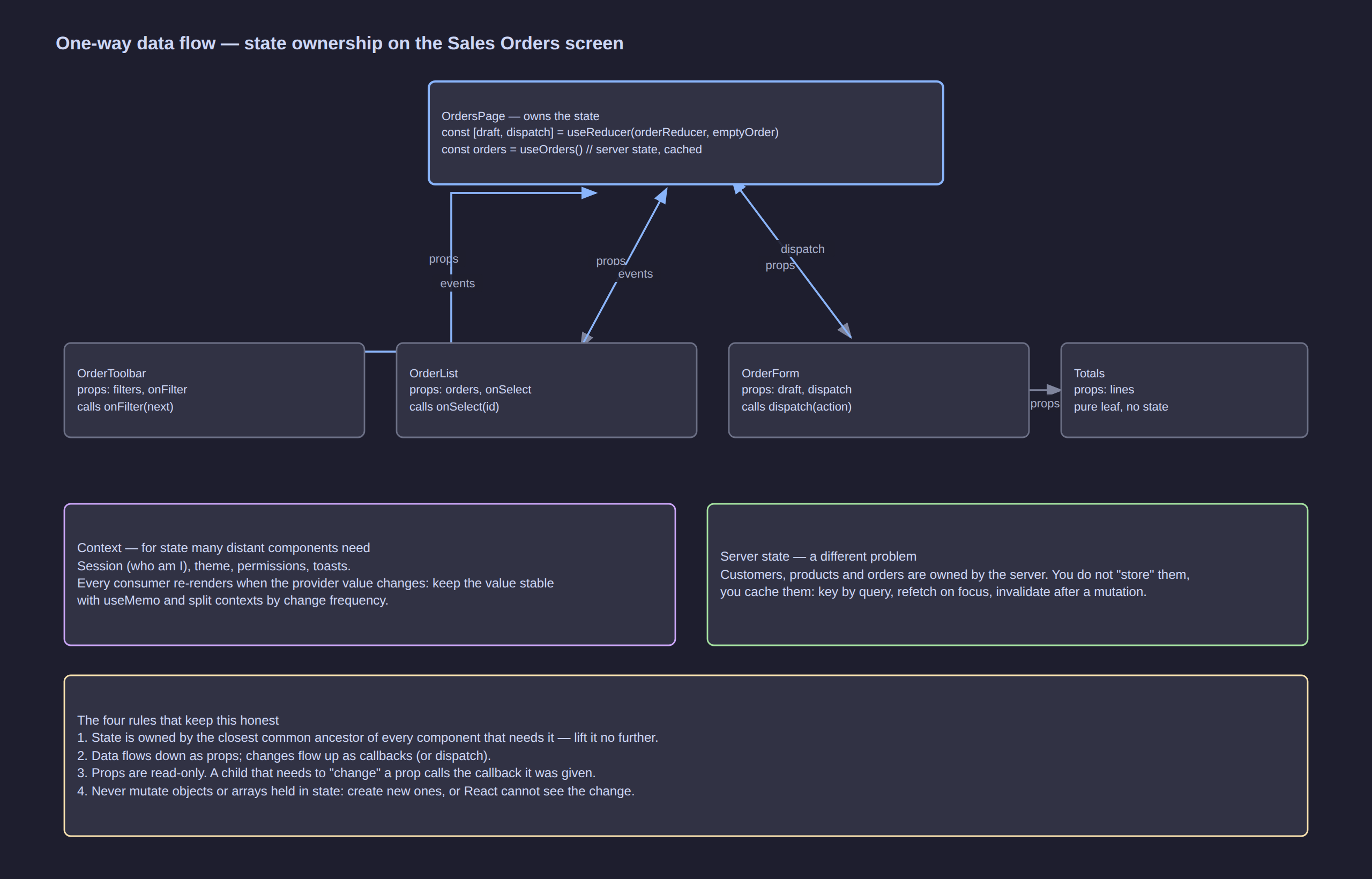
Click the diagram to open it at full resolution.
Read the arrows as the contract: OrdersPage owns the draft order and hands down values and callbacks; the children report intent upward; Context carries what many distant components need; server data lives in a cache, not in the tree.
Effects
An effect is code that synchronises your component with something outside React: a network request, a subscription, the browser API, a third-party widget.
useEffect(() => {
  // runs after the browser paints
  const controller = new AbortController();
  let cancelled = false;

  fetch(`/api/v1/customers/${customerId}`, { signal: controller.signal })
    .then((r) => r.json())
    .then((data) => { if (!cancelled) setCustomer(data); })
    .catch((err) => { if (err.name !== 'AbortError') setError(err); });

  return () => {
    // cleanup: runs before the next effect and on unmount
    cancelled = true;
    controller.abort();
  };
}, [customerId]);     // dependency array
The three parts, and what each is for:
| Part | Meaning |
|---|---|
| The function | the synchronisation itself |
| The cleanup | how to stop doing it (abort, unsubscribe, clear) |
| The dependency array | when to re-run: whenever any listed value changes |
| Dependency array | When the effect runs |
|---|---|
| omitted | after every render — almost always wrong, and how infinite loops are born |
[] |
once, after the first render (mount); cleanup on unmount |
[a, b] |
after the first render, and again whenever a or b changes |
Before you write an effect, ask whether you need one
| You want to… | Do not use an effect. Instead… |
|---|---|
| Update derived data when props change | compute it during render |
| Reset state when a prop changes | use key to remount the component, or derive |
| Run code because the user clicked something | do it in the event handler |
| Transform a list for display | do it in the render body |
| Adjust state from state | set it in the setter/updater, or derive it |
The remaining legitimate uses are genuinely about external systems: fetching, subscriptions (websockets, matchMedia, ResizeObserver), timers, analytics, and syncing with a non-React library.
Real ERP effects
// 1. Follow the system colour scheme (subscribe to an external store)
useEffect(() => {
  const mq = window.matchMedia('(prefers-color-scheme: dark)');
  const onChange = (e: MediaQueryListEvent) => setDark(e.matches);
  mq.addEventListener('change', onChange);
  return () => mq.removeEventListener('change', onChange);
}, []);

// 2. Autosave a draft order, debounced
useEffect(() => {
  const id = setTimeout(() => saveDraft(draft), 1000);
  return () => clearTimeout(id);          // cancels the save if the draft changes again
}, [draft]);

// 3. Focus a field when the row enters edit mode
useEffect(() => {
  if (editing) qtyRef.current?.focus();
}, [editing]);

// 4. Document title from data
useEffect(() => {
  document.title = `${order?.number ?? 'Order'} — ERP`;
  return () => { document.title = 'ERP'; };
}, [order?.number]);
[!WARNING] The infinite loop pattern. An effect that sets state which is itself in the dependency array re-runs forever. If you see
Maximum update depth exceeded, look forsetXinside an effect whose deps containx— or for an object/array dependency recreated on every render (fix withuseMemo, or store primitives instead).
The useEffect dependency rule
Every reactive value used inside the effect must be in the dependency array — props, state, and anything derived from them. That is what eslint-plugin-react-hooks enforces, and fighting it with // eslint-disable-next-line is how stale-closure bugs get shipped. When a dependency feels wrong, the usual fix is to move the function inside the effect, or use an updater function instead of reading state.
useEffect versus useLayoutEffect: useEffect runs after paint (correct for almost everything). useLayoutEffect runs before paint, and is only for measuring the DOM and synchronously correcting it — a tooltip that must be positioned before the user sees it, for example. Using it for fetching makes the UI slower, not faster.
Refs
A ref is a box that holds a mutable value for the whole life of the component, and changing it does not re-render.
const inputRef = useRef<HTMLInputElement>(null);
const renderCount = useRef(0);
const timerId = useRef<number | null>(null);
// focus management — the classic use
function SkuSearch() {
  const ref = useRef<HTMLInputElement>(null);
  useEffect(() => { ref.current?.focus(); }, []);
  return <input ref={ref} placeholder="Search by SKU…" />;
}

// holding a timer across renders without re-rendering
function AutosaveButton({ draft }: { draft: SalesOrder }) {
  const timer = useRef<ReturnType<typeof setTimeout> | null>(null);
  function schedule() {
    if (timer.current) clearTimeout(timer.current);
    timer.current = setTimeout(() => saveDraft(draft), 800);
  }
  return <button onClick={schedule}>Queue save</button>;
}
Refs versus state
useState |
useRef |
|
|---|---|---|
| Triggers a re-render on change | yes | no |
| Value visible to the render output | yes | not directly |
| Survives re-renders | yes | yes |
| Use for | anything the user sees | DOM nodes, timer ids, counters, previous values |
Never read or write ref.current during render (it breaks the purity rule); do it in an event handler or an effect.
Exposing an imperative API
By default a parent cannot put a ref on a child. useImperativeHandle deliberately exposes a tiny imperative surface — appropriate for things that are inherently imperative, like a canvas or a focusable dialog.
type OrderFormHandle = { focusFirstLine: () => void; reset: () => void };

const OrderForm = forwardRef<OrderFormHandle, { lines: OrderLine[] }>(function OrderForm(
  { lines }, ref,
) {
  const firstLineRef = useRef<HTMLInputElement>(null);
  useImperativeHandle(ref, () => ({
    focusFirstLine: () => firstLineRef.current?.focus(),
    reset: () => { /* … */ },
  }), []);
  return <input ref={firstLineRef} />;
});

// parent
const formRef = useRef<OrderFormHandle>(null);
<OrderForm ref={formRef} lines={lines} />;
<button onClick={() => formRef.current?.focusFirstLine()}>Add line</button>
Modern React also accepts ref as a normal prop on function components, so forwardRef is no longer mandatory in the newest versions — but the mental model is the same: refs are an escape hatch, and reaching for one should be a deliberate choice.
Context
Context passes a value down the tree without threading it through every intermediate component.
// 1. Define it with a useful default (or null + a guard hook)
type Session = { userId: string; name: string; permissions: string[] };

const SessionContext = createContext<Session | null>(null);

// 2. A hook that fails loudly instead of silently returning null
export function useSession(): Session {
  const ctx = useContext(SessionContext);
  if (!ctx) throw new Error('useSession must be used inside <SessionProvider>');
  return ctx;
}

// 3. The provider — memoise the value so consumers do not re-render needlessly
export function SessionProvider({ children }: { children: React.ReactNode }) {
  const [session, setSession] = useState<Session | null>(null);

  useEffect(() => {
    fetch('/api/v1/whoami').then((r) => r.json()).then(setSession);
  }, []);

  const value = useMemo(() => session, [session]);
  if (!session) return <SplashScreen />;      // do not render consumers without data

  return <SessionContext.Provider value={value}>{children}</SessionContext.Provider>;
}

// 4. Any descendant reads it directly
function DeleteOrderButton({ orderId }: { orderId: string }) {
  const { permissions } = useSession();
  if (!permissions.includes('orders.delete')) return null;
  return <button onClick={() => deleteOrder(orderId)}>Delete</button>;
}
When Context is the right answer
| Good fit | Poor fit |
|---|---|
| Session, current user, permissions | A form's field values |
| Theme, locale, feature flags | A list of entities the server owns |
| A dispatcher/store object that rarely changes | Anything that changes on every keystroke |
| Toast/notification API | Values needed by exactly one subtree |
The two Context performance traps
- A new object every render.
<Ctx.Provider value={{ user, setUser }}>recreates the value each render, so every consumer re-renders on every parent render. Wrap it inuseMemo. - One big context for everything. Anything that changes re-renders every consumer. Split by change frequency — a
SessionContextthat never changes after login, aThemeContextthat changes on toggle, aToastsContextthat changes often — instead of oneAppContext.
// ❌ every consumer re-renders when any field changes
<AppContext.Provider value={{ session, theme, toasts, filters }} />

// ✅ separate providers, separate frequencies
<SessionContext.Provider value={session}>
  <ThemeContext.Provider value={theme}>
    <ToastsContext.Provider value={toasts}>
      {children}
    </ToastsContext.Provider>
  </ThemeContext.Provider>
</SessionContext.Provider>
Context is not a state manager
Context solves transport, not ownership or updates. It carries a value down; something still has to own it and re-render. For data the server owns, Context is the wrong tool — a query cache is (Data Fetching).
Reducers
useReducer replaces several related useState calls with one state object and a list of named transitions. It is the right tool when:
- several fields always change together (a draft order with its lines),
- the next state depends on the previous one in non-trivial ways,
- you want the transitions to be testable in isolation, or
- you want to pass a
dispatchdown instead of five callbacks.
type DraftOrderState = {
  customerId: string | null;
  lines: OrderLine[];
  notes: string;
  dirty: boolean;
};

type Action =
  | { type: 'customerSelected'; customerId: string }
  | { type: 'lineAdded'; line: OrderLine }
  | { type: 'lineQuantityChanged'; id: string; quantity: number }
  | { type: 'lineRemoved'; id: string }
  | { type: 'notesChanged'; notes: string }
  | { type: 'saved' }
  | { type: 'reset' };

function orderReducer(state: DraftOrderState, action: Action): DraftOrderState {
  switch (action.type) {
    case 'customerSelected':
      return { ...state, customerId: action.customerId, dirty: true };
    case 'lineAdded':
      return { ...state, lines: [...state.lines, action.line], dirty: true };
    case 'lineQuantityChanged':
      return {
        ...state,
        dirty: true,
        lines: state.lines.map((l) =>
          l.id === action.id ? { ...l, quantity: Math.max(1, action.quantity) } : l,
        ),
      };
    case 'lineRemoved':
      return { ...state, lines: state.lines.filter((l) => l.id !== action.id), dirty: true };
    case 'notesChanged':
      return { ...state, notes: action.notes, dirty: true };
    case 'saved':
      return { ...state, dirty: false };
    case 'reset':
      return initialState;
    default:
      return state;
  }
}

const initialState: DraftOrderState = { customerId: null, lines: [], notes: '', dirty: false };

function OrderForm({ onSaved }: { onSaved: () => void }) {
  const [state, dispatch] = useReducer(orderReducer, initialState);

  async function save() {
    await createOrder({ customerId: state.customerId!, lines: state.lines, notes: state.notes });
    dispatch({ type: 'saved' });
    onSaved();
  }

  const total = state.lines.reduce((s, l) => s + l.quantity * l.unitPrice, 0);

  return (
    <form onSubmit={(e) => { e.preventDefault(); save(); }}>
      <CustomerPicker onSelect={(id) => dispatch({ type: 'customerSelected', customerId: id })} />
      <LinesEditor lines={state.lines} dispatch={dispatch} />
      <Totals total={total} />                      {/* derived, not stored */}
      <button disabled={!state.dirty || !state.customerId}>Save order</button>
    </form>
  );
}
Note what happened: the component's render body shrank to reading state and deciding what to show, while all the transition rules live in one pure function. That function has no React in it at all, so it can be unit-tested directly:
Choose useState when |
Choose useReducer when |
|---|---|
| one or two independent values | several fields change together |
| simple direct updates | next state depends on the previous in non-trivial ways |
| the component is small | you want the transition logic testable |
| you pass setters around rarely | you would otherwise pass many callbacks down |
Custom Hooks
A custom hook is a function whose name starts with use and which calls other hooks. It is not a new React feature — it is how you share stateful logic between components.
// Debounce any value — used by every search box in the ERP
export function useDebouncedValue<T>(value: T, delay = 300): T {
  const [debounced, setDebounced] = useState(value);
  useEffect(() => {
    const id = setTimeout(() => setDebounced(value), delay);
    return () => clearTimeout(id);
  }, [value, delay]);
  return debounced;
}
// A reusable data fetch with loading, error and cancel — the pattern behind most ERP screens
export function useFetch<T>(url: string, deps: unknown[] = []): {
  data: T | null; loading: boolean; error: Error | null;
} {
  const [state, setState] = useState<{ data: T | null; loading: boolean; error: Error | null }>(
    { data: null, loading: true, error: null },
  );

  useEffect(() => {
    const controller = new AbortController();
    setState({ data: null, loading: true, error: null });

    fetch(url, { signal: controller.signal })
      .then((r) => { if (!r.ok) throw new Error(`HTTP ${r.status}`); return r.json(); })
      .then((data: T) => setState({ data, loading: false, error: null }))
      .catch((err: Error) => {
        if (err.name !== 'AbortError') setState({ data: null, loading: false, error: err });
      });

    return () => controller.abort();
    // eslint-disable-next-line react-hooks/exhaustive-deps
  }, [url, ...deps]);

  return state;
}
// URL-synced filters — remember the user's view, and make it shareable
export function useUrlFilters() {
  const [params, setParams] = useSearchParams();

  const filters = {
    search: params.get('search') ?? '',
    status: (params.get('status') ?? 'all') as OrderStatus | 'all',
    page: Number(params.get('page') ?? 1),
  };

  function setFilters(next: Partial<typeof filters>) {
    const merged = { ...filters, ...next, page: next.page ?? 1 };   // any filter change resets the page
    setParams(Object.fromEntries(Object.entries(merged).map(([k, v]) => [k, String(v)])));
  }

  return { filters, setFilters };
}
// Usage: one line in the screen, all the behaviour in the hook
function OrdersPage() {
  const { filters, setFilters } = useUrlFilters();
  const debouncedSearch = useDebouncedValue(filters.search);
  const url = `/api/v1/orders?search=${debouncedSearch}&status=${filters.status}&page=${filters.page}`;
  const { data, loading, error } = useFetch<{ results: SalesOrder[]; count: number }>(url);
  …
}
What custom hooks are for — and not for
| Use a custom hook to share | Do not use it to |
|---|---|
| Behaviour: debouncing, fetching, form state, pagination, subscriptions | Replace a component you did not want to write |
| The wiring of several hooks into one unit | Hide a single useState behind an indirection |
| Logic that must be tested without a UI | Make two components share state — hooks do not share state, they share logic |
Two components calling useDebouncedValue each get their own state. To share state you lift it, or put it in Context, or move it to a cache.
The rules of hooks
- Call hooks only at the top level of a component or another hook — never inside a condition, a loop, or a nested function.
- Name custom hooks
useSomething.
React tracks hooks by call order, not by name. A hook behind an if means the order changes between renders, and React reads the wrong slot — which is why an early return above a hook is a bug and why the lint rule exists.
// ❌ conditional hook
if (isAdmin) { const [a, setA] = useState(0); }

// ✅ hook always called; the condition is inside
const [a, setA] = useState(0);
if (isAdmin) { /* use a */ }
Rendering, Reconciliation and Keys
When a component re-renders
A component re-renders when:
- its own state changes (
useState/useReducersetter called with a different value), - its parent re-renders (by default this cascades to all children), or
- a context value it reads changes.
Nothing else. A ref change does not re-render. A variable assigned in the body does not re-render. A promise resolving does not re-render unless you call a setter from it.
The two phases
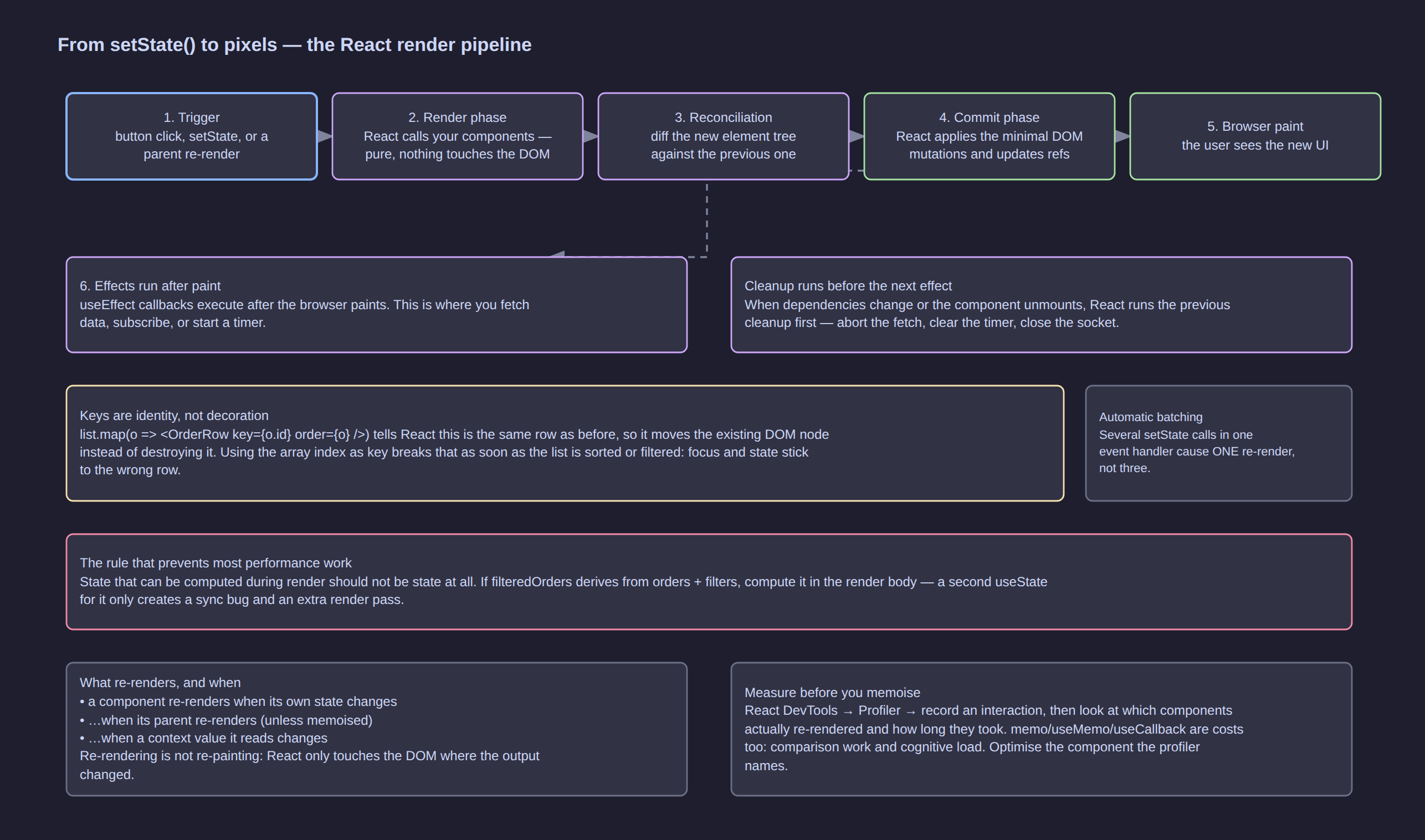
Click the diagram to open it at full resolution.
| Phase | What React does | Can you have side effects here? |
|---|---|---|
| Render | calls your components, builds a new element tree | no — must be pure |
| Reconciliation | diffs the new tree against the previous one | (internal) |
| Commit | applies the minimal DOM mutations, updates refs | refs are safe, DOM exists |
| Paint | the browser draws | — |
| Effects | your useEffect callbacks run after paint |
yes — this is where side effects live |
Because render can run more than once for one update (StrictMode, or React interrupting a render to handle something more urgent), anything you do during render can happen twice. That single fact justifies the purity rule better than any style guide.
Reconciliation: how React decides what to touch
React compares element trees position by position:
- Same element type at the same position → keep the DOM node, update its attributes and recurse into children.
- Different type → tear down the old subtree (unmount) and build a new one (state is lost).
- Lists → compare by
key, so an item that moved is moved, not rebuilt.
That last point is why keys exist:
With an index key, sorting the table by amount makes React believe row 0 is still row 0 — so it keeps the old DOM node, the old internal state (a half-typed quantity, an expanded detail panel, focus) and simply rewrites the text. The visible result: your edits jump to the wrong row. With order.id, React sees the same row appearing at a different position and moves it.
[!WARNING] Never use an index as a key unless the list is static, never reordered, never filtered, and has no per-row state. When in doubt:
key={item.id}, or generate an id when the item is created.
Changing a component's key deliberately is also a useful technique: it forces React to remount instead of updating, which resets all its state. Rendering <CustomerForm key={customerId} … /> gives every customer a fresh form — one line instead of an effect that resets fields.
Batching
React batches state updates inside the same event handler (and, in modern versions, inside promises, timeouts and native handlers too):
function handleSave() {
  setSaving(true);
  setError(null);
  setDirty(false);
}   // one re-render, not three
Avoiding re-renders without memoisation
The cheapest optimisation is structural: pass expensive or independent subtrees as children so that the parent's state changes do not re-render them.
// ❌ typing in the filter re-renders the (heavy) results table on every keystroke,
//    because the table is created by the same component that owns the filter state
function OrdersPage() {
  const [search, setSearch] = useState('');
  return (
    <div>
      <SearchInput value={search} onChange={setSearch} />
      <OrdersTable orders={orders} />          {/* re-renders on every keystroke */}
    </div>
  );
}

// ✅ the table arrives as a prop, so the parent re-rendering does not re-render it
function OrdersPage({ children }: { children: React.ReactNode }) {
  const [search, setSearch] = useState('');
  return (
    <div>
      <SearchInput value={search} onChange={setSearch} />
      {children}                                {/* same element object every render */}
    </div>
  );
}

<OrdersPage>
  <OrdersTable orders={orders} />
</OrdersPage>
This generalises into a rule worth remembering: push state down. The lower in the tree the state lives, the fewer components a change reaches.
Memoisation and Performance
Measure first, always
Open React DevTools → Profiler → record the interaction that feels slow → look at the ranked list of components that re-rendered and their render times. Optimising without this is guessing, and React is fast enough that most guessed optimisations make the code harder to read for no measurable gain.
The order of attack, cheapest first:
- Fix the data structure — is something O(n²) in a render body?
- Push state down or pass heavy subtrees as
children. - Split the list — render 20 rows, not 2,000 (windowing).
React.memothe leaf that the profiler named.useMemo/useCallbackto stabilise the props that memo needs.useTransition/useDeferredValueto keep typing responsive while a heavy list updates.
React.memo
Skips re-rendering a component when its props are shallow-equal to last time.
const OrderRow = React.memo(function OrderRow({ order, onSelect }: {
  order: SalesOrder;
  onSelect: (id: string) => void;
}) {
  return (
    <tr onClick={() => onSelect(order.id)}>
      <td>{order.number}</td>
      <td>{formatMoney(order.lines.reduce((s, l) => s + l.quantity * l.unitPrice, 0))}</td>
    </tr>
  );
});
memo is defeated by unstable props — an inline object or a fresh arrow function creates a new reference on every render, so the comparison always fails:
<OrderRow order={o} onSelect={(id) => select(id)} />        // ❌ new function every render
<OrderRow order={o} onSelect={select} />                     // ✅ stable reference
<OrderRow order={o} onSelect={useCallback((id) => select(id), [select])} />   // ✅ if it must be inline
useMemo and useCallback
// useMemo — cache the RESULT of a computation
const filtered = useMemo(
  () => orders.filter((o) => o.status === status).sort((a, b) => b.placedAt!.localeCompare(a.placedAt!)),
  [orders, status],
);

// useMemo — a stable object/array prop so a memoised child can skip
const columns = useMemo(() => [{ key: 'sku', label: 'SKU' }, { key: 'name', label: 'Name' }], []);

// useCallback — a stable FUNCTION identity
const handleSelect = useCallback((id: string) => setSelectedId(id), []);
| Use it when | Skip it when |
|---|---|
| The computation is genuinely expensive (large sort/filter/aggregate) | It is a + 1 or a string concat |
| The value is a dependency of another hook or a memoised child | Nothing downstream compares identity |
You are stabilising a Context value or a table columns array |
You would have to add more code than you save |
useMemo is a cache, not a guarantee: React may discard it. Never put side effects in it, and never rely on it for correctness.
Keeping input responsive on big lists
useTransition and useDeferredValue let React keep the urgent update (the keystroke) instant while a non-urgent one (re-rendering 5,000 filtered rows) happens in the background:
function ProductSearch({ products }: { products: Product[] }) {
  const [query, setQuery] = useState('');
  const deferredQuery = useDeferredValue(query);      // lags behind, but never blocks typing

  const matches = useMemo(
    () => products.filter((p) => p.name.toLowerCase().includes(deferredQuery.toLowerCase())),
    [products, deferredQuery],
  );

  return (
    <>
      <input value={query} onChange={(e) => setQuery(e.target.value)} placeholder="Search products…" />
      {query !== deferredQuery && <p className="hint">Filtering…</p>}
      <ProductList products={matches} />
    </>
  );
}
// useTransition — mark the expensive update itself as interruptible
const [isPending, startTransition] = useTransition();

function onStatusChange(next: OrderStatus | 'all') {
  setStatus(next);                                    // urgent: the select must respond now
  startTransition(() => setPage(1));                  // non-urgent: reset the list
}
Windowing
For thousands of rows, render only what is visible. A windowing library (react-window, TanStack Virtual) renders ~30 rows and recycles them as you scroll:
import { FixedSizeList } from 'react-window';

<FixedSizeList height={600} itemCount={orders.length} itemSize={44} width="100%">
  {({ index, style }) => <OrderRow style={style} order={orders[index]} onSelect={select} />}
</FixedSizeList>
No amount of memo fixes 5,000 mounted rows; windowing does.
Data Fetching and Server State
Server data is not component state. You do not own it — the server does — and copying it into useState gives you two sources of truth. It is also not one value but four: data, loading, error, and whether it is still fresh.
Doing it by hand
function CustomersPage() {
  const [customers, setCustomers] = useState<Customer[] | null>(null);
  const [loading, setLoading] = useState(true);
  const [error, setError] = useState<Error | null>(null);

  useEffect(() => {
    const controller = new AbortController();
    setLoading(true);
    fetch('/api/v1/customers', { signal: controller.signal })
      .then((r) => { if (!r.ok) throw new Error(`HTTP ${r.status}`); return r.json(); })
      .then((d) => { setCustomers(d.results); setError(null); })
      .catch((e: Error) => { if (e.name !== 'AbortError') setError(e); })
      .finally(() => setLoading(false));
    return () => controller.abort();
  }, []);
  …
}
This works, and it is what you should write when you want to understand the mechanics. But written by hand, for every screen, you must also re-invent: caching, deduplication, refetch-on-focus, refetch-on-reconnect, pagination, mutation + invalidation, retries, and stale-while-revalidate. That is a library's job.
The query-cache model
| Concept | Meaning |
|---|---|
| Query key | the identity of a request, e.g. ['orders', { status, page }] |
| Cached data | the last successful response, shared by every component asking the same key |
| Stale time / cache time | how long data is considered fresh, and how long unused data is kept |
| Refetch triggers | mount, window focus, reconnect, interval, manual |
| Mutation | a write, followed by invalidating the keys it affects |
| Optimistic update | apply the expected result immediately, roll back on failure |
import { useQuery, useMutation, useQueryClient } from '@tanstack/react-query';

function useOrders(filters: { status: OrderStatus | 'all'; page: number; search: string }) {
  return useQuery({
    queryKey: ['orders', filters],                       // filters are part of the identity
    queryFn: async ({ signal }) => {
      const res = await fetch(`/api/v1/orders?${new URLSearchParams({
        status: filters.status === 'all' ? '' : filters.status,
        page: String(filters.page),
        search: filters.search,
      })}`, { signal });
      if (!res.ok) throw new Error(`HTTP ${res.status}`);
      return res.json() as Promise<{ results: SalesOrder[]; count: number }>;
    },
    staleTime: 30_000,                                   // fresh for 30s
    placeholderData: (prev) => prev,                     // keep the old page while the next loads
  });
}

function OrdersPage() {
  const { filters, setFilters } = useUrlFilters();
  const { data, isPending, isError, error, isFetching } = useOrders(filters);

  if (isPending) return <TableSkeleton rows={10} />;
  if (isError) return <ErrorBox error={error} onRetry={() => refetch()} />;

  return (
    <>
      <OrderToolbar filters={filters} onChange={setFilters} busy={isFetching} />
      <OrderTable orders={data.results} />
      <Pagination page={filters.page} count={data.count} onPage={(p) => setFilters({ page: p })} />
    </>
  );
}
Mutations, invalidation and optimistic updates
function useConfirmOrder() {
  const qc = useQueryClient();

  return useMutation({
    mutationFn: (orderId: string) =>
      fetch(`/api/v1/orders/${orderId}/confirm`, { method: 'POST' }).then((r) => {
        if (!r.ok) throw new Error('Could not confirm the order');
        return r.json();
      }),

    // 1. optimistic: show the new status straight away
    onMutate: async (orderId) => {
      await qc.cancelQueries({ queryKey: ['orders'] });
      const previous = qc.getQueryData(['orders']);
      qc.setQueriesData({ queryKey: ['orders'] }, (old: any) =>
        old ? { ...old, results: old.results.map((o: SalesOrder) =>
          o.id === orderId ? { ...o, status: 'confirmed' as const } : o) } : old);
      return { previous };
    },

    // 2. roll back if the server disagrees
    onError: (_err, _id, ctx) => {
      if (ctx?.previous) qc.setQueryData(['orders'], ctx.previous);
      toast.error('Confirming the order failed — the list has been restored');
    },

    // 3. always reconcile with the server afterwards
    onSettled: () => {
      qc.invalidateQueries({ queryKey: ['orders'] });
      qc.invalidateQueries({ queryKey: ['invoices'] });
    },
  });
}
The three-step shape — snapshot, apply optimistically, reconcile in onSettled — is the pattern to memorise. It is what makes an ERP feel instant without lying to the user.
Loading and error UX that does not flicker
| Situation | Do this |
|---|---|
| First load of a screen | skeleton table, not a spinner in the middle of an empty page |
| Changing a filter | keep the previous results, show a subtle "updating" indicator (isFetching) |
| Background refetch | show nothing at all |
| Request failed | inline error box with a retry action, and the last good data if you have it |
| Mutation failed | toast + rollback, never a silent failure |
| Empty result | an EmptyState that says what to do next, not a blank table |
Code splitting with Suspense and lazy
import { lazy, Suspense } from 'react';

const InvoicesPage = lazy(() => import('./features/invoices/InvoicesPage'));

<Suspense fallback={<TableSkeleton rows={8} />}>
  <InvoicesPage />
</Suspense>
Every route-level page should be lazy: the dashboard does not need the invoice editor's code, and the first paint gets measurably faster.
Routing
An ERP is a multi-screen application, so routing is not optional. React Router is the default choice; the concepts transfer to TanStack Router or Next.js's file-based router.
import { createBrowserRouter, RouterProvider } from 'react-router-dom';

const router = createBrowserRouter([
  {
    path: '/',
    element: <AppShell />,                        // layout: sidebar + topbar + <Outlet/>
    errorElement: <RouteErrorPage />,             // per-route error boundary
    children: [
      { index: true, element: <DashboardPage /> },
      {
        path: 'customers',
        children: [
          { index: true, element: <CustomersPage /> },
          { path: ':customerId', element: <CustomerDetailPage /> },
        ],
      },
      { path: 'orders', element: <OrdersPage /> },
      { path: 'orders/new', element: <OrderEditorPage /> },
      { path: 'orders/:orderId', element: <OrderDetailPage /> },
      { path: '*', element: <NotFoundPage /> },
    ],
  },
]);

createRoot(document.getElementById('root')!).render(
  <StrictMode><RouterProvider router={router} /></StrictMode>,
);
function AppShell() {
  const session = useSession();
  return (
    <div className="app">
      <Sidebar permissions={session.permissions} />
      <main>
        <Topbar userName={session.name} />
        <Outlet />                                 {/* the matched child route renders here */}
      </main>
    </div>
  );
}
What you actually use day to day
const { orderId } = useParams();                            // /orders/:orderId
const [params, setParams] = useSearchParams();               // ?status=draft&page=2
const navigate = useNavigate();                              // imperative navigation
const location = useLocation();                              // current URL, for analytics

navigate(`/orders/${id}`);
navigate('/orders', { replace: true });                      // no back-button entry
| Concept | Why it matters in an ERP |
|---|---|
| Nested routes + layout route | the shell (sidebar, topbar) renders once and survives navigation |
| URL search params as state | a filtered, sorted, paginated list becomes shareable and back-button correct |
| Route params | /orders/SO-2026-0142 is a link a colleague can paste into a chat |
errorElement per route |
a broken screen does not blank the whole application |
| Lazy routes | each module ships its own code chunk |
| Route guards | wrap protected branches in a component that redirects when session is absent |
[!TIP] Store list state in the URL, not in
useState. It makes every list in the ERP shareable, refresh-safe and back-button correct — and it removes a whole category of "I lost my filters" complaints.
Error Handling
Error boundaries catch render errors
An error boundary is a component that catches errors thrown while rendering its subtree and shows a fallback instead of unmounting the whole app.
import { ErrorBoundary } from 'react-error-boundary';

function Fallback({ error, resetErrorBoundary }: { error: Error; resetErrorBoundary: () => void }) {
  return (
    <div className="error-panel">
      <h3>This panel failed to load</h3>
      <pre>{error.message}</pre>
      <button onClick={resetErrorBoundary}>Try again</button>
    </div>
  );
}

<ErrorBoundary FallbackComponent={Fallback} onError={(e, info) => logToSentry(e, info.componentStack)}>
  <InvoicesPanel />
</ErrorBoundary>
Place boundaries where a failure is survivable: around each dashboard widget, around each routed page, and around anything driven by third-party code.
What error boundaries do not catch
| Not caught | Handle it with |
|---|---|
| Errors in event handlers | try/catch in the handler |
Errors in async code (promises, setTimeout) |
try/catch inside the async function |
| Errors in the effect's async body | catch in the effect, stored as state |
| Server errors on a mutation | the mutation's onError + a toast |
Show errors where the action happened
function useCreateOrder() {
  const [error, setError] = useState<string | null>(null);
  return {
    error,
    async submit(payload: NewOrder) {
      try {
        setError(null);
        return await api.createOrder(payload);           // let the caller navigate on success
      } catch (e) {
        setError(e instanceof Error ? e.message : 'Unknown error');
        throw e;                                        // keep the promise rejected for callers
      }
    },
  };
}
The rule: an error message appears next to what caused it. A failed save belongs on the form; a failed list load belongs on the list.
Styling
React has no opinion, which is why the ecosystem offers several answers.
| Approach | How it works | Best when |
|---|---|---|
| Plain CSS / CSS Modules | import s from './OrdersPage.module.css' then className={s.row} |
you want zero dependencies and scoped class names |
| Utility CSS (Tailwind) | className="flex items-center gap-2 rounded px-3" |
many components, fast iteration, a design system in tokens |
| CSS-in-JS | styles in the component file (styled-components, Emotion) | dynamic theming driven by props |
| Component library | MUI, Mantine, Ant Design, shadcn/ui | an ERP where tables, date pickers and dialogs are table stakes — do not rewrite them |
| Designer-owned tokens | CSS custom properties from a DESIGN.md token set | consistent theming across a product family |
// CSS Modules — local by default, no name collisions
import s from './OrderTable.module.css';

<tr className={`${s.row} ${selected ? s.selected : ''}`}>
// Conditional classes without string surgery
function cx(...parts: Array<string | false | null | undefined>) {
  return parts.filter(Boolean).join(' ');
}

<span className={cx('badge', status === 'confirmed' && 'badge-ok', status === 'cancelled' && 'badge-danger')}>
For an ERP, the pragmatic answer is: pick a component library for the table/form/dialog primitives, and use utility or module CSS for your own layout. Time spent rebuilding a date picker is not spent on the business problem.
TypeScript with React
Types are documentation the compiler enforces, and they pay off most on props, events and hook state.
// Props: a type alias per component, defined next to it
type OrderTableProps = {
  orders: SalesOrder[];
  selectedId?: string;
  onSelect: (id: string) => void;
  emptyLabel?: string;
};

export function OrderTable({ orders, selectedId, onSelect, emptyLabel = 'No orders' }: OrderTableProps) {
  if (orders.length === 0) return <p>{emptyLabel}</p>;
  return (
    <table>
      <tbody>
        {orders.map((o) => (
          <OrderRow key={o.id} order={o} selected={o.id === selectedId} onSelect={onSelect} />
        ))}
      </tbody>
    </table>
  );
}
The types you will actually write
| Need | Type |
|---|---|
| Children | React.ReactNode (anything renderable) or React.ReactElement (an element only) |
| An event handler in a prop | (id: string) => void — keep the domain type, not the DOM event |
| A click handler inline | React.MouseEvent<HTMLButtonElement> |
| A change handler on an input | React.ChangeEvent<HTMLInputElement> |
| A form submit | React.FormEvent<HTMLFormElement> |
| All native props of an element | React.ComponentProps<'button'> |
| A style object | React.CSSProperties |
| A ref to a DOM node | useRef<HTMLInputElement>(null) |
| A generic list component | function List<T>({ items, render }: { items: T[]; render: (item: T) => React.ReactNode }) |
Model the states so impossible states cannot happen
An ERP screen has exactly one of: loading, error, empty, data. Do not model that as three booleans.
// ❌ four combinations that lie: loading && error, data && !data && error …
const [loading, setLoading] = useState(false);
const [error, setError] = useState<Error | null>(null);
const [data, setData] = useState<SalesOrder[] | null>(null);

// ✅ a discriminated union — the compiler forces every case to be handled
type AsyncState<T> =
  | { status: 'idle' }
  | { status: 'loading' }
  | { status: 'error'; error: Error }
  | { status: 'success'; data: T };

function render(state: AsyncState<SalesOrder[]>) {
  switch (state.status) {
    case 'loading': return <TableSkeleton rows={8} />;
    case 'error': return <ErrorBox error={state.error} />;
    case 'success': return <OrderTable orders={state.data} />;
    case 'idle': return null;
  }
}
Typing a reducer
type Action =
  | { type: 'lineAdded'; line: OrderLine }
  | { type: 'lineRemoved'; id: string };

function reducer(state: State, action: Action): State { … }   // switch is exhaustive-checked
Prefer narrow union members over { type: string; payload?: any } — the whole value of a reducer is that only legal transitions compile.
Testing
React Testing Library is the standard. Its philosophy: test the application the way a user meets it — by role, label and text — rather than by component internals.
import { render, screen } from '@testing-library/react';
import userEvent from '@testing-library/user-event';
import { QueryClient, QueryClientProvider } from '@tanstack/react-query';

function setup(ui: React.ReactElement) {
  const qc = new QueryClient({ defaultOptions: { queries: { retry: false } } });
  return render(<QueryClientProvider client={qc}>{ui}</QueryClientProvider>);
}

test('adds a line to the draft order and updates the total', async () => {
  const user = userEvent.setup();
  setup(<OrderEditorPage />);

  await user.click(await screen.findByRole('button', { name: /add line/i }));
  await user.selectOptions(screen.getByLabelText(/product/i), 'SKU-001');
  await user.clear(screen.getByLabelText(/quantity/i));
  await user.type(screen.getByLabelText(/quantity/i), '3');

  expect(screen.getByLabelText(/quantity/i)).toHaveValue(3);
  expect(screen.getByTestId('order-total')).toHaveTextContent('90.00');
});
Query priority — use the highest one that works
| Priority | Query | Why |
|---|---|---|
| 1 | getByRole('button', { name: /save/i }) |
what a screen reader and a user both perceive |
| 2 | getByLabelText(/quantity/i) |
form fields should always be labelled |
| 3 | getByPlaceholderText, getByText |
content the user reads |
| 4 | getByTestId |
last resort, for things with no accessible identity |
What to test, and what not to
| Test | Skip |
|---|---|
| Reducers and pure helpers — exhaustive, no DOM needed | That JSX renders without crashing |
| User flows: filter a list, edit a field, submit a form, see the result | Internal state variables, hook counts |
| Error paths: request fails → the error appears with a retry | That useEffect ran |
| Permissions: the button is absent without the claim | Implementation details of any kind |
// The cheapest high-value tests in any React codebase are the pure ones
test('quantity is clamped to a minimum of 1', () => {
  const next = orderReducer(
    { ...initialState, lines: [{ id: 'l1', productId: 'p1', quantity: 5, unitPrice: 100 }] },
    { type: 'lineQuantityChanged', id: 'l1', quantity: 0 },
  );
  expect(next.lines[0].quantity).toBe(1);
});
For the network, intercept at the boundary — MSW (Mock Service Worker) gives you real fetch behaviour with controlled responses, which beats stubbing global fetch by hand.
Project Structure
The structure that scales for an ERP is feature-first, not type-first. Everything about orders lives together; nothing is filed under a components/ folder of 200 unrelated files.
src/
├── main.tsx
├── App.tsx
├── app/
│   ├── router.tsx                # route table
│   ├── providers.tsx             # Query, Auth, Theme, Toasts
│   └── shell/                    # AppShell, Sidebar, Topbar
├── features/
│   ├── auth/                     # hooks/useSession.ts, SessionProvider.tsx
│   ├── customers/
│   │   ├── api.ts                # typed calls for this feature
│   │   ├── hooks.ts              # useCustomers, useCustomer, useSaveCustomer
│   │   ├── queries.ts            # query keys for this feature
│   │   ├── CustomersPage.tsx
│   │   ├── CustomerDetailPage.tsx
│   │   ├── CustomerForm.tsx
│   │   └── CustomerForm.test.tsx
│   ├── orders/
│   │   ├── api.ts
│   │   ├── orderReducer.ts       # pure, tested without React
│   │   ├── useOrders.ts
│   │   ├── OrdersPage.tsx
│   │   ├── OrderEditorPage.tsx
│   │   ├── OrderToolbar.tsx
│   │   ├── OrderTable.tsx
│   │   ├── OrderRow.tsx
│   │   └── LinesEditor.tsx
│   ├── products/
│   └── invoices/
├── components/                   # genuinely shared UI: Button, DataTable, Modal, FormField
├── lib/
│   ├── api.ts                    # fetch wrapper: base URL, auth, error normalisation
│   ├── money.ts                  # formatMoney, parseAmount (cents in, cents out)
│   └── dates.ts
└── styles/
Rules that keep it healthy:
- Colocate. A component, its test, its styles and its hooks live together. Related files in one place beat strict categories.
- Promote on the second use. The first duplicate stays local; the second one moves to
components/orlib/. - One public entry per feature. Other features import from
features/orders(itsindex.ts), not fromfeatures/orders/OrderRow.tsx. lib/api.tsowns the transport. Auth headers, base URL, error shape and 401 handling live in one place — never repeated per call site.- No cross-feature state. If two features share state, it belongs in
app/providers.tsxor in server state, not in one of them. - Avoid blanket barrel files. Re-exporting everything from
components/index.tscreates circular-import puzzles; export from the feature root only.
Anti-Patterns
| Anti-pattern | What goes wrong | Fix |
|---|---|---|
| Copying props into state | the copy never updates again | use the prop, or derive |
| Storing derived data in state | two sources of truth drift | compute during render |
Mutating state (push, obj.x = 1) |
no re-render, or a re-render that shows stale data | create new objects/arrays |
Array index as key |
edits, focus and state stick to the wrong row | key={item.id} |
useEffect to sync props → state |
an extra render and a stale window | derive, or remount with key |
useEffect with no dependency array |
runs after every render; easily loops forever | list the real dependencies |
| Fetch in the render body | fires on every render, twice in StrictMode | fetch in an effect or a query hook |
setState during render |
infinite render loop | move it into an event or an effect |
| One giant context | every consumer re-renders on any change | split by change frequency, memoise the value |
useCallback/memo everywhere "for performance" |
more code, slower in practice | profile first, then memoise what is named |
| Rebuilding tables/date pickers/dialogs | months spent on solved problems | use a component library |
dangerouslySetInnerHTML on user data |
XSS | render as text; sanitise if unavoidable |
// eslint-disable react-hooks/exhaustive-deps |
stale closures ship to production | fix the dependency, or move the code |
| Boolean soup for async state | impossible states render | a discriminated union |
| Global mutable module state | two users/tabs fight, tests leak | state in components, Context or the cache |
| Fetching in a loop without abort | out-of-order responses win | AbortController in the effect cleanup |
Cheat Sheet
Every hook, by purpose
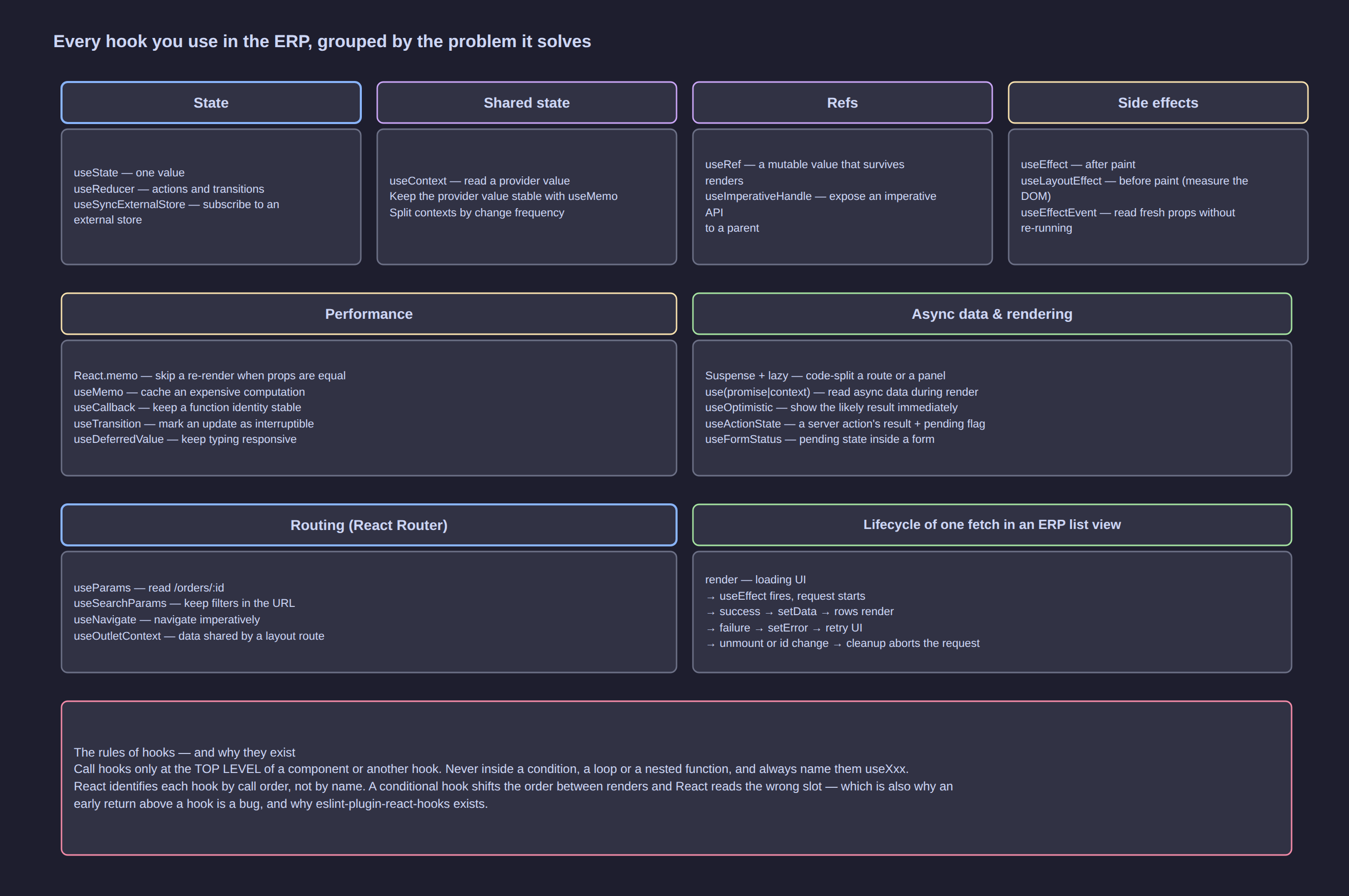
Click the diagram to open it at full resolution.
| Hook | Use it for | Watch out for |
|---|---|---|
useState |
one value that changes over time | updater form when the new value depends on the old |
useReducer |
several fields, complex transitions | keep the reducer pure and export it for tests |
useRef |
DOM nodes, timers, values that must not re-render | never read/write during render |
useEffect |
sync with external systems | dependencies are the contract; cleanup is mandatory |
useLayoutEffect |
measure/position the DOM before paint | blocks paint — use useEffect by default |
useContext |
read a shared value (session, theme) | memoise the provider value; split by frequency |
useMemo |
cache an expensive computation or a stable object | a cache, not a guarantee; not for side effects |
useCallback |
stable function identity for memoised children | only useful when something compares identity |
useTransition |
mark an update as non-urgent | isPending drives the "updating" UI |
useDeferredValue |
keep typing responsive with a heavy dependent render | the deferred value lags by design |
useId |
accessible ids for labels/inputs | stable across server and client |
useSyncExternalStore |
subscribe to a store outside React | requires a subscribe + getSnapshot pair |
useImperativeHandle |
a narrow imperative API on a child | an escape hatch; prefer props |
React.memo |
skip re-render when props are equal | defeated by inline objects/functions |
lazy + Suspense |
code-split a route or panel | needs a fallback that does not cause layout shift |
useOptimistic |
show the likely result immediately | always reconcile with the server afterwards |
State: where should it live?
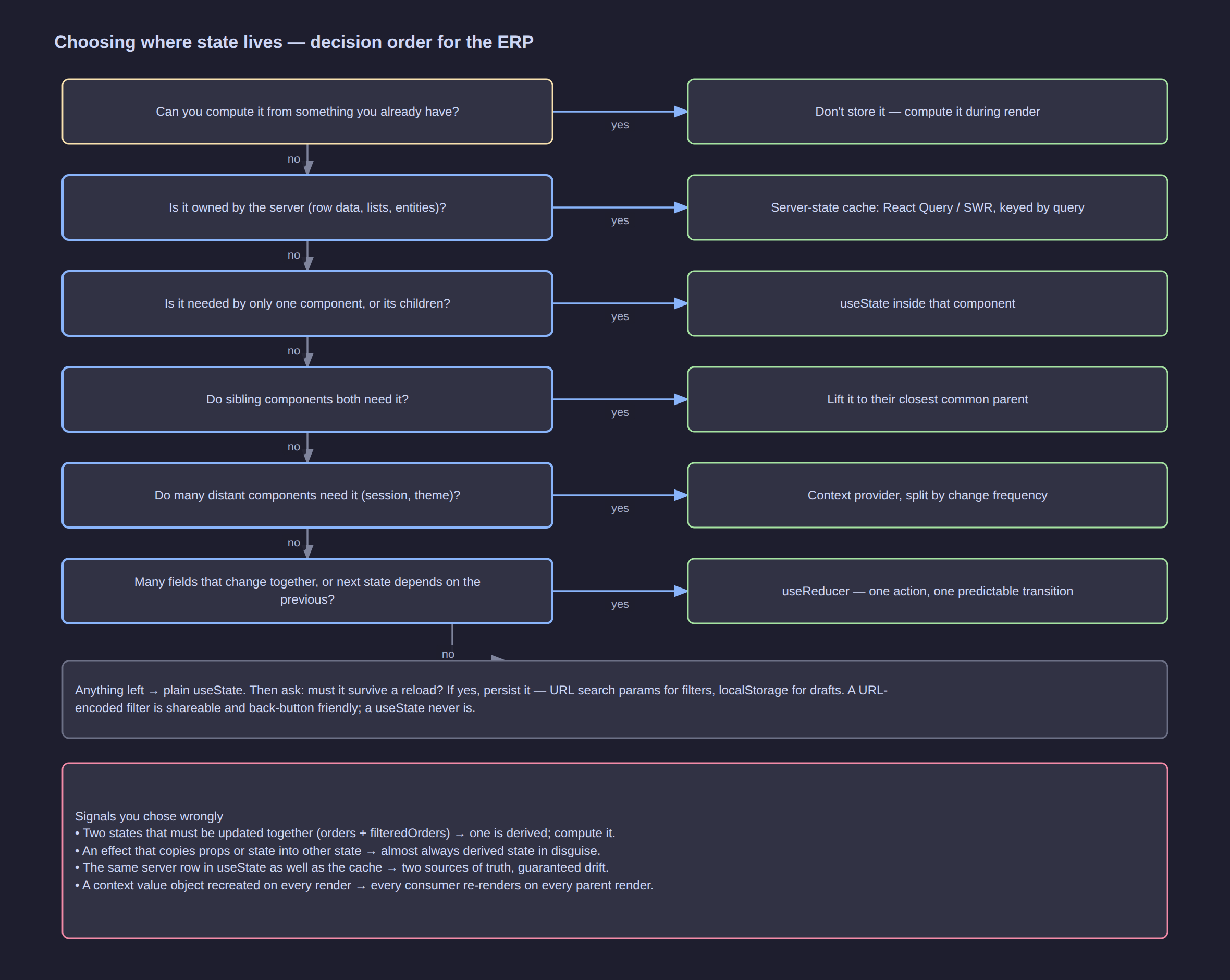
Click the diagram to open it at full resolution.
JSX and events
| HTML habit | React |
|---|---|
class |
className |
for |
htmlFor |
style="width:80px" |
style={{ width: 80 }} |
onclick="fn()" |
onClick={fn} |
onchange |
onChange (fires per keystroke) |
onsubmit + return false |
onSubmit={handler} + e.preventDefault() |
<br>, <img> |
<br />, <img /> |
<!-- … --> |
{/* … */} |
| multiple roots | <>{…}</> or <Fragment> |
Commands
npm create vite@latest erp-web -- --template react-ts   # scaffold
npm run dev                                             # dev server + HMR
npm run build                                           # production build
npm run preview                                         # serve the build locally
npx tsc --noEmit                                        # type-check only
npm test                                                # unit + component tests
npm run lint                                            # includes react-hooks rules
The five rules that prevent most bugs
- Render must be pure — no side effects, no mutation, safe to run twice.
- State is immutable — copy, never edit in place.
- Derive, do not duplicate — if it can be computed, do not store it.
- Keys are identity — use a stable id, never the array index.
- Push state down and lift it only as far as the nearest common parent.
Further Reading
- React — official documentation — particularly Learn React and You Might Not Need an Effect
- Thinking in React — the mental model this article's ERP example follows
- React Router — routing, loaders and nested layouts
- TanStack Query — the server-state layer described above
- React DevTools — Components and Profiler panels
- Testing Library — the testing philosophy used here
- eslint-plugin-react-hooks — enforces the rules of hooks
- Related pages in this KB: Next.js — React Framework Guide