18 — The Node.js Runtime and the Event Loop
Level: Intermediate · Time: ~35 min · Prerequisites: Lesson 17 — Composition, Domain Modelling and Custom Errors
Why this matters
You can write Node code for a year without knowing what the loop does, and then one evening a single
for loop over a large CSV stops your server answering requests while nothing in the code looks wrong.
Node runs your JavaScript on one thread and moves the slow parts elsewhere, so almost every performance
surprise in this course comes from forgetting that. Knowing the phases and what occupies the thread
turns an unexplainable hang into a five-minute diagnosis.
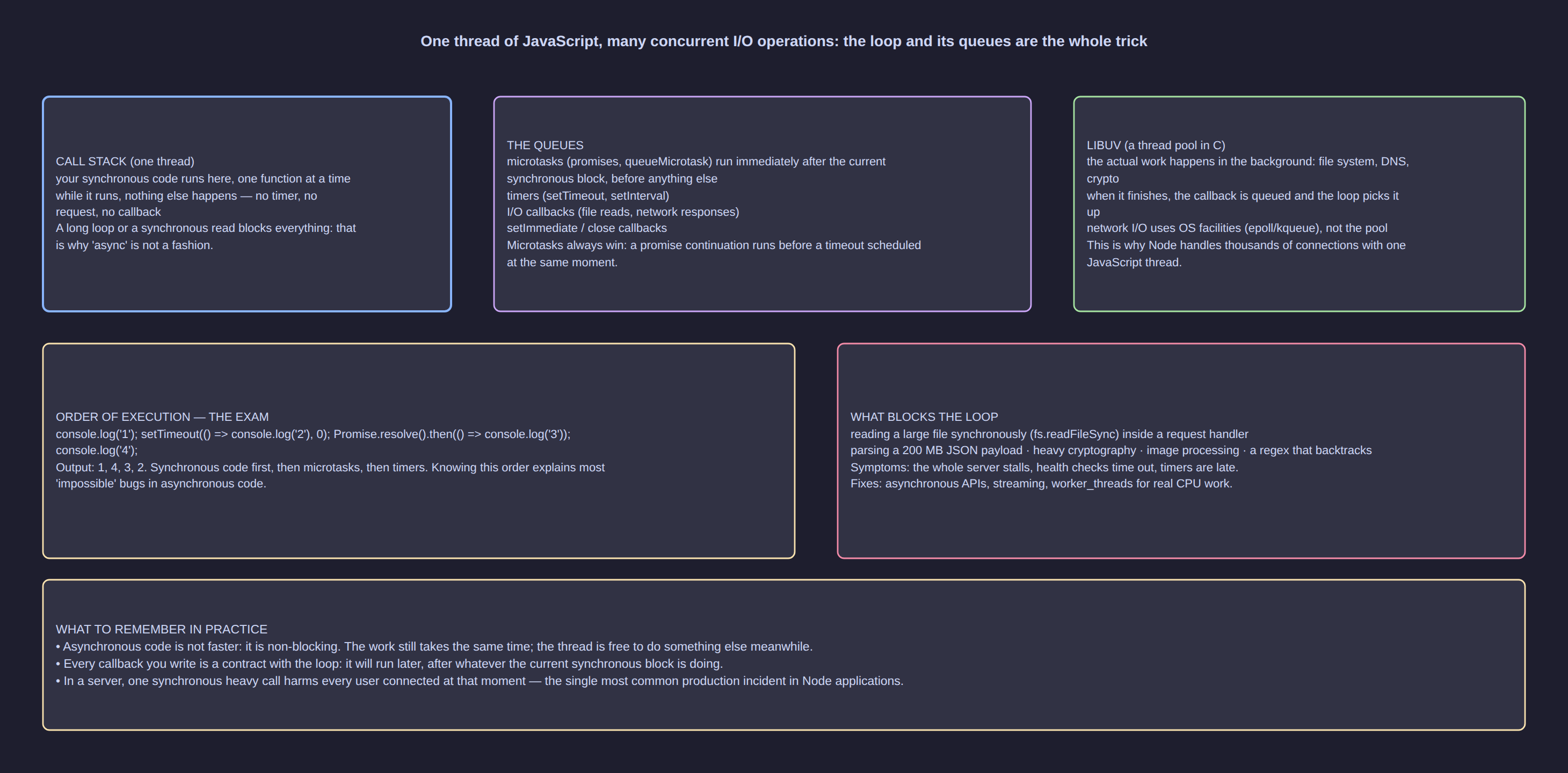
Click the diagram to open it full size.
What Node actually is
Three layers. V8 is the JavaScript engine — it parses, compiles and runs your code and collects its
garbage. libuv is a C library providing the event loop, timers, cross-platform I/O and a background
thread pool. The platform APIs — files, sockets, processes, cryptography — reach you as node:
modules. Your JavaScript runs on a single thread, while filesystem, DNS, TLS and hashing work waits in
libuv's pool, four threads by default (UV_THREADPOOL_SIZE changes it). Single-threaded does not mean
slow: it means the thread must never be occupied.
The event loop, phase by phase
| Phase | What runs there |
|---|---|
| timers | callbacks whose delay has elapsed (setTimeout, setInterval) |
| pending callbacks | deferred system callbacks, such as a TCP connection error |
| poll | new I/O events and their callbacks; the loop waits here when idle |
| check | setImmediate callbacks |
| close | close events, such as a socket closing |
Between phases, and after every single callback, Node empties the microtask queues: promise
callbacks and queueMicrotask first, then process.nextTick. That is why await resumes "immediately"
while a timer waits for its phase.
// src/loop-order.ts
console.log("1 sync");

setTimeout(() => console.log("2 timers phase"), 0);
setImmediate(() => console.log("3 check phase"));
process.nextTick(() => console.log("4 nextTick"));
queueMicrotask(() => console.log("5 queueMicrotask"));
Promise.resolve().then(() => console.log("6 promise callback"));

console.log("7 sync again");
Expected output: 1, 7, 4, 5, 6, then 2 and 3 in either order — documented behaviour:
from the main module the 0 ms timer and the immediate race. Inside an I/O callback the check phase
follows poll directly, so there the immediate always wins.
Microtasks, nextTick and the ordering gotchas
process.nextTick(fn) runs before every other microtask, immediately after the current operation;
queueMicrotask(fn) and Promise.then(fn) share the microtask queue and run after it; setImmediate
runs in the check phase; and setTimeout(fn, 0) waits for the next timers phase, never sooner than
about a millisecond. setInterval repeats the same way, its delay a minimum rather than a promise.
[!WARNING] Recursively scheduling
process.nextTick(or a promise that resolves into another promise) starves timers and I/O for ever, because the microtask queue never empties. To yield to the loop between chunks of work, usesetImmediate.
Why one synchronous loop freezes everything
// src/blocking.ts
const started = performance.now();
setTimeout(() => {
  console.log(`timer set for 50 ms fired after ${Math.round(performance.now() - started)} ms`);
}, 50);

let checksum = 0;
for (let i = 0; i < 2_000_000_000; i++) checksum = (checksum + i) % 1000;

console.log(`loop finished, checksum ${checksum}`);
Expected output: the loop finished line first, then the timer line reporting a number far above
50 — typically over a thousand on a laptop, because the loop owned the thread while the timer, every
request and every file read waited. The same applies to JSON.parse of a very large payload, the
synchronous functions of node:zlib and crypto.pbkdf2Sync, and image or PDF work. Three remedies,
cheapest first: chunk the work and yield with setImmediate; move it to a worker_threads worker,
which has its own isolate and receives data by postMessage; or push it out of the process entirely.
process, arguments, exit codes and signals
process.argv holds the raw command line, process.env the environment variables, process.exitCode
the code the shell will see, and process.on(...) the signals. Parse arguments with node:util rather
than counting positions by hand.
// src/cli.ts
import { parseArgs } from "node:util";

const options = {
  plant: { type: "string", short: "p" },
  days: { type: "string", short: "d", default: "30" },
  verbose: { type: "boolean", short: "v", default: false },
} as const;

const { values } = parseArgs({ options });
const days = Number(values.days);

if (!Number.isInteger(days) || days <= 0) {
  console.error(`--days must be a positive integer, got ${values.days}`);
  process.exitCode = 2; // convention: 0 success, 1 failure, 2 wrong usage
} else {
  console.log(`plant ${values.plant ?? "(all)"}, ${days} days, verbose=${values.verbose}`);
}
The as const keeps the option types literal, so values.plant is string | undefined rather than
unknown. Exit codes are contracts — a scheduled script believes 0 and gives up on anything else — so
set process.exitCode and let the program finish, calling process.exit() only when you cannot wait.
Shutdown arrives as a signal: handle SIGINT and SIGTERM with process.on(signal, handler), stop
accepting work and close the server inside server.close(...), so in-flight responses finish.
The platform modules you actually use
| Module | What you take from it |
|---|---|
node:path |
join, resolve, dirname, basename, extname — never build paths with + |
node:url |
fileURLToPath to turn import.meta.url into a path, pathToFileURL the other way |
node:os |
homedir, tmpdir, platform, arch, cpus |
node:crypto |
randomUUID for ids, createHash for checksums, randomBytes for secrets |
node:util |
parseArgs, and promisify (Lesson 19) |
// src/platform.ts
import { basename, dirname, extname, join, resolve } from "node:path";
import { arch, cpus, homedir, platform } from "node:os";
import { fileURLToPath, pathToFileURL } from "node:url";
import { createHash, randomUUID } from "node:crypto";

const report = resolve(join(homedir(), "solar-data"), "nasa-power-2024.json");
console.log(basename(report), extname(report), dirname(report));
console.log(`${platform()}/${arch()} with ${cpus().length} cpus`);
console.log(dirname(fileURLToPath(import.meta.url)), pathToFileURL(report).href);
console.log(`${randomUUID()} ${createHash("sha256").update("sn-01:2024-06-01").digest("hex").slice(0, 12)}`);
Expected output: nasa-power-2024.json .json /root/solar-data, then something like
linux/x64 with 8 cpus, your module directory beside a file:///…nasa-power-2024.json URL, and a UUID.
Common mistakes
| Mistake | What happens | The fix |
|---|---|---|
A long for loop inside a request handler |
Every other request, timer and I/O callback waits for the whole loop | Chunk with setImmediate, or move the work to a worker_threads worker |
readFileSync in a server handler |
The thread blocks exactly as with a synchronous loop, with no error handling either | Use node:fs/promises (Lesson 22) |
| Believing a 0 ms timer is "immediate" | Timers run in their phase, after all microtasks, at about 1 ms resolution | queueMicrotask when ordering matters, setImmediate to yield to the loop |
items.forEach(async (item) => …) |
forEach ignores the returned promises, so output interleaves and errors vanish |
for…of with await, or Promise.all(items.map(…)) (Lesson 19) |
process.exit() inside a signal handler |
Buffer writes and in-flight responses are cut mid-flight | Close the server or database, set process.exitCode, let the loop drain |
Try it
- Create
src/loop-order.tswith the seven numbered logs above and run it three times:
Expected output: the same first five lines every time (1, 7, 4, 5, 6) with 2 and 3
swapping places between runs — the race you cannot control from the main module.
- Add
src/blocking.ts, run it, then split the loop into four chunks separated byawait new Promise((resolve) => setImmediate(resolve))and run it again.
Expected output: the first run reports a thousand milliseconds or more; the chunked run reports close to the total the whole loop takes, because the loop now returns to the event loop between chunks. The total time barely changes.
- Add
src/cli.tsand run it twice, checkingecho $?after each:
Expected output: plant sn-01, 7 days, verbose=true, then
--days must be a positive integer, got 0 with exit code 2.
Key takeaways
- Node is V8 plus libuv plus the platform APIs: one JavaScript thread, I/O in a small thread pool.
- The loop cycles through timers, poll, check and close, draining microtasks between phases.
process.nextTickruns before promise callbacks, and recursing on either starves timers and I/O.- Any long synchronous computation blocks every request, timer and I/O callback in the process.
process.argv,process.env, exit codes and signals are the contract with the shell.
Check yourself
- A file read is started with
fs/promisesand asetTimeout(…, 0)is scheduled straight after it. Which callback runs first, and what would change the answer? - Why does the blocking test report a timer delay of over a second when you asked for 50 ms?
- You must hash 500 000 rows. Why is neither "just loop" nor "await inside the loop" a real answer?
- Why is setting
process.exitCodesafer than callingprocess.exit(1)at the end of a report command? - Your service receives
SIGTERMand callsserver.close(), yet the process hangs for two minutes. Name two plausible reasons in terms of what the loop is still waiting for.