02 — Your Toolchain — Node, npm, VS Code and the Compiler
Level: Beginner · Time: ~30 min · Prerequisites: Lesson 1 — What TypeScript Is, and Why It Exists
Why this matters
The compiler Lesson 1 promised is an ordinary program you install and configure, and the configuration
is where beginners lose evenings. A project whose tsconfig.json disagrees with its package.json, or
whose compiler came from a global install nobody remembers, produces errors that look like language
problems but are toolchain problems. Four programs do the work: Node runs JavaScript, npm installs and
records packages, the editor's language server checks types as you type, and tsc checks them from a
terminal. Install them once, deliberately, and every remaining lesson is only about TypeScript.
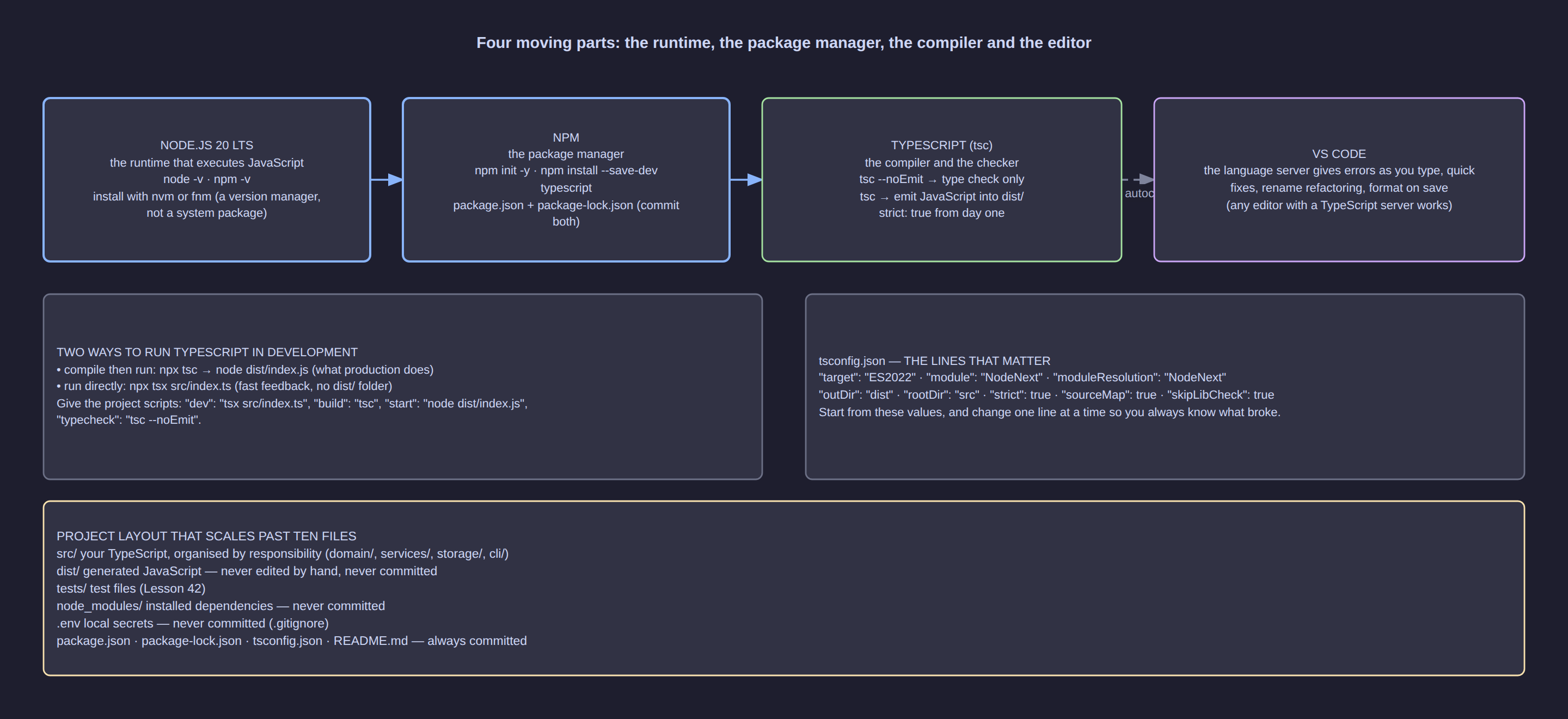
Click the diagram to open it full size.
The mental model: four programs, one pipeline
TypeScript has no runtime, so something else always executes your code.
| Program | Runs on | Its one job |
|---|---|---|
| Node.js | your machine | executes plain JavaScript — the only thing that ever runs |
| npm | Node | downloads packages; writes package.json and package-lock.json |
| tsc | Node | reads .ts, checks types, emits .js into dist/ |
| TS language server | Node, inside the editor | the same checker in editor mode: squiggles, hover, autocomplete |
The pipeline for every file you write: edit .ts → tsc checks → tsc erases the types and emits .js → node runs the .js.
Installing Node with a version manager
Install through fnm or nvm, never apt install nodejs: the system package manager writes into
root-owned directories, which is the origin of the EACCES: permission denied errors that push people
into sudo npm install -g. A version manager keeps Node in your home directory and lets each project pin its own version.
fnm install 22 && fnm use 22 && fnm default 22   # or: nvm install 22 && nvm use 22
node -v            # v22.x.y — anything 20 or newer is fine
npm -v             # 10.x.y
node -v > .nvmrc   # optional: lets `fnm use` / `nvm use` pick the right version
Node 20 is the minimum because it is the first long-lived LTS line that also ships modern module
resolution and fetch globally. Everything here assumes Node 20+ and ESM; on Node 16 you will meet errors that have nothing to do with types.
VS Code: the language server is the point
TypeScript support is built in — there is no extension to install. Four settings are worth doing on
day one: the Problems panel (Ctrl+Shift+M, Cmd+Shift+M on macOS) lists every error with file
and line; quick fixes (Ctrl+.) offer the compiler's own suggestions; "editor.formatOnSave": true
keeps diffs readable; and "typescript.tsdk": "node_modules/typescript/lib", followed by the command
palette entry TypeScript: Select TypeScript Version → Use Workspace Version, makes the editor use the compiler you actually installed rather than a bundled one.
[!IMPORTANT] If the editor is happy and
npm run typecheckis not, the two are reading differenttsconfig.jsonfiles. The status bar of an open.tsfile shows which config the language server chose.
Local, not global: npx and the runners
Tools a project needs belong in that project's devDependencies, so a colleague gets identical versions from one npm install:
mkdir -p ~/dev/ts-zero-to-hero && cd ~/dev/ts-zero-to-hero
npm init -y
npm install --save-dev typescript @types/node tsx
npx tsc --version        # Version 5.x.y
npx <tool> looks in ./node_modules/.bin first and only reaches the network if it finds nothing,
which is why npx tsc needs no global install. @types/node supplies the types for process,
node:fs and the rest — without it the compiler does not know process.env exists.
| Command | What it does | When it is right |
|---|---|---|
npx tsc |
checks, then emits JavaScript into dist/ |
npm run build, and anything you deploy |
npx tsx file.ts |
strips the types in memory and runs the file | experiments and one-off scripts |
npx tsx watch file.ts |
runs, then re-runs on every save | the everyday development loop |
node dist/index.js |
runs emitted JavaScript only | production, and debugging built output |
nodemon is still widely used, but it was built for JavaScript: watching TypeScript means configuring
it to run tsx as its executor. tsx watch does the same job with no configuration at all.
[!WARNING]
tsxerases types; it does not check them. A file with a real type error runs happily undertsxand only fails whentscruns — which is whynpm run typecheckexists.
tsconfig.json, read line by line
Replace whatever npx tsc --init generates with this, the configuration the course assumes:
{
  "compilerOptions": {
    "target": "ES2022",
    "lib": ["ES2022"],
    "module": "NodeNext",
    "moduleResolution": "NodeNext",
    "rootDir": "src",
    "outDir": "dist",
    "strict": true,
    "skipLibCheck": true,
    "sourceMap": true,
    "forceConsistentCasingInFileNames": true
  },
  "include": ["src/**/*.ts"]
}
target— which JavaScript version is emitted. Node 20 understands ES2022 natively, so nothing is down-levelled and the output resembles the source.lib— which global APIs the checker believes exist. LeavingDOMout is deliberate: in a Node project a straydocument.querySelectorshould be a compile error, not a runtime mystery.module/moduleResolution— emit and resolve modules the way Node 20 really does, which means ESM. Because resolution is real, relative imports carry the.jsextension even though the file you wrote is.ts:import { total } from "./yield.js". Lesson 12 covers this properly.rootDir/outDir— the input and output trees;dist/mirrorssrc/exactly, sosrc/report.tsbecomesdist/report.js.strict— a bundle of checks againstnull, unannotated parameters and several unsound patterns. It is one flag because it is meant to be on; Lesson 3 unpacks the parts.skipLibCheck— does not check your dependencies'.d.tsfiles. Real build speed, at the price of hiding errors inside libraries you cannot fix anyway.sourceMap— emits.js.mapfiles so a debugger steps through your original.ts(Lesson 3).
Layout, scripts and what not to commit
The layout is src/ for your TypeScript, dist/ for generated output, plus package.json, package-lock.json and .gitignore — nothing else at the top level.
package.json needs "type": "module" and four scripts, which become the vocabulary of the course:
{
  "scripts": {
    "typecheck": "tsc --noEmit",
    "build": "tsc",
    "start": "node dist/index.js",
    "dev": "tsx watch src/index.ts"
  }
}
typecheck runs the compiler with --noEmit: it reports errors and writes nothing, which is the check
you will run a hundred times a day. .gitignore holds node_modules/, dist/, *.log and .env —
both generated trees are reproducible from package.json and src/, so they are noise in a diff.
package-lock.json is the opposite: commit it, because it is what makes an install identical on another machine six months from now.
Common mistakes
| Mistake | What happens | The fix |
|---|---|---|
npm install -g typescript |
A second, silently different compiler the project does not control | Install locally with --save-dev and call npx tsc |
Committing dist/ or node_modules/ |
Diffs nobody can review, plus stale output hiding build failures | Ignore both; commit package.json and the lock file |
import { total } from "./yield" under NodeNext |
Node throws ERR_MODULE_NOT_FOUND when the built code runs |
Write the extension the runtime sees: "./yield.js" |
Trusting tsx watch as a type check |
Type errors reach your commit because a run succeeded | Run npm run typecheck before every commit |
Editing files inside dist/ |
The next npm run build overwrites your change silently |
Edit only src/; treat dist/ as disposable |
Leaving lib at its default in a Node project |
document and window type-check, then crash at runtime |
Set "lib": ["ES2022"] and install @types/node |
Try it
- Build the skeleton and confirm the tools are local:
cd ~/dev/ts-zero-to-hero && mkdir -p src
npm install --save-dev typescript @types/node tsx
npx tsc --version
Expected: a line such as Version 5.6.3, and ls node_modules/.bin listing tsc and tsx.
-
Create
src/index.tswith one line:console.log("solar tracker: bootstrap complete"); -
Run the check, the build and the output in order:
Expected: typecheck prints nothing — silence is success. ls dist shows index.js and index.js.map. npm start prints solar tracker: bootstrap complete.
- Prove the two runners differ. Replace the line with
const annualYieldKwh: number = "five thousand"; console.log(annualYieldKwh);and compare:
npx tsx src/index.ts   # prints "five thousand" — no complaint at all
npm run typecheck      # error TS2322: Type 'string' is not assignable to type 'number'.
Delete the broken line afterwards. This contrast is the single most useful thing to carry out of the lesson.
Key takeaways
tscchecks, erases the types and emits JavaScript; Node always runs JavaScript and never runs TypeScript.- Install Node with a version manager and the compiler as a local devDependency; global installs cause permission errors and version drift.
tsxruns TypeScript but checks nothing, sonpm run typecheck(tsc --noEmit) belongs in every project you create.tsconfig.jsonis the contract between source and compiler:targetandlibdecide which JavaScript exists,moduleandmoduleResolutiondecide how imports work,rootDirandoutDirdecide where output goes.src/is yours;dist/andnode_modules/are generated and ignored;package-lock.jsonis committed so installs are reproducible.
Check yourself
- A colleague's editor shows no errors while
npm run typecheckfails on the same commit. Name two plausible causes and how you would confirm each. - Why does this course keep
DOMout oflibfor a Node program — what class of mistake does that turn into a compile error? - You move
@types/nodefromdevDependenciestodependencies. What changes, and when? - Explain why
npm startrunsdist/index.jsrather thansrc/index.ts, and what would have to be true for that to be wrong.