41 — The Full-Stack Project — Build, Configuration and Deployment
Level: Advanced · Time: ~50 min · Prerequisites: Lesson 40 — A Backend in TypeScript
Why this matters
Everything so far ran on your machine: two terminals, a debugger, a database you started by hand. Production removes those props. Two runtimes now matter separately — a browser that downloads files anybody can read, and a server that holds credentials nobody may read — and only what your build produced reaches the server. The failures that follow are rarely about the code: they are configuration reaching the wrong process, an artefact never shipped, or a migration applied after the new code started.
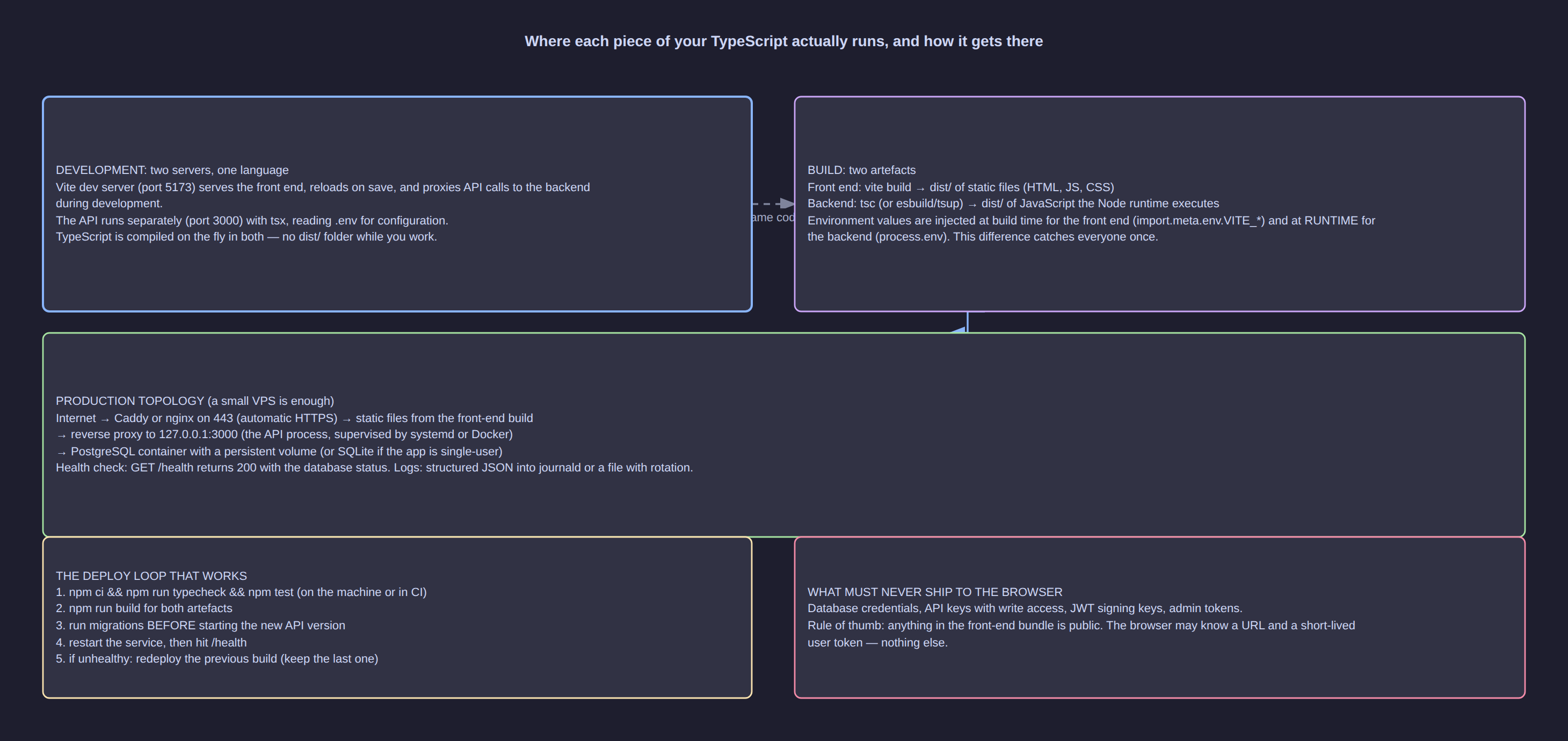
Click the diagram to open it full size.
Two runtimes, two kinds of configuration
A browser cannot keep a secret, so the split below is not a matter of taste: it is what each runtime is allowed to know.
| Value | Where it lives | Who can read it | To change it |
|---|---|---|---|
VITE_REGION, VITE_API_BASE |
.env.production, inlined into the bundle by Vite |
every visitor, in clear text | rebuild the front end |
PORT |
the service's EnvironmentFile |
the server process | restart the service |
DATABASE_URL |
the same file, mode 600, owned by the service user |
the server process | restart the service |
LOG_LEVEL, SOLAR_CONCURRENCY |
the same file | the server process | restart the service |
Read the last column: the front end is static files and needs a rebuild; the API is long-running and needs a restart.
[!WARNING] A
VITE_prefix means "inline this into the bundle". Anyone can open the built file and read the value, so a key placed there is published. Secrets live on the server only.
Build: three artefacts and the scripts that produce them
Two packages, api/ and web/, and one root package.json chains them: the backend is compiled by
tsc into dist/, the front end is bundled by vite build, and nothing ships that has not passed
tsc -b first.
{
  "name": "solar-tracker",
  "private": true,
  "type": "module",
  "scripts": {
    "typecheck": "npm --prefix api run typecheck && npm --prefix web run typecheck",
    "build": "npm run typecheck && npm --prefix api run build:api && npm --prefix web run build:web",
    "migrate": "npm --prefix api run migrate",
    "start": "node api/dist/server.js"
  }
}
The API's tsconfig.json is the half that matters, because Node runs its output directly: module: "NodeNext" with
moduleResolution: "NodeNext" makes import { readConfig } from "./config.js" — the .js extension for a TypeScript
file, from Lesson 12 — correct as well as necessary. tsup src/server.ts --format esm --target node20 can bundle the
server instead, but it does not typecheck, so tsc -b stays in the chain.
An image that is small, reproducible and not root
A multi-stage build keeps the compiler, the dev dependencies and the build cache out of the artefact that runs, which is where the megabytes and most of the attack surface live.
# api/Dockerfile
FROM node:20-slim AS build
WORKDIR /app
COPY package.json package-lock.json ./
RUN npm ci
COPY prisma ./prisma
RUN npx prisma generate
COPY tsconfig.json ./
COPY src ./src
RUN npm run build:api

FROM node:20-slim AS runtime
ENV NODE_ENV=production
WORKDIR /app
COPY package.json package-lock.json ./
RUN npm ci --omit=dev && npm cache clean --force
COPY --from=build /app/node_modules/.prisma ./node_modules/.prisma
COPY --from=build /app/dist ./dist
COPY prisma ./prisma
USER node
EXPOSE 8787
HEALTHCHECK --interval=30s --timeout=3s --start-period=10s --retries=3 \
  CMD node -e "fetch('http://127.0.0.1:' + (process.env.PORT ?? 8787) + '/api/health').then(r => process.exit(r.ok ? 0 : 1)).catch(() => process.exit(1))"
CMD ["node", "dist/server.js"]
Four lines carry the weight. npm ci --omit=dev keeps TypeScript, the test runner and the linter out of the
shipped image. USER node switches off root, so a compromise cannot write as the superuser — and it means logs
go to stdout rather than to a file inside the image. prisma generate runs in the build stage, and the
HEALTHCHECK makes the container's verdict visible in docker ps, on the route the deploy script calls.
A service, a reverse proxy and HTTPS
The Node process listens on 127.0.0.1:8787; ports 80 and 443 belong to the reverse proxy. A systemd unit
of five directives does the job: Type=simple, User=solar, an EnvironmentFile at
/etc/solar/api.env with mode 600, ExecStart=/usr/bin/node /opt/solar/dist/server.js, and
Restart=on-failure — adopted with sudo systemctl daemon-reload and
sudo systemctl enable --now solar-api.
Caddy obtains and renews the TLS certificate by itself once the domain resolves to the machine, which is why it is the shorter answer than nginx plus certbot.
solar.example.com {
    encode gzip
    handle /api/* {
        reverse_proxy 127.0.0.1:8787
    }
    handle {
        root * /srv/solar-web
        try_files {path} /index.html
        file_server
    }
}
The first block replaces the Vite dev proxy from Lesson 39 with a real one: in production both halves share one
origin, so VITE_API_BASE stays empty and no CORS headers are needed. The second serves the built front end.
Adopt it with sudo caddy validate --config /etc/caddy/Caddyfile and sudo systemctl reload caddy.
Deploying in this order, and the evidence you check after
Each step depends on the one before it, and a backup taken after a migration is not a backup.
# on the server, in /opt/solar
export STAMP=$(date -u +%Y%m%dT%H%M%SZ)
sudo -u postgres pg_dump -Fc solar_prod > /var/backups/solar/pre-${STAMP}.dump   # 1. backup
docker compose run --rm api npx prisma migrate deploy                           # 2. migrate
docker compose up -d --no-deps api                                              # 3. start
curl -fsS https://solar.example.com/api/health                                  # 4. verify
Migrations go first, as an explicit step: run from application startup, ten replicas would race on the same schema
change. Prisma's migrations are forward-only, so rolling back is two actions: point RELEASE_TAG in api.env at the
previous image and run docker compose up -d --no-deps api, and if the schema changed, restore the pre-migration
dump. Keep changes additive for that reason — a new nullable column is ignored by old code.
Observability is two habits rather than a product. Logs go to stdout, so journald or the container runtime keeps
them: journalctl -u solar-api -n 50 --no-pager, docker compose logs -f --tail=100 api. The health route answers
200 with {"status":"ok","db":true} and 503 when the query behind it fails. Then verify the whole path: the CLI
import still runs against production data, the API returns rows the front end can validate, and the dashboard renders.
Common mistakes
| Mistake | What happens | The fix |
|---|---|---|
A secret in a VITE_ variable |
It is inlined into a public bundle and readable by anyone | Keep secrets in the server environment file; proxy the call through /api |
| A production install carrying devDependencies | A large image holding the compiler and test runner, and more code to patch | npm ci --omit=dev in the runtime stage of a multi-stage build |
| Running the container as root | A compromise can write anywhere in the image | USER node, and write logs to stdout rather than to a file inside the image |
| Exposing the Node port directly | The API answers plain HTTP on :8787 and bypasses the proxy and its HTTPS |
Bind to 127.0.0.1 and let Caddy or nginx own 80 and 443 |
| Migrating after the new code starts | The application queries columns the schema does not have yet | Backup, prisma migrate deploy, then start — never migrate from application startup |
No health route and no HEALTHCHECK |
"It started" becomes the only evidence, disproved by a user | One cheap route that checks the database, called by the health check and the deploy script |
Copying node_modules into the build context |
Slow builds that occasionally ship a stale tree | A .dockerignore with node_modules, dist, web, .git and .env |
Try it
-
Build from a clean checkout with
npm ci && npm run build && ls api/dist/server.js web/dist/index.html. Expected:tsc -bprints nothing on success,api/dist/server.jsexists, andweb/dist/holdsindex.htmlbeside hashed assets. -
Build the image and run it exactly as the server would:
docker build -t solar-api:local api
docker run --rm -d --name solar-api --env-file /etc/solar/api.env -p 127.0.0.1:8787:8787 solar-api:local
docker inspect --format '{{.State.Health.Status}}' solar-api
curl -fsS http://127.0.0.1:8787/api/health
Expected: healthy after the ten-second start period, then the health JSON. If it says unhealthy,
docker logs solar-api names the reason — usually a DATABASE_URL the container cannot resolve.
-
Deploy in the order above, then read the evidence: the health call,
journalctl -u solar-api -n 50 --no-pager, andcurl -fsS https://solar.example.com/api/days | head -c 200. Expected: no stack traces in the log, and JSON rows from production. -
Break it on purpose — stop the database and call health (expected
503, not a connection error page), thensudo systemctl kill -s SIGKILL solar-apiand watchsystemctl status solar-api --no-pagerfor ten seconds (expectedactive (running)again). Finally pointRELEASE_TAGat the previous image, rundocker compose up -d --no-deps apiand repeat the health call: expected is200from the older release.
Key takeaways
- Configuration splits by trust:
VITE_values are inlined and need a rebuild; server environment values are read at start and need a restart. - The build produces three artefacts behind one gate:
tscfor the API,vite buildfor the browser,tsc -bin front of both. - A multi-stage image with
npm ci --omit=dev,USER nodeand aHEALTHCHECKis an image you can rebuild next year. - Deployment has an order — backup, migrate, start, verify — and rollback means the previous image tag plus the pre-migration dump.
- Observability is logs on stdout and a health route that reports the database honestly.
Check yourself
- Your dashboard shows stale figures after a change on the server: which kind of change was it, and which step did you forget?
- Why must the health route query the database rather than return
{"status":"ok"}unconditionally? - A migration adds a required column with no default: why is that a bad release, and what is the additive version?
- Ten replicas each run
prisma migrate deployon boot: name two distinct ways this goes wrong. - You have ninety seconds to decide whether to roll back: which three pieces of evidence do you check?