Radio, Antennas and LoRa — How It Actually Works
Last reviewed: 2026-09-20
Overview
This article explains, from zero, how a radio link works, why antennas behave the way they do, and how the LoRa radio underneath Meshtastic and Reticulum turns a few tens of milliwatts into several kilometres. It ends with a complete, real project: a farm with no cell coverage, four nodes, the arithmetic behind the layout, and the parts to buy.
You do not need any electronics background. Every number in this article is either computed here, taken from the official documentation of the tools involved, or labelled as an order of magnitude. Where a figure is a datasheet value, it is said so.
[!NOTE] What you will be able to do after reading. Judge whether a radio link will work before buying anything; know why a node that performs badly does so; build and deploy a solar-powered LoRa node; and choose between LoRaWAN, Meshtastic and Reticulum on reasons instead of fashion.
Part 1 — The physical layer, from scratch
Radio is an electric current that leaves the wire
Forget the word "wave" for a moment. A radio transmitter takes an alternating current and pushes it into a piece of metal. The electrons in that metal accelerate back and forth, and accelerating charges radiate energy: part of the current detaches from the wire and travels through space. At the other end, the field passing over a second piece of metal pushes its electrons around, creating a tiny — really tiny — current that the radio chip amplifies and decodes.
That is the whole story. Everything else is detail about how well it works.
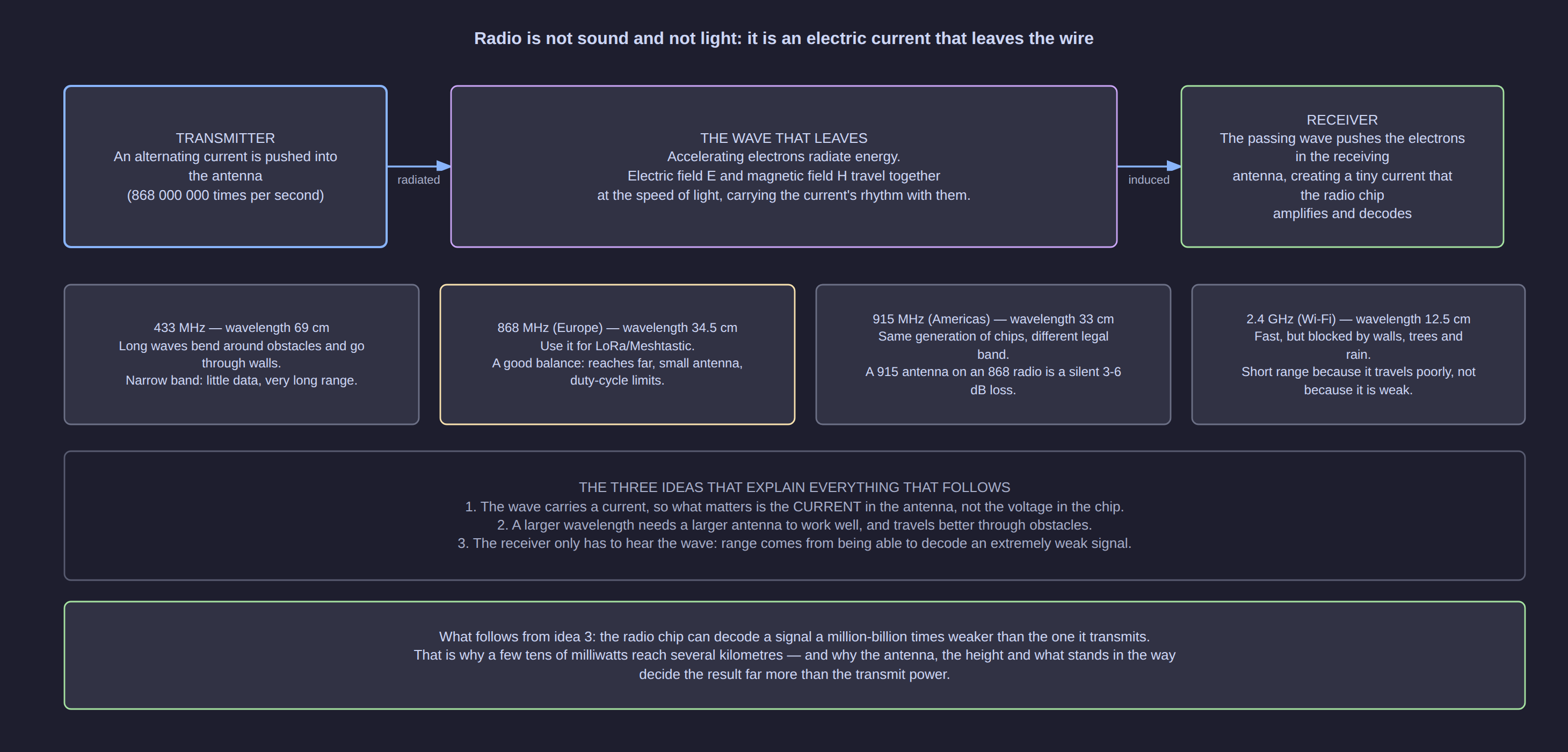
Three ideas explain everything that follows.
- The wave carries a current, so what matters is the current in the antenna — not the voltage on the chip's pin.
- A longer wavelength needs a longer antenna to work well, and it travels better through walls and trees.
- The receiver only has to hear the wave. Range comes from being able to decode an extremely weak signal, not from shouting.
Idea 3 is the one people get wrong. A LoRa receiver can decode a signal around a million-billion times weaker than what it transmits (a receiver sensitivity near −137 dBm against a transmit power near +22 dBm). That is why milliwatts cross kilometres: the receiving end is extraordinarily good at hearing, not the transmitting end at shouting.
The wavelength decides everything else
Frequency and wavelength are two views of the same thing: wavelength = speed of light / frequency. At 868 MHz — the European band used by LoRa — the wavelength is 34.5 cm. That single number explains antenna lengths, how well the signal goes through a wall, and how much data you can carry.
| Band | Wavelength | Behaviour | Typical use |
|---|---|---|---|
| 433 MHz | 69 cm | Bends around obstacles, goes through walls, very long range, very little data | Remote controls, some LoRa kits |
| 868 MHz (Europe) | 34.5 cm | Good balance: reaches far, small antenna, duty-cycle limits apply | LoRa, Meshtastic, LoRaWAN in the EU |
| 915 MHz (Americas) | 33 cm | Same generation of chips, different legal band | LoRa in the US, Brazil, Australia |
| 2.4 GHz | 12.5 cm | Fast, but absorbed by walls, leaves and rain | Wi-Fi, Bluetooth, drone video |
The trap in that table is the middle two rows. A 915 MHz antenna on an 868 MHz radio still screws on, still receives something, and silently costs you 3–6 dB — half to three quarters of your power, thrown away by a part that "works". Always read the band on the listing before you buy an antenna.
dBm and dB without fear
Radio power is measured in dBm, which is a way of writing milliwatts on a logarithmic scale. It exists because power ratios in radio span absurd ranges (from 0.0000000000001 mW at the receiver to 100 mW at the transmitter), and logarithms turn that into numbers you can add.
| dBm | Milliwatts | Where you meet it |
|---|---|---|
| 0 dBm | 1 mW | The reference point |
| +10 dBm | 10 mW | Low-power modules |
| +14 dBm | ≈ 25 mW | The legal ERP limit for the 868.0–868.6 MHz sub-band |
| +20 dBm | 100 mW | Common maximum on cheap LoRa boards |
| +22 dBm | ≈ 158 mW | SX1262 module maximum (Heltec V3/V4 class) |
| +27 dBm | ≈ 500 mW | High-power modules, only where the law allows |
Two rules to memorise, because they are used constantly:
- 3 dB = twice (or half) the power. 6 dB = four times. 10 dB = ten times.
- 6 dB ≈ twice the distance in free space. This is why an antenna is worth more than a bigger radio: going from 20 dBm to 22 dBm buys you 2 dB (a third of "twice"), while a 5 dBi antenna instead of a 2 dBi one buys you 3 dB immediately and legally.
Receive power is also a dBm figure, and it is always negative: −80 dBm is a strong signal, −120 dBm is weak, −137 dBm is at the edge of what LoRa can decode.
Part 2 — Antennas
An antenna is a piece of metal cut to match the wavelength
An antenna is a tuned circuit made of metal. Its length has to relate to the wavelength for it to work efficiently, and the two lengths you meet are λ/4 and λ/2.
At 868 MHz:
- λ/4 = 8.6 cm — the little rubber whip on a LoRa board. It works against a "ground plane": the board itself, a metal case, a ground wire. That counterweight is part of the antenna, which is why the same board performs differently in a plastic box and inside a metal enclosure.
- λ/2 = 17.3 cm — a dipole: two λ/4 arms fed in the middle, no ground plane needed. It has ≈ 2.15 dBi of gain and is the reference against which every other antenna gain is quoted.
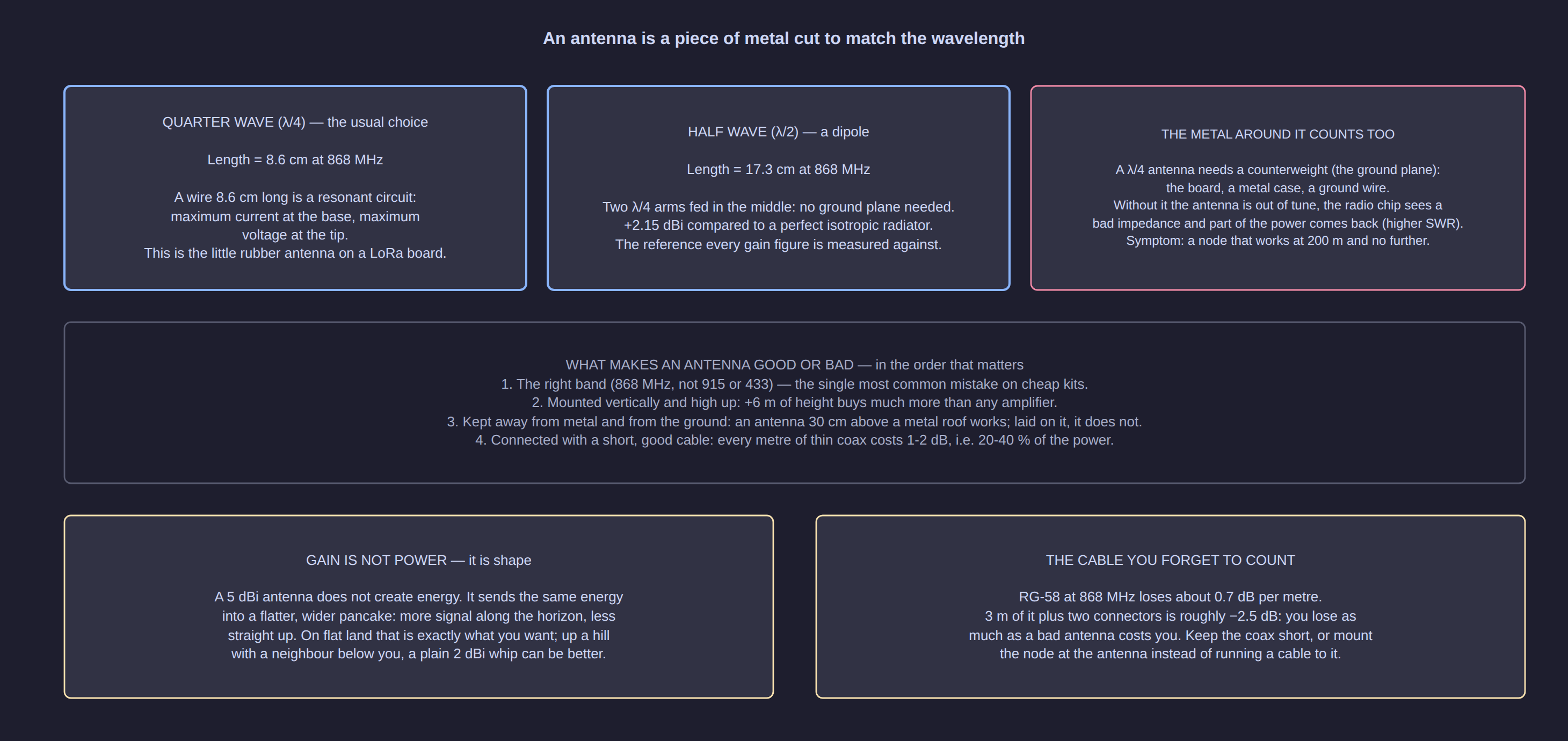
What makes an antenna good, in the order that matters:
- The right band. 868 MHz, not 915 or 433. This is the most common mistake on cheap kits.
- Height. Six extra metres of height buys far more than any amplifier, and the law does not care about height.
- Distance from metal and from the ground. An antenna 30 cm above a metal roof works; laid on it, it does not.
- A short, good feed cable. Every metre of thin coax costs 1–2 dB, i.e. 20–40 % of your power. If you need the antenna high, put the whole node high.
Gain is shape, not power
The word "gain" misleads everybody. A 5 dBi antenna does not create energy: it sends the same energy out in a flatter, wider pancake, so there is more of it along the horizon and less going straight up.
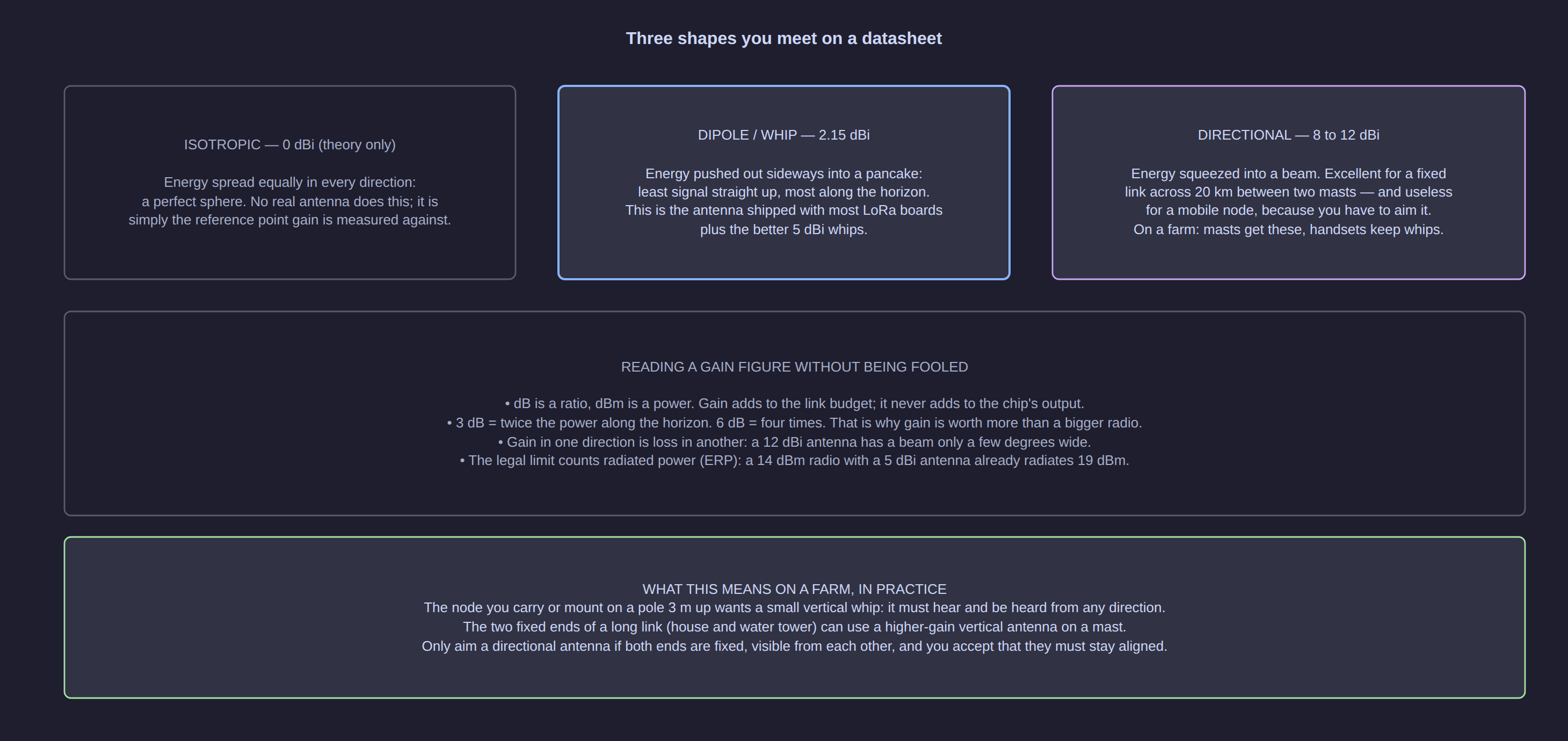
| Antenna | Gain | When it is the right choice |
|---|---|---|
| Isotropic | 0 dBi | Theory only — the reference point |
| Quarter-wave whip (board antenna) | ≈ 2 dBi | Portable nodes, handhelds, anything that moves |
| 5 dBi vertical whip | 5 dBi | The sweet spot for a fixed node on a pole |
| Fibreglass outdoor vertical | 8–12 dBi | A mast at the far end of a long fixed link |
| Yagi / directional | 8–15 dBi | Two fixed masts, aligned, far apart |
[!WARNING] Gain counts towards the legal limit. Regulations limit radiated power (ERP), not the chip's output. A 14 dBm radio with a 5 dBi antenna already radiates about 19 dBm. Adding gain is legal only up to the ERP ceiling of your band — see the legal section below.
Polarisation: keep every antenna vertical
The wave oscillates in a plane. If both antennas share that plane, the link works normally. If they are crossed — one vertical, one horizontal — the receiving antenna sees almost nothing: up to 20 dB lost, which is the difference between a comfortable link and none at all.
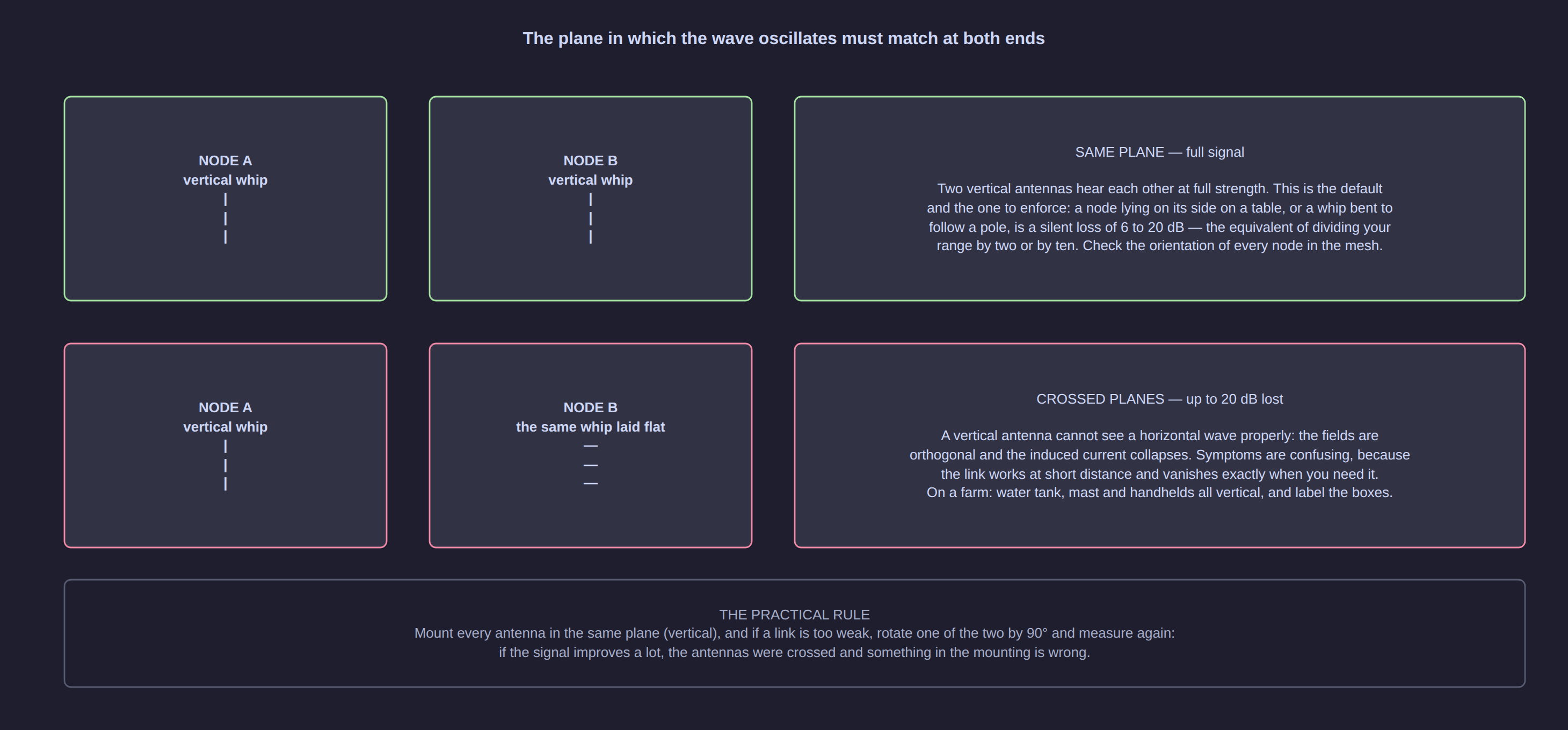
This matters in the field, not in theory: a node taped flat onto a mast, a whip bent to one side along a pole, a handset lying on a table. Mount all antennas in the same plane (vertical), and if a link is unexpectedly weak, rotate one by 90° and measure again.
Part 3 — The maths that decides your range
The link budget: one addition that answers "will it work?"
Add everything that helps, subtract everything that hurts, and the result is your margin. If the margin is positive, the link closes; if it is negative, no setting will save it.
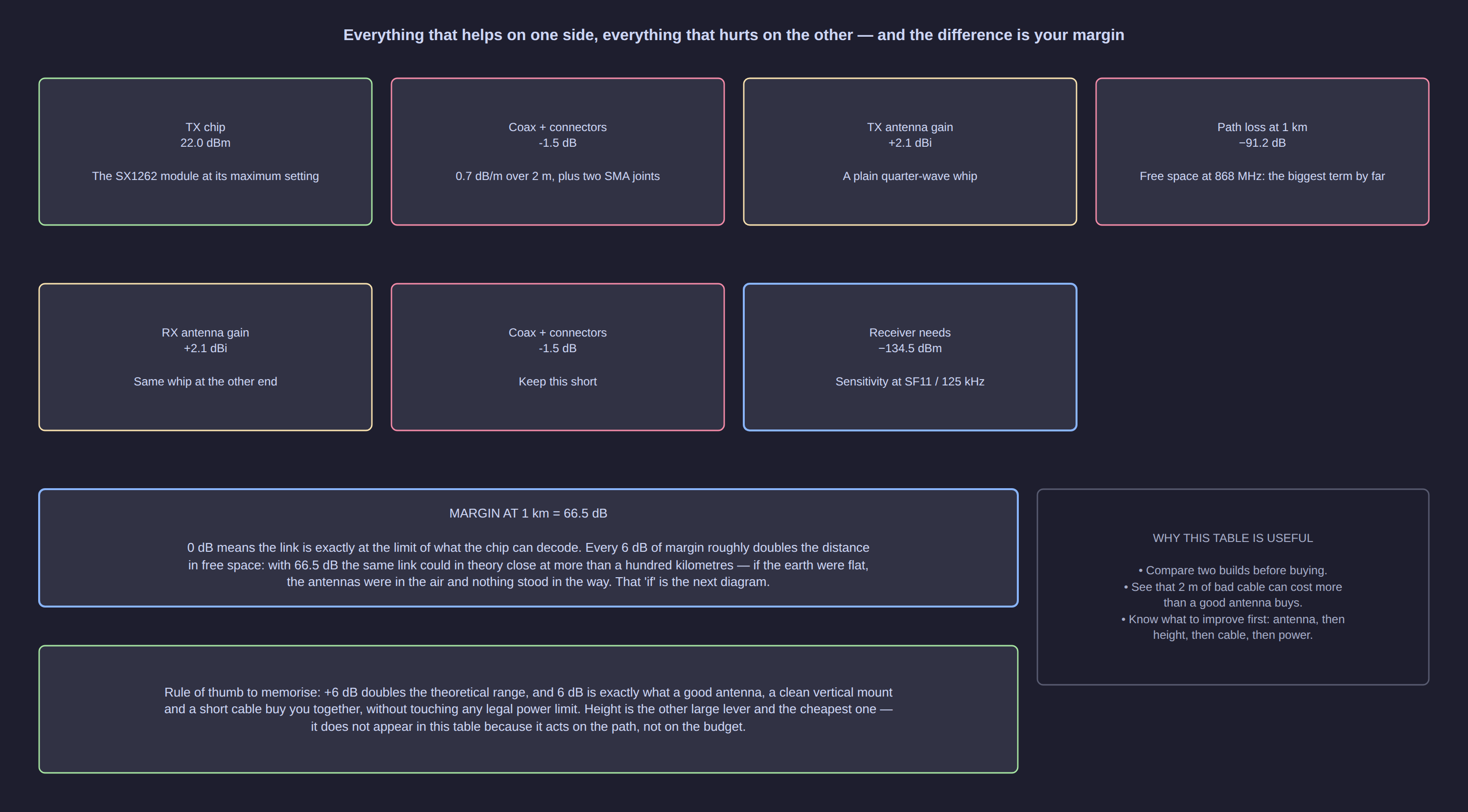
The largest term by far is the free-space path loss: how much the signal spreads out and thins as it travels. It grows with the square of the distance — double the distance, lose 6 dB.
| Distance | Free-space loss at 868 MHz | What it costs you |
|---|---|---|
| 0.5 km | 85.2 dB | — |
| 1 km | 91.2 dB | The reference almost every datasheet uses |
| 2 km | 97.2 dB | |
| 5 km | 105.2 dB | |
| 10 km | 111.2 dB | |
| 20 km | 117.2 dB | |
| 40 km | 123.3 dB | Already more than a whole transmit power |
Now put a real radio against those numbers. An SX1262-based board transmits at a known power and can decode down to a sensitivity that depends on the spreading factor (datasheet figures at 125 kHz bandwidth):
| Spreading factor | Receiver sensitivity | Budget at +22 dBm (0 dBi antennas) | Free-space distance this budget buys |
|---|---|---|---|
| SF7 | −123 dBm | 145 dB | ≈ 490 km |
| SF9 | −129 dBm | 151 dB | ≈ 976 km |
| SF11 | −134.5 dBm | 156.5 dB | ≈ 1 840 km |
| SF12 | −137 dBm | 159 dB | ≈ 2 450 km |
[!IMPORTANT] Those distances are not a mistake and not a promise. Free-space maths ignores the earth, the ground and everything standing on it. It is how a datasheet arrives at "15 km" claims for a device that gives you 800 m in a street. The budget tells you the potential; the next two sections tell you what actually limits you.
What really stops you: the horizon and the Fresnel zone
Two physical effects do almost all of the damage.
The Fresnel zone. The energy of the link does not travel along an infinitely thin line: it travels inside an ellipsoid around that line. Obstacles inside the first Fresnel zone weaken the signal without necessarily breaking the link — the classic "it works sometimes, and always fails when it matters".
| Distance | Radius of the first Fresnel zone | Clearance to keep (60 %) |
|---|---|---|
| 0.5 km | 6.6 m | 3.9 m |
| 1 km | 9.3 m | 5.6 m |
| 2 km | 13.1 m | 7.9 m |
| 5 km | 20.8 m | 12.5 m |
| 10 km | 29.4 m | 17.6 m |
The horizon. Radio waves bend slightly around the earth (a little more than light does), but not much. Two antennas can only see each other up to a distance set by their heights:
| Antenna height (both ends) | Radio horizon |
|---|---|
| 1.5 m | ≈ 10 km |
| 2 m | ≈ 12 km |
| 5 m | ≈ 18 km |
| 10 m | ≈ 26 km |
| 20 m | ≈ 37 km |
| 30 m | ≈ 45 km |
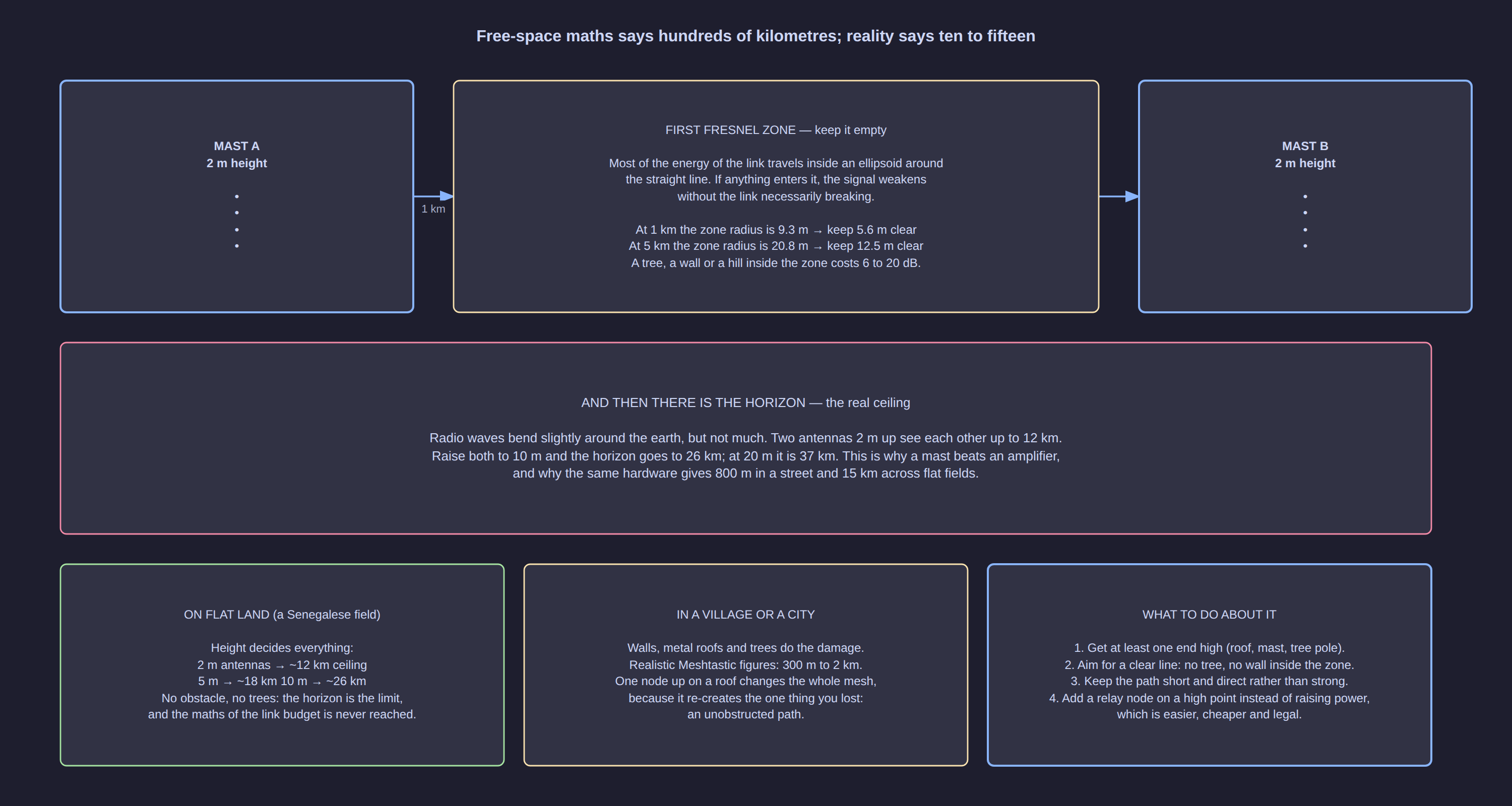
This table is the most useful one in the article. It explains why the same hardware gives 800 m in a village and 15 km across flat farmland: on flat land with no obstacles, the horizon — not the link budget — is the ceiling, and it is bought with height, which costs a mast and no electricity.
The spreading factor: the dial you trade range against speed with
LoRa does not transmit on one frequency. It sweeps a tone across the whole channel — a chirp — and the receiver looks for that glide. Noise does not glide, so a LoRa receiver can pick a chirp out of a signal far weaker than the noise around it. This is why range is bought with sensitivity rather than power.
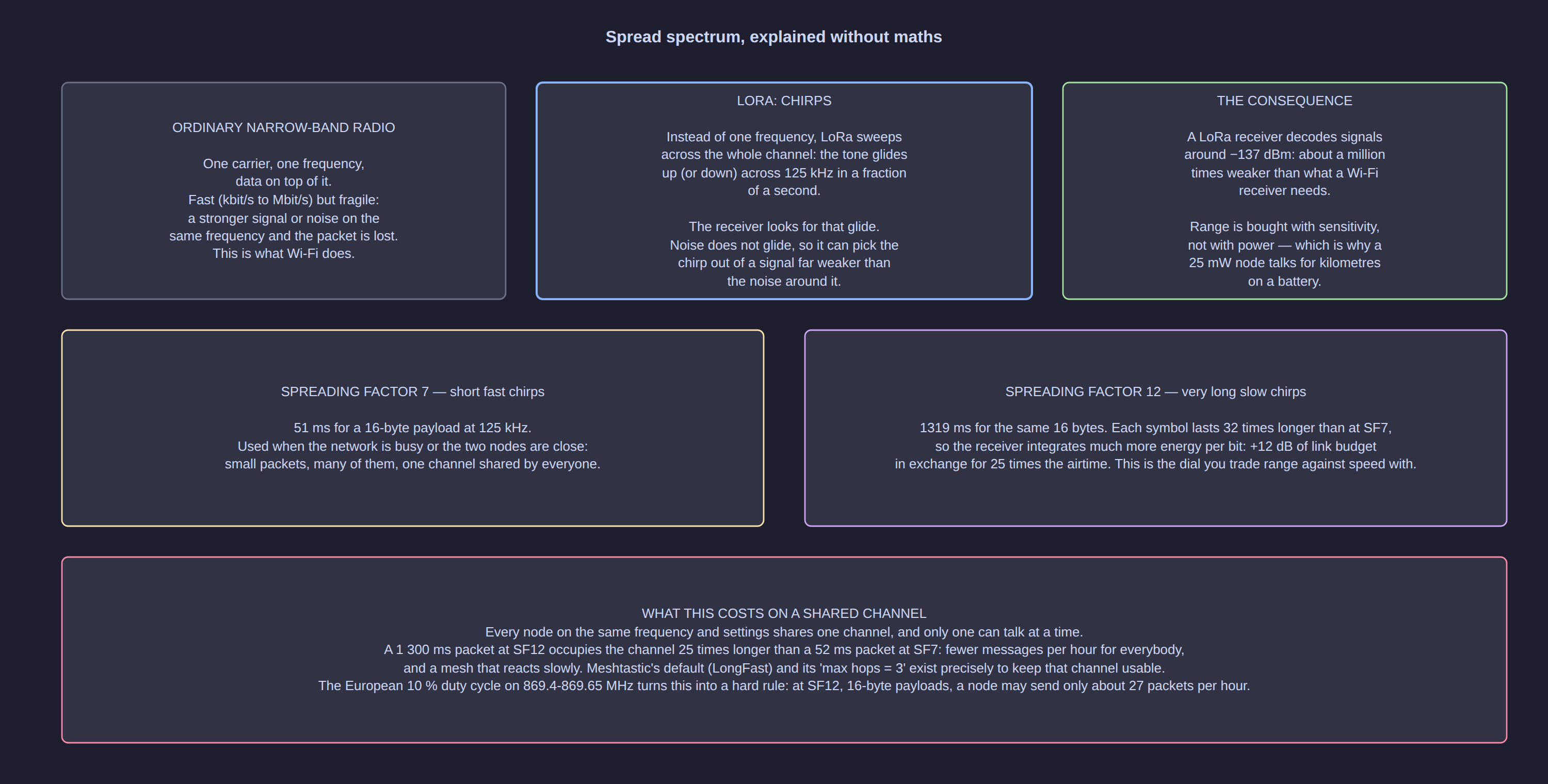
How fast the chirp sweeps is the spreading factor (SF), and it is the single most important setting on a LoRa network. A higher SF means a longer symbol, more energy gathered per bit, and therefore a weaker signal that can still be decoded — in exchange for airtime.
Airtime for a 16-byte payload (a typical position or short text message), computed with the standard Semtech airtime formula at 125 kHz bandwidth:
| Spreading factor | Airtime for 16 bytes | Theoretical data rate | Messages per hour at 1 % duty cycle |
|---|---|---|---|
| SF7 | 51 ms | 2 488 bit/s | ≈ 699 |
| SF8 | 93 ms | 1 381 bit/s | ≈ 388 |
| SF9 | 165 ms | 776 bit/s | ≈ 218 |
| SF10 | 330 ms | 388 bit/s | ≈ 109 |
| SF11 | 659 ms | 194 bit/s | ≈ 54 |
| SF12 | 1 319 ms | 97 bit/s | ≈ 27 |
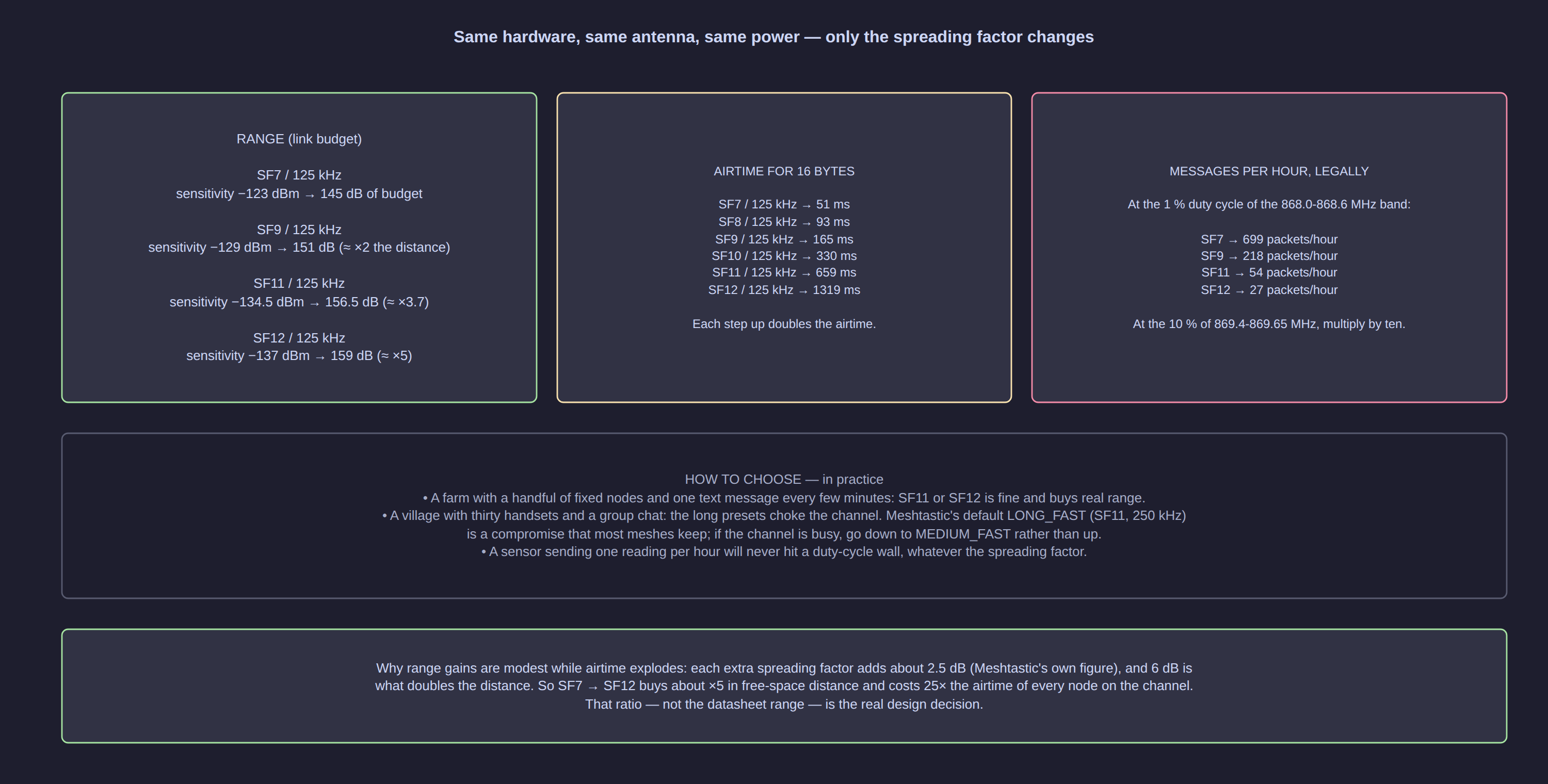
Read the last column twice. This is the real design decision on a LoRa network, not the datasheet range. Every node on the same frequency and settings shares one channel, and only one can transmit at a time. Going from SF7 to SF12 buys about five times the free-space distance and costs 25 times the airtime of every node on the network. The gain per step is modest (about 2.5 dB per step, per Meshtastic's own documentation) while the cost is brutal.
Practical consequences:
- A handful of fixed nodes exchanging a message every few minutes: SF11 or SF12 is fine and buys real range.
- A village with dozens of handsets and a group chat: long slow presets choke the channel. Meshtastic's default
LONG_FAST(SF11, 250 kHz) is the compromise most meshes keep; if it saturates, go down toMEDIUM_FAST, not up. - A sensor sending one reading per hour will never hit a duty-cycle wall, whatever the spreading factor.
Part 4 — The networks: LoRaWAN, Meshtastic, Reticulum
The confusion to clear first: LoRa is the radio, not the network. You buy a board with an SX1262 chip on it; every network below is software you flash onto that board, and one board runs one of them at a time.
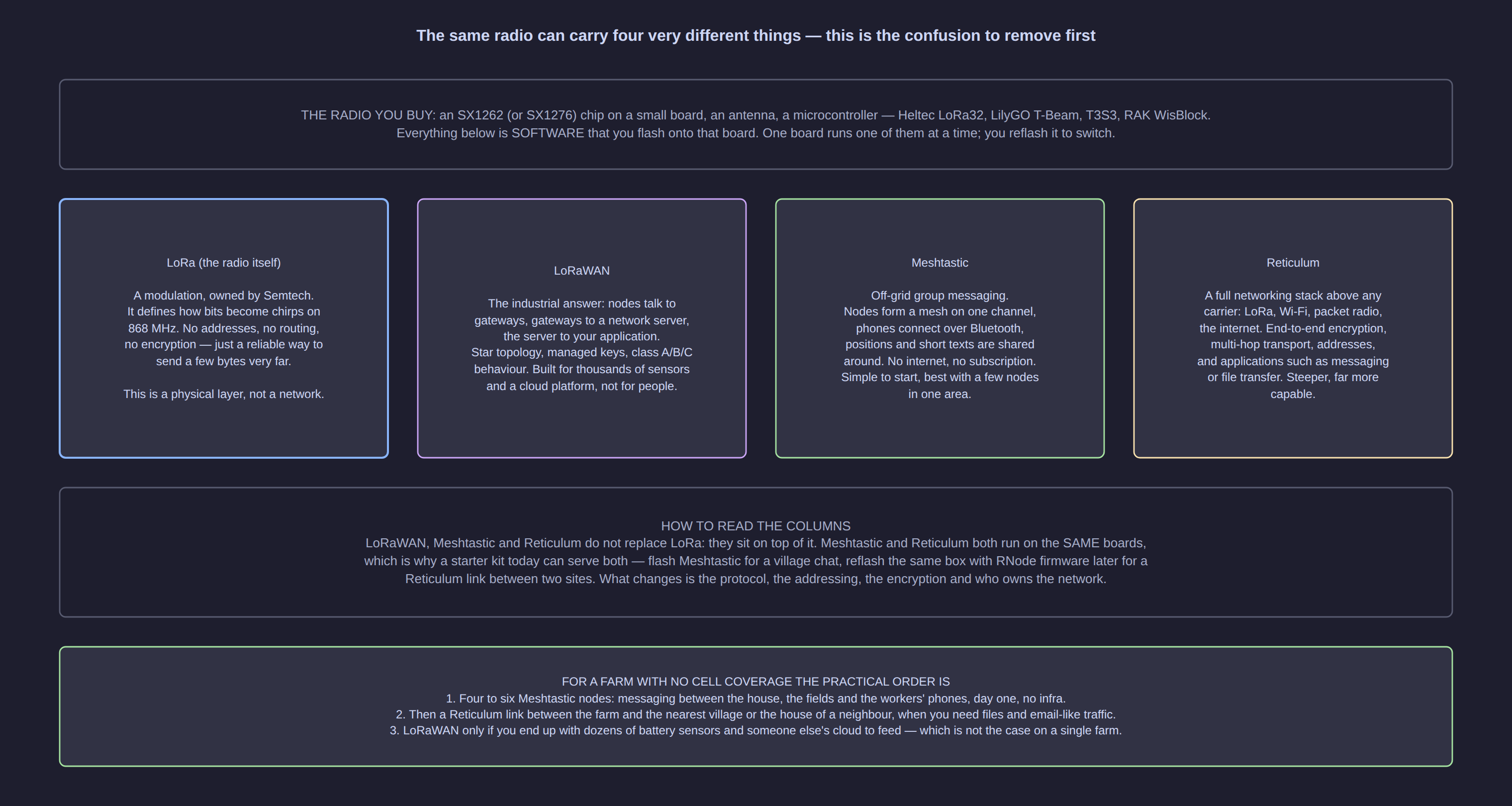
| Network | What it is | Topology | Who it is for |
|---|---|---|---|
| LoRa | The modulation, owned by Semtech. No addressing, no routing, no encryption | Point to point | Building blocks; not something you "use" directly |
| LoRaWAN | The industrial standard: gateways, a network server, managed keys, classes A/B/C | Star (gateway-centric) | Thousands of sensors feeding a cloud platform |
| Meshtastic | Off-grid group messaging: a mesh of nodes, phones over Bluetooth, positions and short texts | Mesh, one shared channel | People covering an area with no infrastructure |
| Reticulum | A full cryptography-based networking stack above any carrier: LoRa, Wi-Fi, packet radio, the internet | Mesh, multi-hop transport | Links between sites, files, encrypted traffic, sovereignty |
Meshtastic
Meshtastic is what most people should start with, because it works on day one with two boards and a phone. You flash the firmware from a browser, install the phone app, and the nodes find each other.
What it does:
- Group text messages, positions on a map, and a few useful extras (telemetry, alerts) over a shared channel.
- A phone connects to a node over Bluetooth and acts as the user interface — the node itself is a small box on a pole.
- Nodes relay each other's packets, extending coverage without any tower.
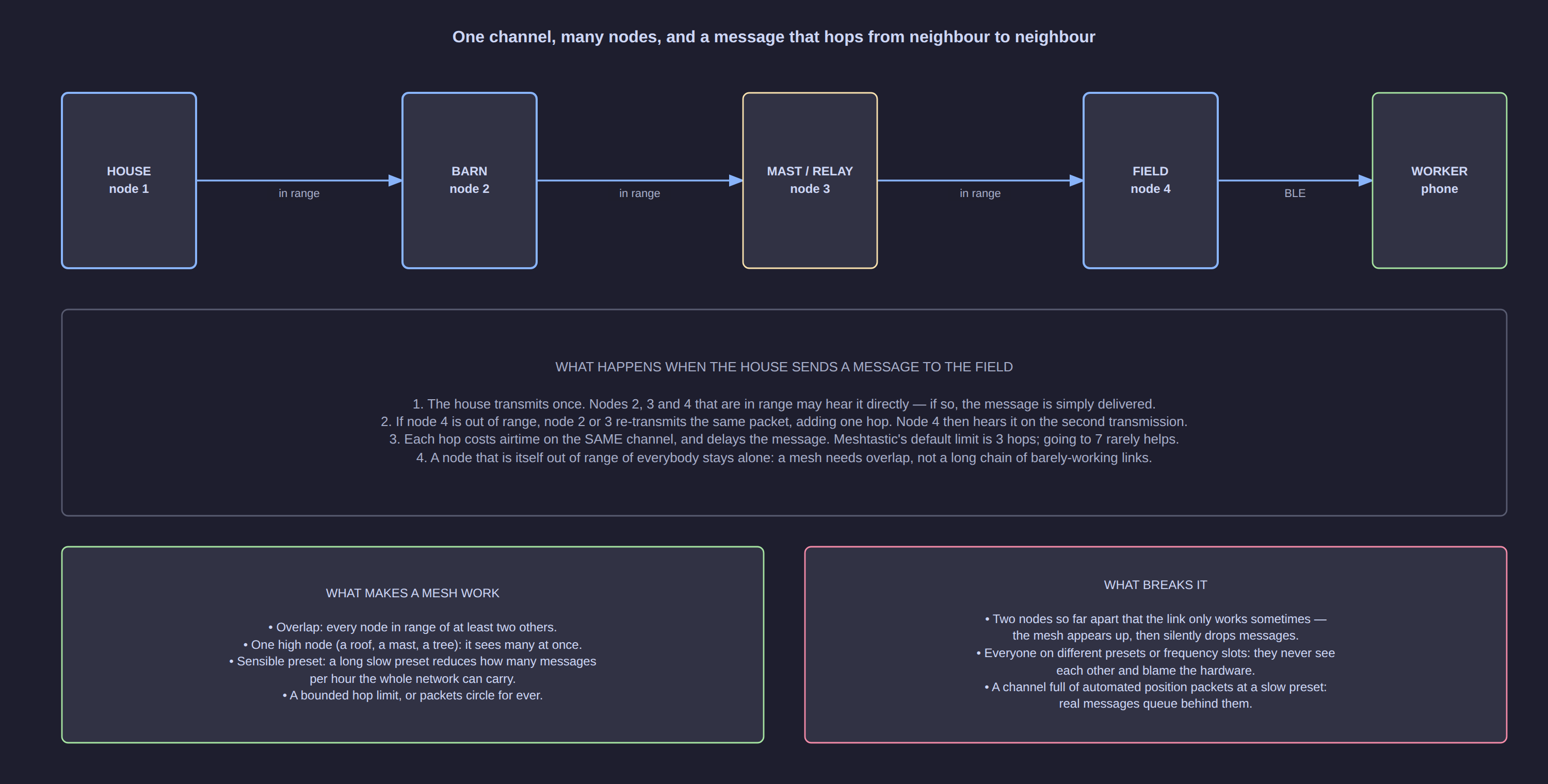
What to know before relying on it:
- You must set the region. Until you do, the node does not transmit. France is
EU_868; check your own country in Meshtastic's region table, because transmitting on the wrong band is both illegal and useless. - Max hops defaults to 3 (the maximum is 7, and 3 is enough for almost everything). Every hop costs airtime on the same channel.
- Everyone in the mesh must share the region and the preset, or they simply never see each other — the most common "the hardware is broken" that is not.
- A mesh is not a private network by default: whoever has the channel key is in the conversation. Change the default key.
Reticulum
Reticulum is the opposite trade: harder to start, far more capable. It is a complete networking stack built on cryptography — end-to-end encryption, forward secrecy, cryptographic addressing, multi-hop transport — and it can run over LoRa, Wi-Fi, Ethernet or the internet, mixing them in one network. It runs in userland on Python 3 and even on a Pi Zero, and it does not need IP.
Its radio counterpart is RNode: not a product but an open design, a LoRa transceiver running dedicated firmware. RNode uses raw LoRa — it has nothing to do with LoRaWAN — and lets Reticulum handle all the protocol work. Supported boards include the Heltec LoRa32 v2/v3/v4 and T114, the LilyGO LoRa32, T-Beam, T-Deck, T-Echo and T3S3, and RAK4631 boards: largely the same hardware as Meshtastic, reflashed.
Choose Reticulum when you need to move more than chat: an actual data link between two sites, messaging that survives with no internet at all, or a network you own end to end. The reference documentation is at reticulum.network.
LoRaWAN
LoRaWAN is the right answer to a different question: "I have two hundred battery sensors spread over a city and a cloud platform that consumes their data". It needs gateways on masts, a network server, and an operator. For a farm with four nodes, it is infrastructure you do not want to maintain — which is why the project below is a mesh, not a LoRaWAN network.
Part 5 — A real project: a farm with no cell coverage
The scenario: a farm in the Sokone area of Senegal. Flat farmland, no reliable cellular data, one house with solar power, a water tank 1.2 km away with a clear view, and a far field 2.5 km away behind a tree line. Phones are used for everything; nobody can reach the fields.
The layout. Four nodes and one phone.
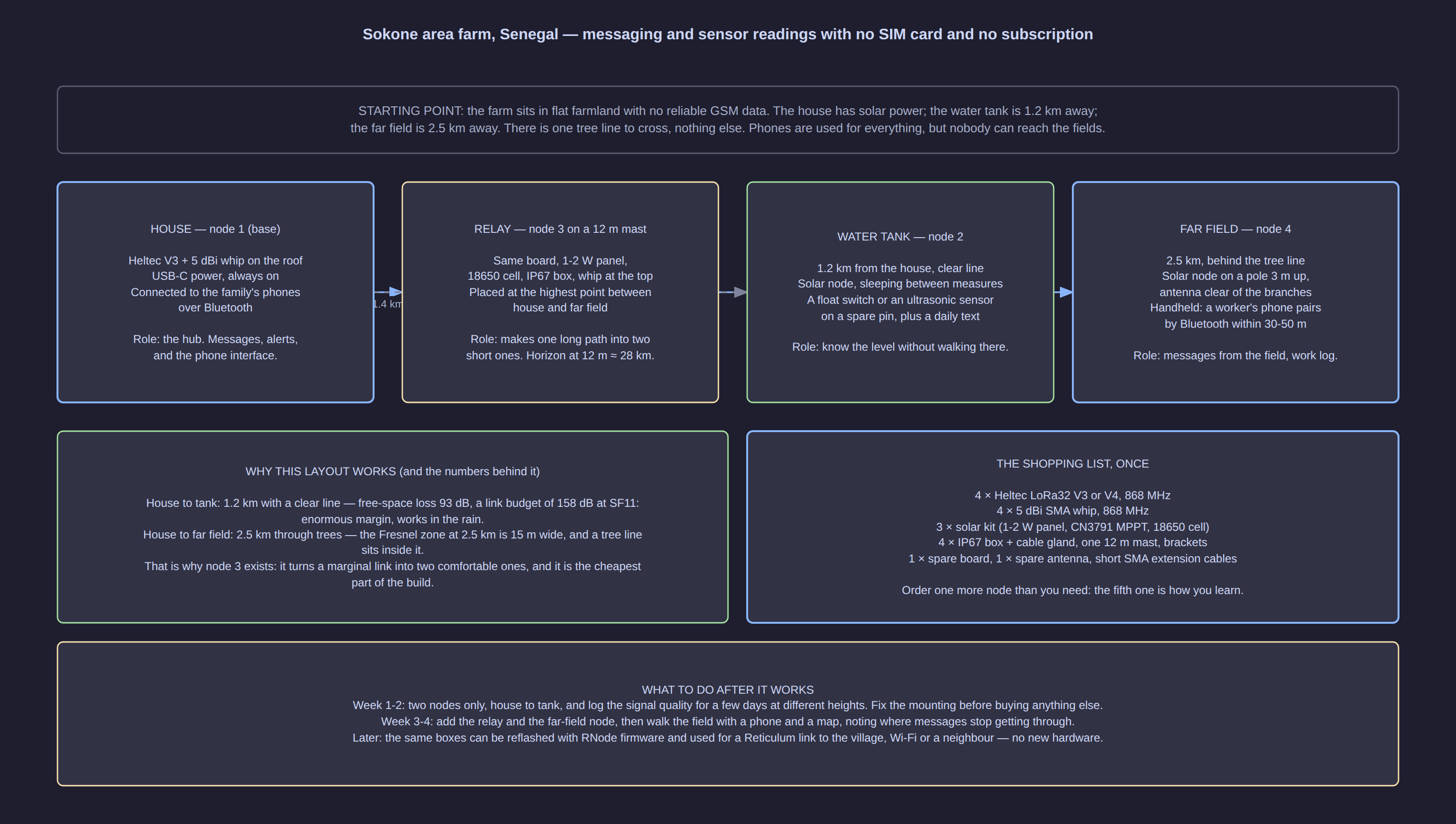
| Node | Where | Role | Power |
|---|---|---|---|
| 1 — House | On the roof, 5 dBi whip | The hub: messages, alerts, phone interface over Bluetooth | Mains / USB-C, always on |
| 2 — Water tank | On the tank, 1.2 km from the house | Level sensor + a daily reading, no more walking there | Solar |
| 3 — Relay | Highest point between house and far field, 12 m mast | Turns one marginal link into two comfortable ones | Solar |
| 4 — Far field | On a pole 3 m up, antenna clear of the branches | Messages from the field, work log | Solar |
Why this works, with the numbers. House to tank is 1.2 km with a clear line: free-space loss is 93 dB, against a link budget of 158 dB at SF11 — an enormous margin, which means it keeps working in rain and heat haze. Both antennas sit within the 12 km horizon of a 2 m height, so the horizon is not the limit.
House to far field is the interesting link: 2.5 km through a tree line. The Fresnel zone at 2.5 km is about 15 m wide, and trees sit inside it, which is exactly the situation that produces a link that works "sometimes". That is why node 3 exists — and it is the cheapest part of the build. Placed 12 m up, the two hops are short, the horizons are wide and both links have large margins.
Build order, and why in that order. Two nodes first (house and tank), for two weeks, at different heights, logging signal quality. Fix the mounting before buying anything else: nine times out of ten the problem is height, not hardware. Then add the relay and the far field node, and walk the field with a phone and a map to find where messages stop getting through. Only then consider a high-gain antenna or a taller mast.
The node, part by part
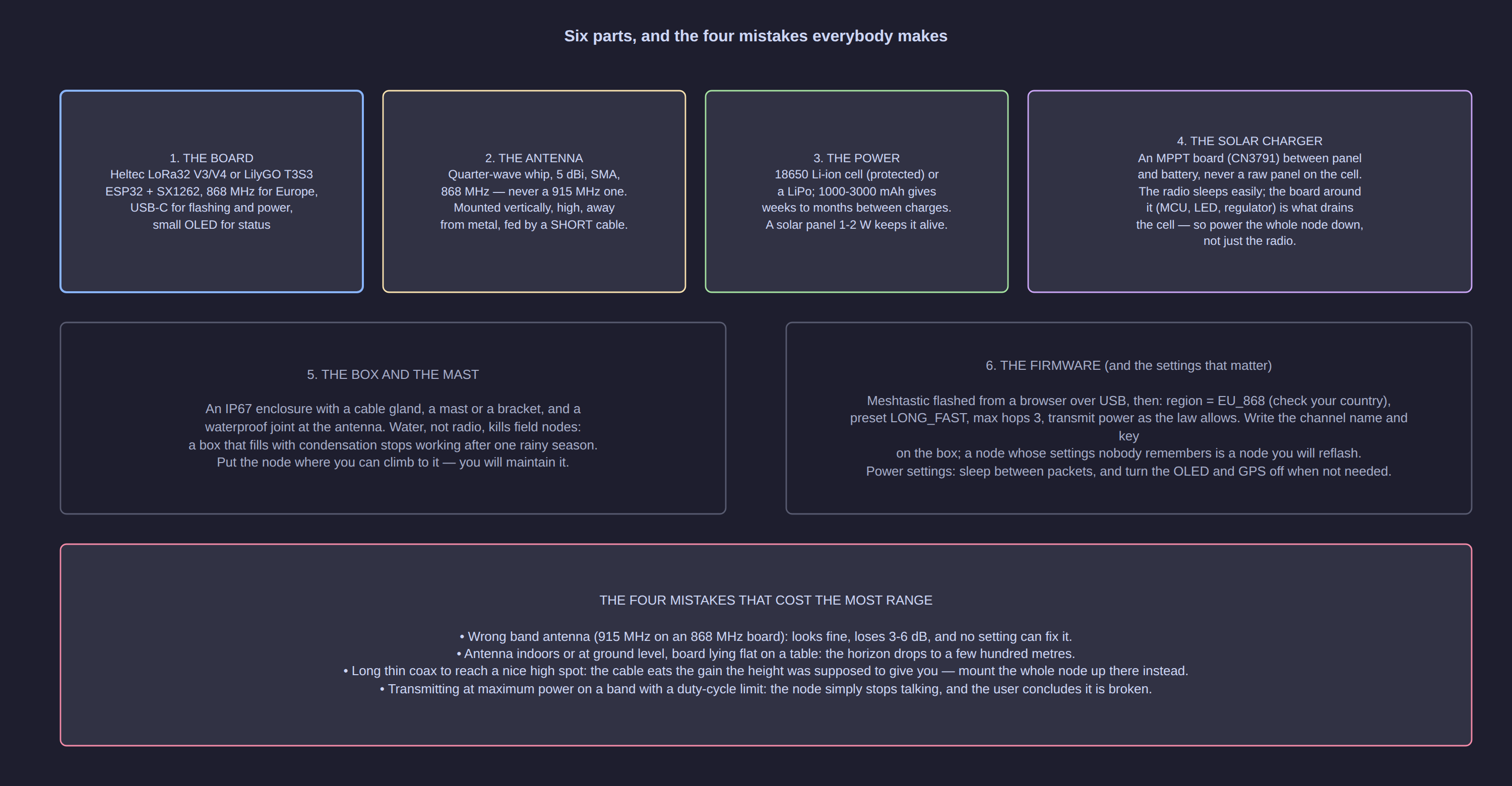
| Part | What to pick | Why |
|---|---|---|
| Board | Heltec LoRa32 V3 or V4, or LilyGO T3S3 — 868 MHz | ESP32 + SX1262, USB-C, runs Meshtastic and RNode firmware |
| Antenna | 5 dBi vertical whip, SMA male, 868 MHz | The cheapest 3 dB you will ever buy |
| Power | 18650 Li-ion cell (protected) or a LiPo | Weeks to months between charges for a sleeping node |
| Solar | 1–2 W panel (6 V) + an MPPT charge board (CN3791) | The panel only has to replace what the node consumes per day |
| Enclosure | IP67 box + cable gland, waterproof antenna joint | Water, not radio, kills field nodes |
| Mounting | Mast, bracket, hose clamps, short SMA pigtail | Height is the biggest range lever you own |
| Firmware | Meshtastic, region EU_868, LONG_FAST, max hops 3 |
Then reflash with RNode firmware if you move to Reticulum |
[!TIP] Sizing the solar part without a datasheet. You do not need a precise current figure: measure or estimate the node's daily consumption in milliampere-hours, then size the panel for five to ten times that, because cloudy days, dust and panel angle will eat most of it. A node that only wakes to send a couple of messages a day is trivial to power; a node with the GPS and the OLED left on is not.
Part 6 — The shopping list (AliExpress, real listings)
Prices below are French-storefront prices read from the listings on 20 September 2026. AliExpress prices move with promotions, so treat them as orders of magnitude, and check the band and the connector on the page before paying: 868 MHz and SMA are the two words that decide whether the part will work.
| Part | Listing seen | Price seen | Link |
|---|---|---|---|
| 2 × Heltec WiFi LoRa 32 V3 boards (SX1262) | 2-pack, 4.9★, 1 000+ sold | ≈ €42.59 | fr.aliexpress.com/item/1005010455051423.html |
| 1 × Heltec V3 board with antenna | 5★, 4.9★ variants | ≈ €19.59–23.19 | fr.aliexpress.com/item/1005011982682740.html |
| 1 × Heltec LoRa 32 V4 with case | 4.8★, 1 000+ sold | ≈ €38.39 | fr.aliexpress.com/item/1005010443795505.html |
| 5 dBi LoRa antenna, 868/915 MHz, SMA male | 4.9★, 5 000+ sold | ≈ €2.86 | fr.aliexpress.com/item/1005010572789349.html |
| Outdoor fibreglass vertical 868 MHz | 4.9★, 429 sold | ≈ €9.49 | fr.aliexpress.com/item/1005008569452739.html |
| 868 MHz SMA cable (RG-58) | several sellers | ≈ €0.74–8.48 | fr.aliexpress.com/item/1005003461022228.html |
| Solar panel 6 V, 1–3 W | 4.8★, 474 sold | ≈ €4.59 | fr.aliexpress.com/item/1005010123021643.html |
| CN3791 MPPT solar charger for 18650 | 4.9★, 5 000+ sold | ≈ €2.44 | fr.aliexpress.com/item/1005008744020414.html |
| IP67 junction box 100 × 68 × 50 mm | 4.9★, 3 000+ sold | ≈ €3.61 | fr.aliexpress.com/item/1005008144942260.html |
| 18650 protected cells | per cell or per pack — read the quantity | ≈ €28 per pack listing | fr.aliexpress.com/item/1005013156908137.html |
| Ready-made solar Meshtastic node (D5L) | 4.9★, 389 sold — if you would rather not build | ≈ €93.69 | fr.aliexpress.com/item/1005009582468375.html |
A four-node build with spares lands around €150–200 in parts: four boards, four antennas, three solar kits, four boxes, one mast and a handful of cables. The ready-made solar nodes cost roughly twice that and save you the enclosure and power work.
[!WARNING] Three buying traps. (1) Band: a 915 MHz board or antenna will not interoperate with 868 MHz gear. (2) Connector: SMA and RP-SMA look identical and do not mate — Wi-Fi antennas are often RP-SMA, LoRa boards are usually SMA. (3) Quantity: battery and antenna listings are frequently multipacks priced accordingly; read the title, not the thumbnail.
What to skip at first: directional antennas (you have to aim them), amplifiers (illegal above the ERP limit), and the GPS variants (useful for vehicles and mapping, useless on a fixed tank sensor, and they consume power).
Part 7 — Legal limits, in one page
Radio is free to use only inside limits. They differ per country, and they are about radiated power, which includes antenna gain.
France and the EU, in the 868 MHz band:
| Sub-band | Max ERP | Duty cycle | Typical use |
|---|---|---|---|
| 868.0–868.6 MHz | 25 mW (14 dBm) | 1 % | Classic LoRaWAN channels, LoRa point-to-point |
| 869.4–869.65 MHz | 500 mW | 10 % | Where Meshtastic's EU_868 default sits (869.525 MHz) |
| 869.7–870 MHz | 25 mW | 1 % | Other short-range devices |
Meshtastic's own documentation states that EU_433 and EU_868 must respect a 10 % duty cycle, calculated over a rolling hour, and the firmware stops transmitting rather than exceed it. That is why a node that "stops talking" after a busy period is usually not broken: it is respecting the law.
[!WARNING] Two mistakes that are both illegal and self-defeating. Raising the transmit power above the ERP limit for the sub-band you are using (a 22 dBm module plus a 5 dBi antenna is far above 25 mW ERP), and switching to a wider bandwidth preset — the 500 kHz
SHORT_TURBOpreset is not legal in every region. Also remember that a licence-free band is shared: nobody protects your messages from interference, and heavy automated traffic (position packets every few seconds) degrades the network for everyone around you.
Senegal. Senegal does not appear in Meshtastic's country table, which means the firmware cannot pick a legal region for you. ITU Region 1 rules apply, so the 868 MHz SRD approach is the one to ask about, but confirm the band and the power limit with the regulator (ARTP) before transmitting, and note that Meshtastic's generic ITU1_70CM / ITU1_2M presets are for licensed amateur operators (they unlock power limits and are not a licence-free option). On a farm far from any settlement, interference is not the issue — the law is.
Key takeaways
- Radio is a current that leaves the wire: the transmitter creates a wave, the receiver turns it back into a current, and range comes from decoding very weak signals.
- The wavelength (34.5 cm at 868 MHz) sets antenna length, penetration and data rate.
- Antenna gain is shape, not power. Height and a clean vertical mount beat any amplifier, and they are free.
- The link budget decides whether a link can work; the radio horizon and the Fresnel zone decide whether it actually does.
- The spreading factor is the range/speed dial, and it is paid for in shared airtime: SF7 to SF12 is about 5× the distance for 25× the airtime of every node.
- LoRa is the radio; LoRaWAN, Meshtastic and Reticulum are three different networks on top of it, and the same board can run more than one — reflashing is the switch.
- Build the first two nodes, fix the mounting, then expand. Most "long range" failures are a 915 MHz antenna, a node on the ground, or a cable that ate the gain.
- Everything above the ERP and duty-cycle limits is both illegal and counter-productive; the legal limits are in the firmware for a reason.
Related
- LoRa Field Test — Real-World Range of Several Kilometres — what these numbers look like in a real field test
- Electronic Components — Complete Guide & Cheat Sheet
- Meshtastic documentation: radio settings, LoRa configuration, region by country
- Reticulum documentation: what Reticulum is and communications hardware
- Editable diagrams for every figure in this article:
lora-*.drawioin the same folder